Yes, generally. Standard video editing tools don't support clickable hotspots or branching, so a dedicated interactive video platform or a webinar tool with built-in interactivity is needed.
Video Glossary
Interactive Video
Interactive video allows viewers to engage with each other and with video content in real time.
What is interactive video?
Interactive video allows viewers to engage with each other and with video content in real time. It includes elements like:
- Quizzes to check understanding
- Polls and surveys to guide topics
- Chat to connect with presenters or viewers
- Emoji reactions to express moods
Why should you use interactive video?
With interactive video, you can create more immersive and engaging experiences for viewers. By actively involving viewers in the conversation, this type of video can increase viewing times.
Interactive videos also allow for data collection and analysis. As a result, they can provide valuable insights into audience behaviors and preferences.
What are some examples of interactive videos?
Interactive videos work well for almost any industry or niche. Use these examples to guide your interactive video strategy:
- Add polls and surveys to product demos
- Include quizzes in virtual training videos
- Allow hand raising in online courses
- Incorporate live chat in customer service content
How to create interactive videos with Livestorm
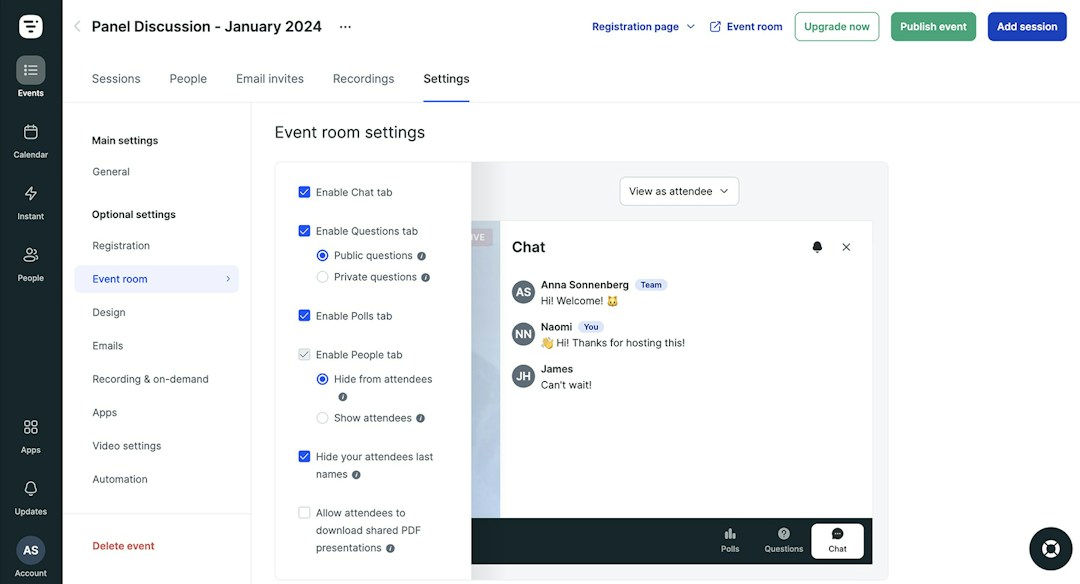
When you host virtual events and live webinars with a video engagement platform like Livestorm, you can add a variety of interactive elements. Livestorm supports:
- Emoji reactions
- Question and answer tabs
- Polls with real-time results
- Public and private chats
- Question upvotes
Are your videos as engaging as you want them to be? Use Livestorm’s engagement score calculator to measure this metric.
How much more engaging is interactive video?
Standard video is a one-way broadcast; interactive video breaks that by asking the viewer to do something — answer a poll, click a hotspot, choose a branching path, respond in a live chat. That two-way loop matters because passive attention drops fast: on average, only 40% of attendees at a virtual event pay attention from start to finish, according to Livestorm’s Video Engagement Score™ research. Adding interactive elements — a poll every 10–15 minutes, a live Q&A window, clickable annotations — is one of the most reliable ways to pull wandering attention back.
Interactivity also changes what happens after the video ends: 50% of attendees who actively engage during a session go on to engage further with the company afterward (visiting the website, replying to a follow-up, requesting a demo). That’s the real ROI case for interactivity — it’s not just a nicer viewing experience, it’s a measurable lift in what happens next.
Common interactive formats worth naming: polls, quizzes, clickable hotspots/annotations, branching narratives (choose-your-own-path), live chat overlays, and shoppable video (clickable product links).
Editorial & methodology — Written and reviewed by the Livestorm content team. Figures on this page are drawn from Livestorm’s Video Engagement Score™ research. Last updated: July 2026.
Frequently Asked Questions
Does interactive video require special software to create?
How much more engaging is interactive video than standard video?
According to Livestorm's Video Engagement Score research (https://video-engagement.org/score-calculator), only 40% of attendees at a virtual event pay attention from start to finish on average. Interactive elements, like a poll every 10 to 15 minutes or a live Q&A window, are one of the most reliable ways to pull that attention back.
Can interactive video be used outside of live webinars?
Yes. Interactive elements can be added to pre-recorded video too, such as clickable product hotspots in a marketing video.
Is interactive video more expensive to produce than standard video?
Usually yes, since it requires additional planning and often specialized tools, though the engagement gains can justify the added cost for high-value content.



Try Livestorm for free
Get started in minutes and run your first engaging webinar today.
- No credit card needed
- No installation required