Live translation for webinars is a feature that converts spoken audio from the host's language into text in the attendee's language, in real time. Unlike pre-recorded subtitles, live translation works during the session itself — so attendees who don't speak the host's language fluently can follow the conversation as it happens.
Company updates
Live Translations: The Accessibility Problem We Kept Calling a Language Problem
Published on May 21, 2026 • About 2 min. read
Written by Olivier Thomas
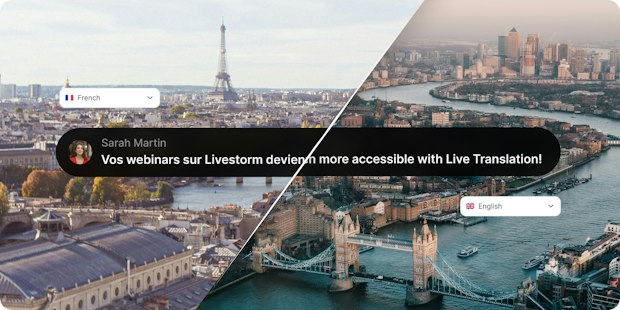
Table of content
Share this article
For years, webinar accessibility meant one thing in practice: captions for attendees who are deaf or hard of hearing. It was the right thing to do, and we built Live Captions accordingly. No downloads, no third-party tools, just text appearing in real time for anyone who needed it.
But the more time I spend with the teams running webinars, and the people attending them, the more a different pattern starts to surface.
A prospect in Warsaw joining a product demo delivered in English. A customer in São Paulo trying to follow a training session well enough to act on it. A team in Seoul sitting through an all-hands where the subtleties get lost somewhere between the speaker and the translation they are doing silently in their head.
Nothing catastrophic. Just a steady drain on comprehension, engagement, and eventually trust.
When "accessible" doesn't actually mean reachable
There is a version of accessibility that gets tracked in compliance checklists. And there is a version that determines whether a person actually walks away from your webinar having understood what you meant to say.
Language sits entirely in the second category.
Most webinar programs are built around the assumption that the audience speaks the host's language comfortably enough to follow along. Sometimes that assumption holds. Often, it doesn't. And the attendees who struggle are rarely the ones who raise their hand about it.
They just disengage quietly. Or don't register at all.
What we were really solving for
Live Captions were the first honest answer to this. Not because captions and translation are the same thing — they are not — but because they forced us to ask a more direct question: who is this webinar actually built for?
Adding Live Translations felt like the natural continuation of that question.
But as we built it, something else became clear. Translation alone is not enough. A webinar is not a document. It is a conversation between people, often several of them at once. Lose track of who said what, get distracted for ten seconds, and the translated text becomes noise.
So we did not just translate. We preserved context.
Live Translations shows who is speaking — name, avatar — right alongside the translated text. And if an attendee loses the thread, they can scroll back a few seconds to catch up, without missing what is happening now. The session stays readable as a conversation, not just a transcript.
That distinction matters more than it sounds. It is the difference between a feature that technically works and one that actually removes friction.
A direction, not a destination
What I find genuinely interesting about where we are is the trajectory, not just the release.
Live Captions. Live Translations. And eventually, Live Interpretation — native, integrated, available without patching together external tools or briefing a human interpreter the day before.
Each step makes webinars a little less dependent on the assumption that everyone in the room shares the same starting point. That assumption has always been a quiet form of exclusion. We are just finally building against it in a systematic way.
Language accessibility is not a niche need. It is the precondition for global reach to mean anything at all.
Frequently asked questions
What is live translation for webinars?
How is live webinar translation different from live captioning?
Live captioning transcribes speech into text in the same language — it's primarily an accessibility feature for deaf and hard-of-hearing attendees. Live translation goes further by converting speech into a different language, serving attendees who don't speak the host's language. A complete accessibility strategy includes both.
Does live translation work for multi-speaker webinars?
It should — and speaker attribution is what makes it usable. Effective live translation tools display the speaker's name and avatar alongside the translated text, so attendees always know who said what. Without this context, translation output becomes difficult to follow in a live, multi-speaker format.
Why do multilingual webinar attendees disengage silently?
Attendees who struggle to follow a webinar in a non-native language rarely raise the issue. Instead, they disengage, drop off early, or simply don't register in the first place. Because there's no visible signal, the language barrier often goes untracked — and its impact on pipeline, training outcomes, and engagement is systematically underestimated.
What is the difference between webinar translation and webinar interpretation?
Translation converts text or speech from one language to another. Interpretation typically refers to real-time spoken rendering by a human interpreter, often used for high-stakes events. Integrated live interpretation — a natural evolution beyond text-based live translation — brings this capability natively into the webinar platform, without requiring external tools or pre-session logistics.


Reports
The Pipeline Truth: 2026 Webinar Benchmark Report
Drive more registrations, boost attendance & multiply content 13x. Based on 7M+ registrations, 33K sessions + 850 go-to-market leader insights.

About the author
Olivier Thomas - Senior Product Marketing Manager
Before joining Livestorm, Olivier built over 10 years of experience shaping go-to-market strategies and driving growth in complex tech environments. At Livestorm, he leads enterprise product marketing, structuring high-impact use cases, and building strategic positioning across industries. He also drives the go-to-market strategy for new features and integrations, ensuring launches translate into adoption and revenue impact.
Related categories
Newsletter