See it with your own deck
Book a live demo and watch your PowerPoint play in Livestorm, exactly as you built it.
Published on November 16, 2026 • About 1 min. read
Written by Olivier Thomas
Table of content
Share this article
You spent hours on your deck. The chart that builds one bar at a time. The Morph transition that sets up your big reveal. The customer video on slide 12. Then you go live, and your audience gets something else: a screen share that stutters, a PDF where nothing moves, or a video you have to play in another window.
When we started building native PowerPoint, we gave ourselves one rule: nothing in your deck gets left behind.
Microsoft makes PowerPoint, and PowerPoint Live in Teams showed what presenting a real deck online can feel like. We wanted that feeling in a webinar, with registrants, guest speakers and an audience that joins from a browser, without asking anyone for a Microsoft account.
Some webinar tools convert your deck after you upload it, recommend sending it a day or two ahead, or leave the videos in your slides out. Here is what plays when you upload a PowerPoint in Livestorm:
Your animations, one click at a time, and your transitions, Morph included.
Your videos, with their sound. A video stored in the file plays right on the slide, and so does a YouTube video.
Everything in sync. When a speaker plays, pauses or skips ahead in a video, every attendee sees the same moment, and anyone on a slow connection catches back up.
No one left behind. Anyone who joins late lands on the current slide, and at the right moment of the video.
Upload your .pptx or .ppsx right in the event room, up to 2 GB, videos included. There's nothing to convert, no processing to wait for, no link to create and no app to install. MP4 videos in your deck stream on their own, so your attendees don't download them with the deck. They don't need PowerPoint or a Microsoft account either: the deck plays in their own browser.
Speakers and moderators, guest speakers included, can move the slides and keep their notes in view, in a panel under the deck. Attendees see the slides, never the notes: the notes are removed from the copy each attendee receives.
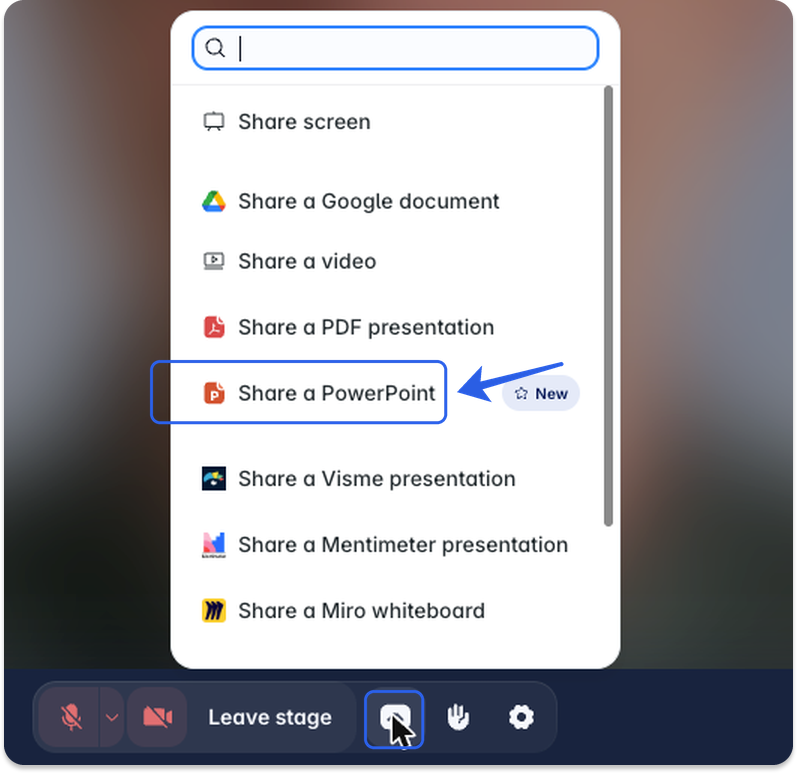
In your event room, click Share, then Share a PowerPoint.
Upload your deck.
Present with Next and Previous, or with your arrow keys.
Native PowerPoint is available now for Livestorm Enterprise customers, with nothing to turn on. Upload your next deck and watch it play exactly as you built it.
About the author
Olivier Thomas - Senior Product Marketing Manager
Before joining Livestorm, Olivier built over 10 years of experience shaping go-to-market strategies and driving growth in complex tech environments. At Livestorm, he leads enterprise product marketing, structuring high-impact use cases, and building strategic positioning across industries. He also drives the go-to-market strategy for new features and integrations, ensuring launches translate into adoption and revenue impact.
Related categories