It's a public library of live and on-demand webinars hosted on Livestorm, by teams across every industry. Anyone can browse it by topic (Marketing, Tech & SaaS, Healthcare and Finance) and register in one click on the event's own page.
Company updates
Someone is looking for your webinar. Now they can find it.
Published on November 20, 2026 • About 1 min. read
Written by Brillixa Herdhiana
The Pipeline Truth: 2026 Webinar Benchmark Report
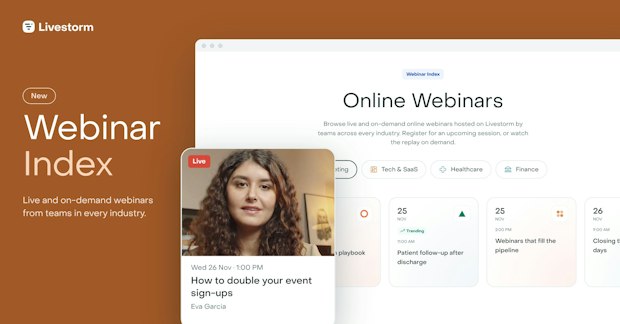
Table of content
Share this article
Key Takeaways
The Webinar Index is a public library of live and on-demand webinars hosted on Livestorm.
Visitors browse by topic and register on the event's own page in one click.
Tick "Display this event on my company page" and your public webinars are listed automatically.
Replays stay on the On-demand tab and keep bringing people in.
Your webinar, outside your own list
Right now, someone is searching for a webinar on exactly your topic. They want a session they can join this week, or a replay they can watch tonight.
They just don't know yours exists.
You send the invites, post on LinkedIn and add a banner to your newsletter. The registrations come in, mostly from people who already know you: your customers, your subscribers, your followers. Everyone outside that circle never hears about the session, however good it is.
"Event managers put weeks into a webinar, then promote it to the same lists every time. We kept hearing the same question: how do I reach people who don't know us yet? The Index is our answer. Your public sessions show up where people are already looking for a webinar on your topic."
What the Webinar Index is
The Webinar Index is a public library of live and on-demand webinars hosted on Livestorm, by teams across every industry. Anyone can browse it, with no account and no login.
Visitors see the upcoming sessions first, and switch to the On-demand tab for replays. They can narrow it down by topic: Marketing, Tech & SaaS, Healthcare and Finance. Each card shows the date, the time, the organizer and the title. One click opens the event's own registration page, and people sign up there as usual.
Why we built it
Livestorm hosts webinars every day, on every topic. Until now, each one lived on its own: you could only find a session through a direct link or the host's own promotion. Good sessions reached the people who were already invited, and nobody else.
The Webinar Index puts those sessions in one place people can browse. Your webinar gets a second way to be found, next to your own emails and posts, and the people who find it there are new to you.
"Our customers run great webinars that too few people get to see. The Index gives every public session a second way to be found, so more people register, more people attend, and our customers get more out of every event they run on Livestorm."
How your webinar gets listed
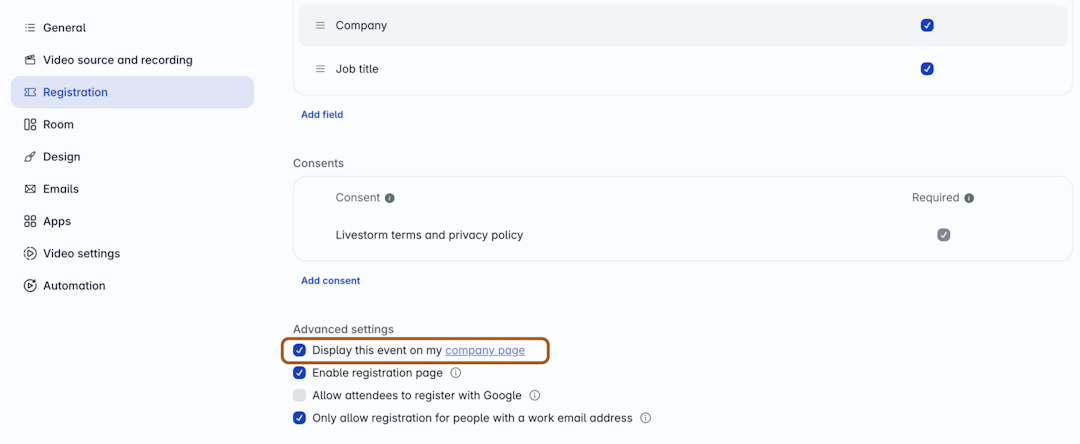
There's no form to fill in. In your event settings, open Registration, then Advanced settings, and make sure Display this event on my company page is ticked. Your public webinars are then added to the Index automatically and sorted by topic. Not sure where that setting is? Read how the company page works.
To keep the Index useful for the people browsing it, internal meetings, test events and sessions without a description stay out. And if you'd rather not have a session listed, contact us and we'll take it down.
When the live session ends, the replay can stay on the On-demand tab if you share it with everyone. It keeps bringing people in long after the live date.
What it changes for your next webinar
New people, not the same list. Visitors who browse a topic find sessions they'd never have heard about.
Replays that keep working. On-demand sessions stay visible and keep collecting registrations.
One box to tick. Keep "Display this event on my company page" on, and the Index does the listing.
Get started
Run your next webinar as a public session on Livestorm, and people browsing your topic can find it. Already hosting? Take a look and see which of your sessions are there.
Frequently asked questions
What is the Webinar Index?
How does my webinar get into the Index?
In your event settings, open Registration, then Advanced settings, and make sure "Display this event on my company page" is ticked. Your public webinars are then added automatically and sorted by topic. Internal meetings, test events and sessions without a description stay out.
Can I remove my webinar from the Index?
Yes. Contact us from the Webinar Index page and we'll take the session down.
Are the webinars in the Index free to attend?
Most are free once you register. Each host sets the access terms, shown on the registration page before you sign up.


Reports
The Pipeline Truth: 2026 Webinar Benchmark Report
Drive more registrations, boost attendance & multiply content 13x. Based on 7M+ registrations, 33K sessions + 850 go-to-market leader insights.

About the author
Brillixa Herdhiana - Senior Growth Manager
Brillixa joined Livestorm as Growth Manager in 2021. Her experience enables her to contribute to business growth through lead generation from ads and organic channels.
Related categories
Featured resource
Reports
The Pipeline Truth: 2026 Webinar Benchmark Report
Drive more registrations, boost attendance & multiply content 13x. Based on 7M+ registrations, 33K sessions + 850 go-to-market leader insights.
Newsletter