A simple registration message is: "You're registered. Check your inbox for the join link and calendar invite." It confirms the signup worked, tells the registrant what happens next, and points them to the details, all in one line.
Webinar
Webinar Confirmation Message: 20 Examples and Templates
Published on August 25, 2026 • About 5 min. read
Written by Brillixa Herdhiana
The Pipeline Truth: 2026 Webinar Benchmark Report
Table of content
Share this article
Key Takeaways
A webinar confirmation message restates key details and builds anticipation.
Strong ones include a join link, the time with time zone, and an add-to-calendar link.
Group your messaging by stage: confirmation, reminder, starting soon, follow-up.
Only about half of registrants show up, so the confirmation is your first save.
Automate the sequence so every registrant gets the right note on time.
A webinar confirmation message is the note a registrant sees or receives right after they sign up for the event. It restates the date and time and provides a link to join.
But the best ones do more than confirm. They set expectations, add the event to a calendar, and start building the anticipation that turns a registrant into an attendee.
Below, I'll share 20 examples grouped by when to use them, plus what to include, subject lines, and how to automate the whole sequence.
What is a webinar confirmation message?
A webinar confirmation message gives registrants everything they need to show up. It includes the date and time, the link to join, and a reason to attend.
It's the first touchpoint after signup. Done well, it can increase the chance that registrants turn up.
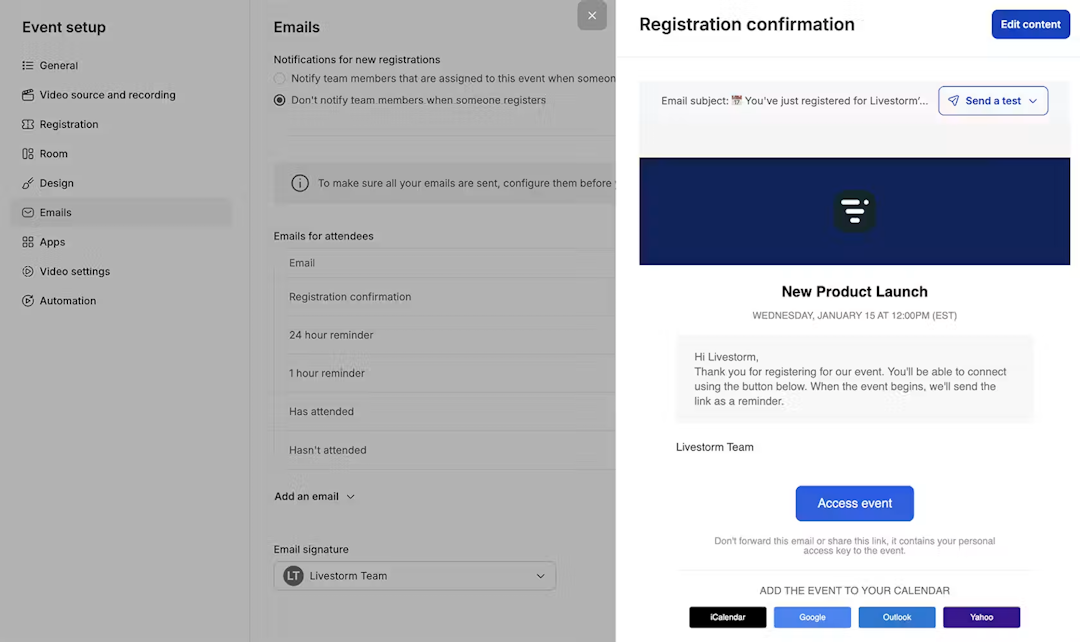
Webinar Confirmation on Livestorm
Confirmation message vs confirmation email vs thank-you page
These three surfaces include roughly the same content. But there are a few important differences.
The on-screen success message appears the instant someone submits your signup form.
The thank-you page is where the form redirects.
The confirmation email appears in their inbox seconds after signup.
These surfaces deliberately overlap to ensure registrants see your messaging on at least one. If webinars are new to your audience, our explainer on what a webinar is is a useful link to include for first-timers.
Why webinar emails matter for attendance
There's a reason to sweat this short message. The average webinar earns 175 registrants and 83 live attendees, per Livestorm's 2026 Webinar Benchmark Report. This equals an average show-up rate of 47.7%.
Converting registrants into attendees is marketers' number one webinar challenge (54.2%). The confirmation is your first chance to maintain or increase that average attendance rate.
What to include in a strong confirmation message
Every effective confirmation message covers five things. Miss any of them and you'll leave attendance on the table.
The five must-have elements in a webinar email
Your registration confirmation email template should have five elements:
Signup verification
Date and time
Link to join or how-to-join steps
Add-to-calendar option
Reason to show up, such as the agenda, the speaker, or quick notes on what attendees will learn
While they're all important, that last one separates a receipt from an invitation worth keeping.
Optional extras that lift show-up rates
If you have room, add a speaker bio, a social share prompt, or a one-question survey. You can also add a short pre-webinar resource to help attendees prepare. These deepen the commitment without cluttering the core message.
Distribution helps, too. Email is the top webinar promotion channel at 86%, so the confirmation email is prime real estate.
20 webinar confirmation message examples by scenario
Here are 20 copy-paste examples grouped by the moment you use them, from the instant someone registers to the minute the session goes live. Swap in your details and adjust the tone to fit your audience.
On-screen registration verification messages
Use this short copy for the confirmation screen or thank you page. It should appear on your webinar landing page immediately after registrants submit the form.
"You're registered. Check your inbox for the join link and calendar invite."
"You're in. We've saved your spot and emailed the details. See you there."
"Thanks for registering. Your confirmation and join link are on the way to your inbox."
"All set. Add the session to your calendar so it doesn't slip. We'll send a reminder too."
Confirmation email messages
This full email body copy confirms; restates details; and has a join link, add-to-calendar, and hook. Send this email instantly upon registration.
"You're registered for [webinar title]. It runs [date] at [time, time zone]. Add it to your calendar here, and join with this link when we go live."
"Thanks for signing up. Here's everything you need: date, time, and your personal join link. See you then."
"Your spot is confirmed. [Speaker] will cover [three things you'll learn]. Save the date and we'll see you on [day]."
"Welcome. We've reserved your seat for [title]. Add to calendar so you don't miss it. Reply to this email if you have a question for the speaker."
"You're on the list. If you can't make it live, we'll send the replay to everyone who signed up."
"Confirmed. Here's your join link and a two-minute read to get the most out of the session."
Reminder message variations
These reminder email reuse the confirmation details to keep the webinar information top of mind. Use it as the event approaches.
Timing matters, because nearly half of registrations happen in the final seven days before the event. Late reminders can reach a lot of people and boost your webinar attendance rate.
(1 week out) "One week to go. [Title] is on [date] at [time]. Here's your join link so it's easy to find."
(1 day out) "Tomorrow. [Speaker] goes live at [time, time zone]. Add it to your calendar if you haven't yet."
(1 hour out) "Starting in an hour. Grab a coffee and join here at [time], see you soon."
(day-of) "Today's the day. [Title] starts at [time]. Your join link is right here."
(10 minutes out) "We go live in 10 minutes. Click to join and get settled before we start."
For the data behind this timing, and how to spread your promotion across the final week, watch this short breakdown:
Starting soon messages
This on-screen and email copy is for the minutes before you go live. It includes a waiting room message.
"The webinar will begin shortly. Thanks for joining early, we'll start right on time."
"Almost there. [Title] starts in a few minutes, feel free to say hello in the chat."
"We're about to begin. Turn up your volume and get comfortable, [speaker] is ready to go."
On-demand and follow-up emails
These messages work on-demand signups and the post-event note. Use them after registration for on-demand webinars or right after the live session.
(on-demand) "Your access is confirmed. Watch [title] whenever suits you with this link, no waiting for a live date."
(post-event) "Thanks for joining. Here's the replay and the resources we mentioned. Watch again or share with your team."
Confirmation templates (with email subject lines that drive opens)
The message only works if registrants open the email, so the subject line matters as much as the body. Keep it specific and lead with the benefit. Signal it's a confirmation, and hint at what's inside. Below, each subject line includes a matching template you can adapt.
1. "You're registered for [title]"
Plain text
Hi [first name],

You're in. We've saved your seat for [title] on [day], [date] at [time] [time zone].
Join link: [link]
Add it to your calendar so you don't miss it: [Add to calendar]

See you there,
[Sender name]
2. "Confirmed: [title] on [day]"
Plain text
Hi [first name],

Your registration for [title] is confirmed.
When: [day], [date] at [time] [time zone]
Where: Online — [join link]
Speaker: [speaker name], [speaker role]

We'll send a reminder before we start. Questions? Just reply to this email.

[Sender name]
3. "Your spot for [title] is saved"
Plain text
Hi [first name],

Your spot is saved for [title] on [day], [date] at [time] [time zone].
Here's what we'll cover:
[Key takeaway 1]
[Key takeaway 2]
[Key takeaway 3]
Join link: [link]

Can't make it live? Register anyway and we'll send you the replay.

[Sender name]
4. "See you [day], here's your join link"
Plain text
Hi [first name],

[Title] is coming up on [day] at [time] [time zone]. Save this email here's everything you need:

Join link: [link]
Add to calendar: [link]

[Sender name]
5. "Tomorrow: [title] with [speaker]"
Plain text
Hi [first name],

Quick reminder: [title] with [speaker name] is tomorrow, [day] at [time] [time zone].
Join link: [link]
Bring your questions. We'll have a live Q&A at the end.

See you tomorrow,
[Sender name]
6. "Starting in 1 hour: [title]"
Plain text
Hi [first name],

[Title] starts in one hour at [time] [time zone].
Join here: [link]
Keep this email handy. Just click and you're in.

[Sender name]
7. "We're live now, join [title]"
Plain text
Hi [first name],

We're live! [Title] is happening right now.
Join now: [link]
Don't miss it. Jump in and catch the rest.

[Sender name]
8. "Your [title] replay is ready"
Plain text
Hi [first name],

Thanks for registering for [title]. The replay is ready to watch whenever it suits you.

Watch the replay: [link]
Download the slides: [link]

The link is available until [expiration date]. Have a question we didn't get to? Reply to this email.

[Sender name]
How to set up confirmation messages in your webinar platform
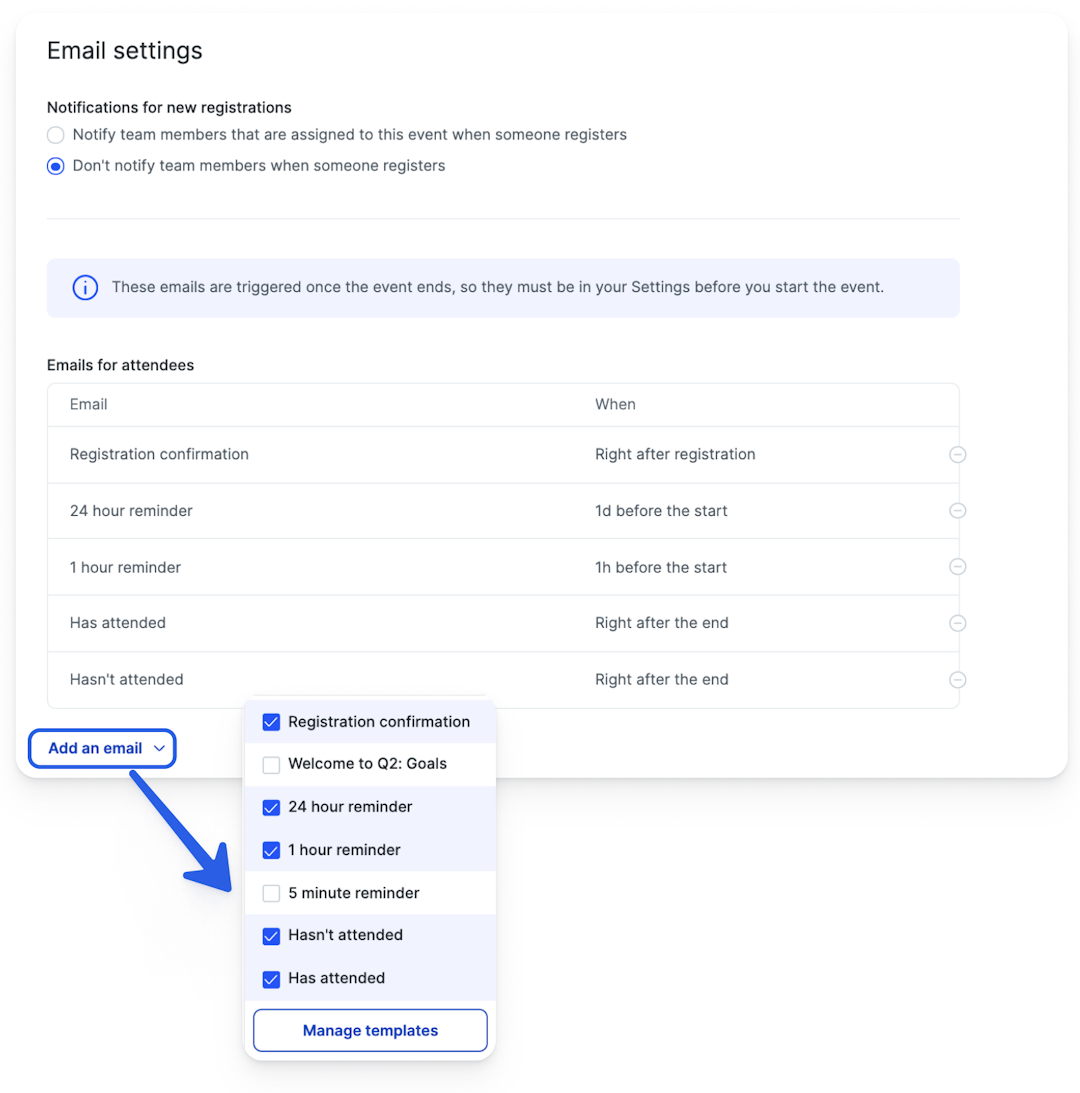
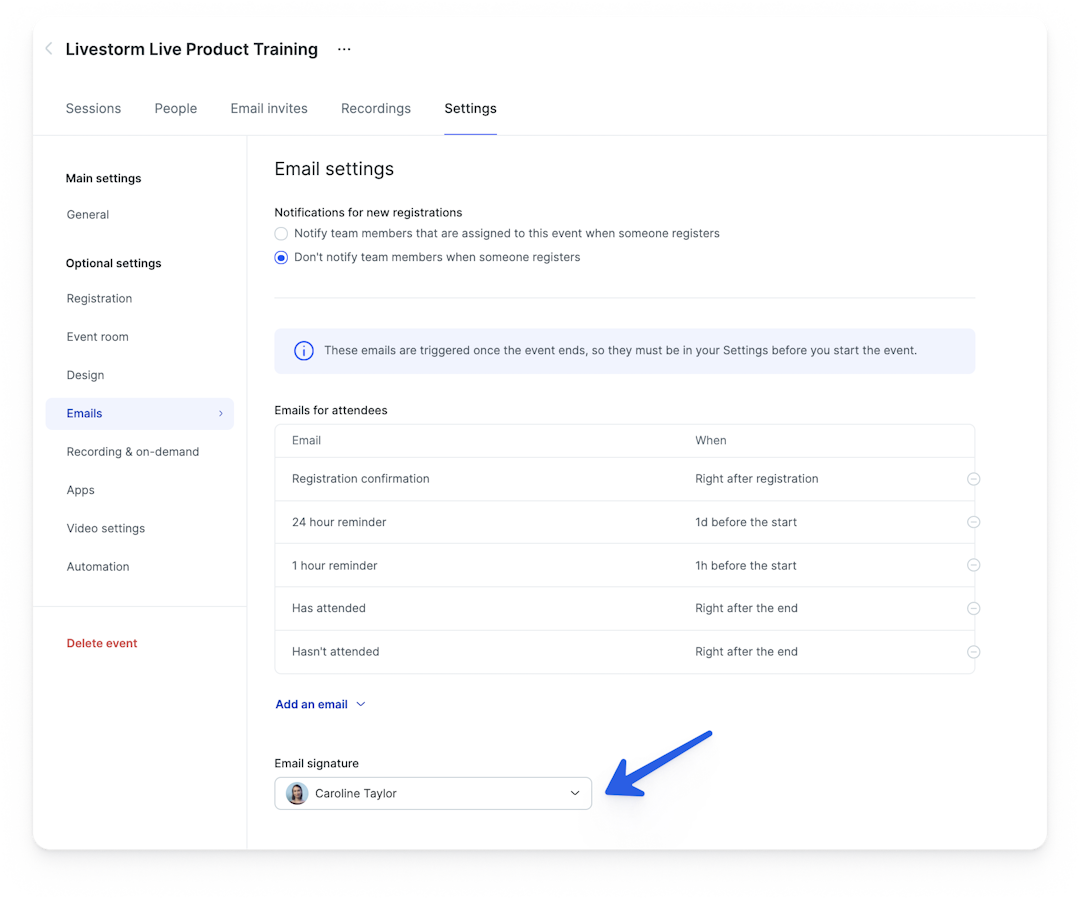
Most webinar tools let you automate confirmation, reminder, and follow-up messages so every registrant gets the right note at the right time without manual work. In Livestorm, these messages are built in. You customize the copy once, and the platform sends them automatically via the webinar software you're already using to host.
Automate the full message sequence
Set the email sequence once and let it run. You'll want to include a confirmation on registration, reminders as the date nears, a starting soon note, and then a follow-up. Automated and on-demand webinars should send the same sequence to everyone who signs up.
Best practices for confirmation messages that convert
Great confirmation copy is short, specific, and human. Send it instantly, restate the essentials, make joining effortless, and give one clear reason to show up. Then keep the momentum with well-timed reminders.
Dos and don'ts
Send the message the moment someone registers. Use the reader's time zone, not yours. Include one primary call to action, the join or add-to-calendar link. Avoid walls of text and multiple competing links. Write like a person, not a system notification.
Timing and cadence
Spread reminders across the week before, the day before, and the hour before, since registrations tend to cluster late. If you're still choosing a time slot, Tuesday has the highest show-up rate (51.7%). This is a useful default when you set the reminder schedule.
Start sending better webinar confirmation messages
Confirmation messages are brief, but they decide how many registrants become attendees. Use the examples above as your starting point, and automate the sequence. You'll spend less time on manual sends and more on the webinar itself.
Start a free trial of Livestorm and set up your first automated confirmation flow.
Frequently asked questions
What is an example of a registration successful message?
How do I thank someone for registering for a webinar?
Open your message with a clear thank you and confirmation. Then restate the date, time, and join link. Add a reason to attend, such as the agenda or speaker. For example: "Thanks for registering for [title]. It runs [date] at [time], here's your join link and what you'll learn."
How do you write a webinar confirmation message?
Cover five things in your message. Confirm the registration, give the date and time with time zone, include the join link, offer add-to-calendar, and add a hook that reminds them why to show up. Keep it short and lead with the confirmation.
What should a webinar confirmation email include?
Your email should include a confirmation line, the schedule with time zone, the join link, an add-to-calendar option, and a hook (agenda, speaker or key takeaways). Optional extras like a speaker bio or a bonus resource can lift show-up rates.
When should you send a webinar confirmation email?
Send the email instantly after someone registers. They'll get the join link while their interest is highest. Then follow with reminders in the week before, the day before, and about an hour before the session.
What does "the webinar will begin shortly" mean?
This is the holding message shown to attendees who've joined before the session starts. It reassures early attendees that they are in the right place and that the webinar will start on time, often paired with a countdown or a hold slide.


Reports
The Pipeline Truth: 2026 Webinar Benchmark Report
Drive more registrations, boost attendance & multiply content 13x. Based on 7M+ registrations, 33K sessions + 850 go-to-market leader insights.

About the author
Brillixa Herdhiana - Senior Growth Manager
Brillixa joined Livestorm as Growth Manager in 2021. Her experience enables her to contribute to business growth through lead generation from ads and organic channels.
Related categories
Featured resource
Reports
The Pipeline Truth: 2026 Webinar Benchmark Report
Drive more registrations, boost attendance & multiply content 13x. Based on 7M+ registrations, 33K sessions + 850 go-to-market leader insights.
Newsletter