Focus on improving show-up intent by setting clear outcomes on your registration page, sending 3–4 reminders (confirmation, 24 hours before, 1 hour before, and "starting now"), and making calendar adds frictionless. Use automated email sequences and one-click calendar invites to reduce drop-off.
Webinar
Average Webinar Attendance Rate (2026) + 15 Ways to Boost It
Published on October 21, 2026 • About 12 min. read
Written by Brillixa Herdhiana
Webinar Promotion Handbook

Table of content
Share this article
Key Takeaways
The average webinar attendance rate is 47.7% across 33,786 sessions in Livestorm's 2026 benchmark, with Tuesday (51.7%) and January (50.4%) the strongest day and month.
Common causes of low attendance include inconvenient timing, irrelevant topics or speakers, poor promotion, insufficient reminders, and lack of live incentives.
Strategies for higher attendance include tailoring event content, segmenting invites, optimizing scheduling, using browser-based platforms, and automating reminders.
Browser-based webinar platforms have shown a 53% higher attendance rate compared to traditional platforms, reducing barriers to entry for participants.
Key metrics tracked for optimization are webinar registrations, registration conversion rate, live attendees, attendance rate, and replay viewers.
When you host a webinar, you want the attendance numbers to match the effort you put into planning and promotion. So when only a fraction of registrants actually show up, it's easy to panic. Low webinar attendance often translates to less engagement, fewer conversions, and lower ROI.
In this guide, I'll walk you through how to boost webinar attendance rates and encourage more people to attend your events in real time. You'll learn what causes people to skip webinars in the first place, which promotional tactics drive attendance, and how to measure whether your efforts are working.
What is a webinar attendance rate?
A webinar attendance rate is the metric that reflects the number of people who actually participate in your live event compared to the number of people who registered for it.
When your attendance rate is high, it usually means your topic is a good fit for your audience, your marketing and promotion efforts are working, and your event offers genuine value for attendees.
How to calculate webinar attendance rate
Calculate this percentage with the following formula:
Webinar Attendance Rate = Number of Attendees / Number of Registrants x 100%
Say you have 500 registrants, and 300 show up for the live event. Your attendance rate would be 60%.
What’s the average webinar attendance rate?
The average webinar attendance rate is 47.7%. That's the average show-up rate across the 33,786 sessions analyzed in the Livestorm 2026 Webinar Benchmark Report, so roughly half of your registrants will join live. In practice, the average webinar turns 175 registrants into 83 live attendees.
Here are the key attendance benchmarks to compare your own results against:
| Benchmark | Value |
|---|---|
| Average webinar attendance (show-up) rate | 47.7% |
| Best day for attendance | Tuesday (51.7% show-up rate) |
| Best month for attendance | January (50.4%) |
| Weakest month for attendance | August (42.9%) |
| Registrations made in the final 7 days | 49.7% |
| Average watch time | 26 minutes (about 38% of runtime) |
Source: Livestorm 2026 Webinar Benchmark Report (33,786 sessions).
However, this rate can vary depending on the industry. Overall, the consumer staples and energy industries have the highest attendance rates — at 80% and 73%, respectively.
This rate also varies seasonally. January has the highest show-up rate at 50.4%, followed by September and November. August is the weakest month at 42.9%, so plan your webinar calendar around these seasonal patterns.

Why do webinars have low attendance rates?
Before we explore how to drive webinar attendance, it's important to know why your results don't match your expectations. Do your organization's virtual events tend to drive a lot of webinar registrations but end up with few real-time attendees?
Converting registrants to attendees is the top challenge for 54.2% of webinar practitioners, according to our 2026 benchmark report. Driving registrations ranks second at 43.6%.
These problems usually come down to a few common factors.
Inconvenient webinar timing
With B2B audiences, timing is everything in a webinar strategy — especially when your prospects or customers are located around the world.
When you schedule a webinar for 12 p.m. CET, you're asking your American audience to join during the early morning and your Asian audience to join during the evening. If your webinar doesn't work with their schedule, they might register without planning to attend live.
Irrelevant topics or speakers for the audience
If your business already has an engaged following, your audience might automatically sign up for webinars based on brand recognition alone. That's an enviable situation to be in. But it might not translate to high attendance.
When it comes time to decide whether to show up for the event, your audience may have second thoughts when they realize the speaker isn't that important or the topic isn't that exciting. To convert registrations into attendance, you have to target the right audience with a relevant event.
Inadequate webinar promotion
A single email newsletter to your entire contact list doesn't mean the right people will register for your webinar. When you aren't strategic about your webinar promotion, you often end up with too few registrants or people who aren't the right fit for the event.
Successful webinar marketing typically takes place across channels, creating multiple opportunities to connect with and convert your ideal audience.
Insufficient reminders before the event
If you take webinar promotion seriously, you likely start weeks ahead of time. This often means that people register well in advance — and then completely forget about the event on the day of. Without timely reminders, you can't expect a good webinar attendance rate.
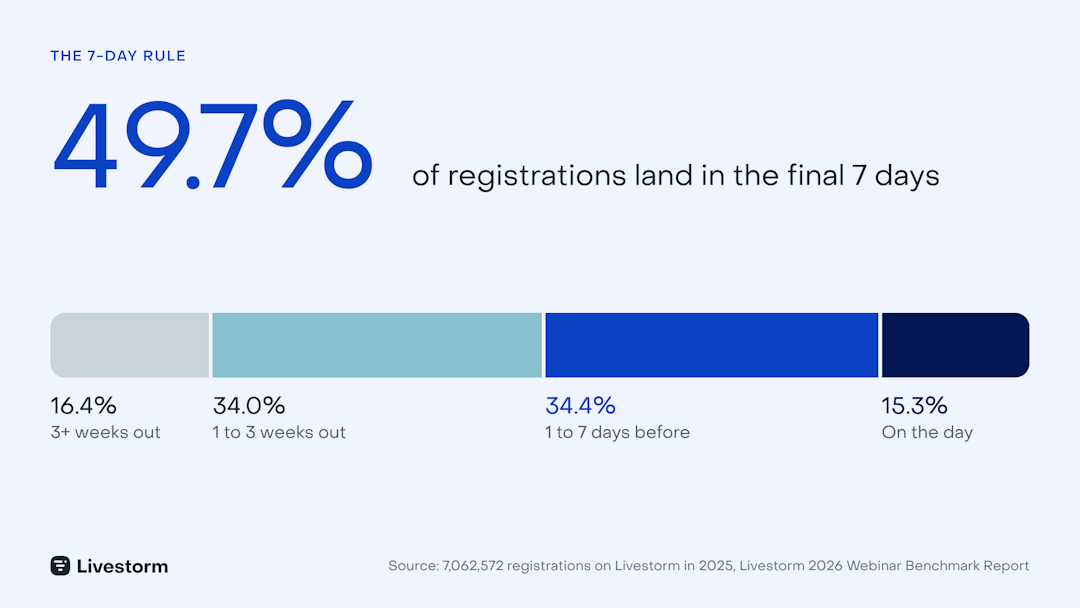
Nearly half of all registrations (49.7%) happen in the final seven days before an event, and 15% come on the day of. Reminder emails during this window are critical for converting late registrants into live attendees.
Lack of incentive to join live
For many B2B teams, it's common courtesy to send a webinar recording after the event ends. This is especially important when you need to maximize registrations.
While it's certainly convenient to invite your audience to watch the replay at their convenience, it's not great for your engagement metrics or your webinar performance. Busy audiences often need an incentive to prioritize your event and make the time to join live.
The average attendee watches for 26 minutes, roughly 38% of the total runtime for a typical webinar. But those who stay between 28 and 35 minutes engage at 2.75x the rate of those who drop off at the 18- to 20-minute mark.
Getting people to attend the live session and making it worthwhile for them to stay has a significant effect on engagement.
15 Ways to boost webinar attendance rates
Once you've identified what's keeping attendance rates low, you can take steps to improve your results. Here's how to increase webinar attendance:
Tailor the event for your audience
Identify topics and angles your audience cares about
The best webinars help your audience solve real problems. Identify their most important concerns by:
Looking through your team's support tickets and sales calls to find recurring questions and challenges
Checking to see which blog posts and resources get the most engagement from prospects and customers
Surveying your audience about what they're working on or concerned about this quarter
The goal is to find topics that relate to immediate, concrete problems. So, a webinar on "how to optimize your ABM strategy to increase pipeline by 5x this quarter" is much more relevant than "ABM strategy 101."
Recruit speakers who resonate with your audience
Your speakers' expertise has to align with what your audience is trying to accomplish. Look for speakers whose company size, industry, and role closely matches your audience's situation.
Here's an easy way to start: Identify a few of your top customers or prospects in the audience segment. Then, pay attention to who they talk about and engage with on platforms like LinkedIn.
Balance educational and sales content
Webinars typically perform best when they aren't thinly disguised sales pitches. To improve webinar attendance, prioritize delivering value to your audience.
Aim to spend at least 75% of the webinar time on education and information sharing. When you do mention your product or service, make sure to directly connect it to the problems and solutions you've covered.
Promote the event to your target audience
Segment your contact list and send email invitations
Inviting your entire contact list might seem like a smart way to get more people to register for your audience. But when webinar attendance is your priority, be more selective about your invitations.
Segment your contact list, focusing on people with an interest in the topic or those who are at a relevant stage in the sales funnel. Then, send a webinar invitation to the segment(s) who are likely to get the most value from your event.
Email is by far the most effective channel for driving webinar registrations. According to our 2026 Webinar Benchmark Report, 86.3% of teams name email as a top-3 registration channel, double the next channel, organic social, at 43.3%.
See how Cody Stover, Senior Demand Generation Manager at Customer.io, used email segmentation to win a 6.25x higher conversion rate:
Use lead gen forms in LinkedIn and Facebook ads
Look beyond your email list and reach new prospects with LinkedIn or Facebook ads. As our 2026 Webinar Benchmark Report shows, 20.4% of teams use paid social to drive registrations.
Use LinkedIn or Meta to build interest or role-based audiences. Then, integrate your Facebook or LinkedIn lead gen forms with Livestorm. This way, you can seamlessly register new attendees from social media ads without having to maintain complex automations or zaps.
Partner with industry thought leaders or B2B brands
There's no need to rely exclusively on your company's internal experts to lead webinars. Instead, co-host with a complementary brand or an industry thought leader.
This approach has two potentially significant benefits: It gives you access to your co-host's audience and it adds credibility to your event.
At Livestorm, we frequently co-host webinars with teams from other B2B SaaS companies. For example, our ABM Meets Events webinar includes guest speakers from Userpilot and Demandbase.
Optimize scheduling and logistics
The data backs this up — here’s what 33,000+ sessions reveal about timing and turnout:
Set up a user-friendly registration page
To increase webinar attendance rates, you need registration landing pages that are easy for your team to set up and easy for your audience to sign up.
With Livestorm, you can easily create landing pages that feature:
Event time and date so registrants know exactly when the webinar is happening
Description of the event, including what attendees will learn
Hosts and speakers, including their companies and roles
Registration options via email, Google, and Microsoft
Link to share the event with colleagues
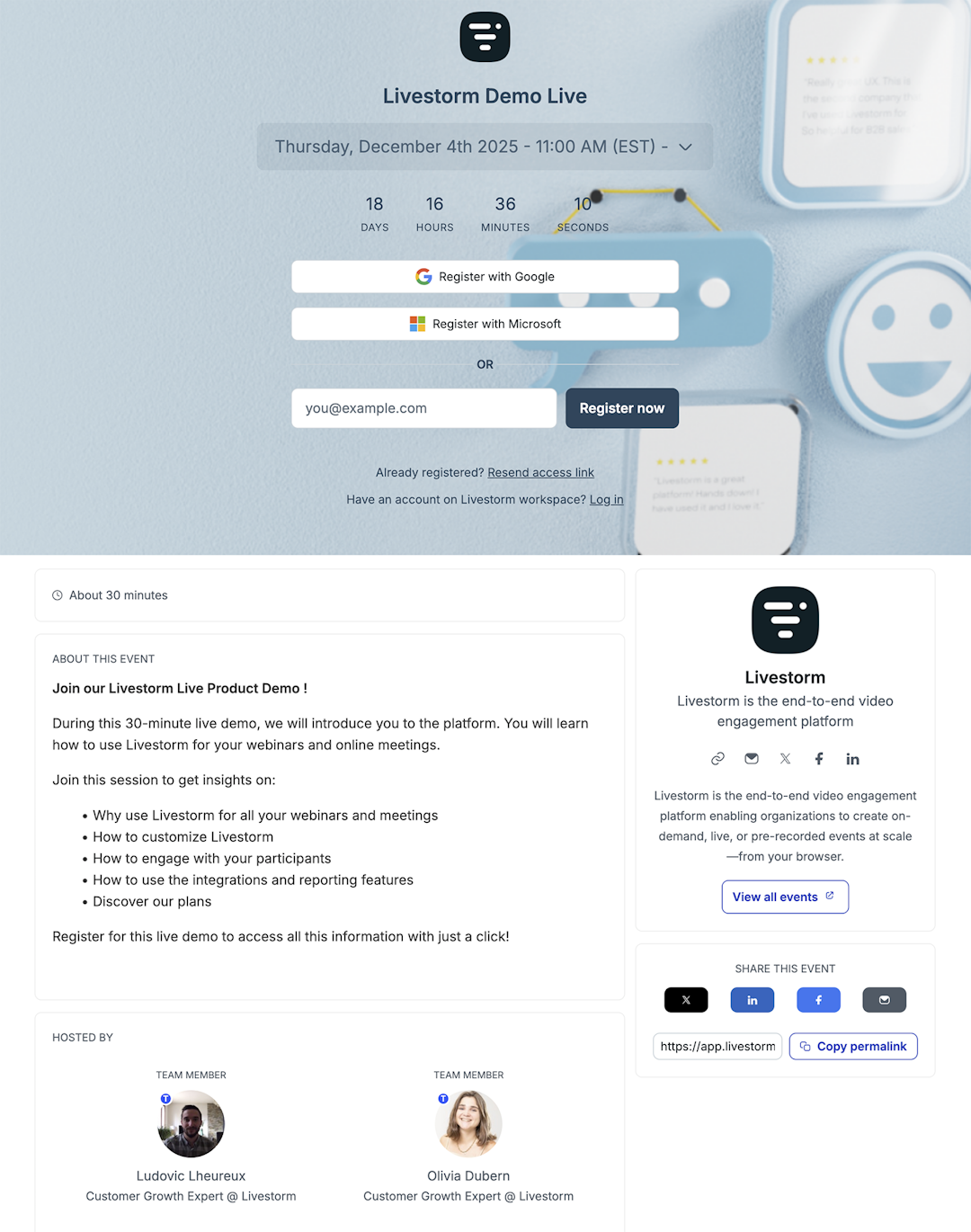
To maximize attendance and engagement, always lead with the webinar's value proposition. What will attendees learn during the event? What will they be able to do afterward?
Choose the right day and time for your audience
Plan webinars at the ideal time for your target audience. Review your webinar analytics to find the times that drove the highest attendance during past events.
Alternatively, use our webinar statistics to find the right timing for your audience. This tool uses data from thousands of webinars hosted with Livestorm to identify the best day to host a webinar and the right duration.
Our 2026 benchmark report shows that Tuesday has the highest show-up rate at 51.7%, while Wednesday draws the largest live audience. For best results, schedule events Monday through Wednesday at 11 a.m. or 2 p.m. ET.
Use a browser-based webinar platform
Make joining your webinars as easy as possible by minimizing the tech requirements for your audience. Reduce friction by choosing a browser-based webinar software platform.
With Livestorm, attendees can join without having to download an app or sign up for an account before tuning into the event. This means Livestorm events have a 53% higher attendance rate compared to the industry average.
Jarvis Legal, a legal practice management platform, saw this play out firsthand:
"We are always surprised by our participation rate, which averages 60%. This is mainly due to the ease of connecting to Livestorm." – Coralie Loheac, Product Owner at Jarvis Legal
Fix your pre-webinar communication
Automate your reminder sequence
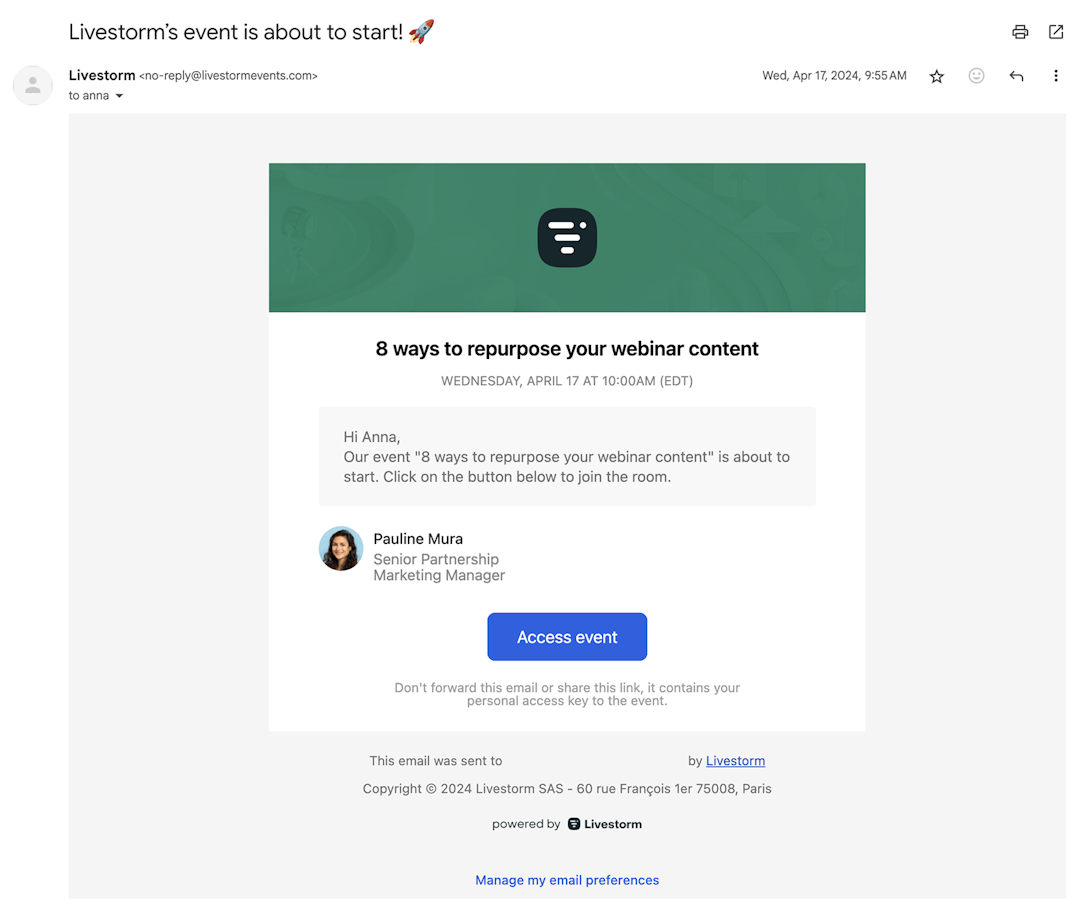
Rather than relying on your team to send reminders manually, use email automation. With Livestorm, you can email reminders based on any schedule you choose.
We typically recommend sending:
Confirmation email after registration
24-hour reminder the day before the event
One-hour reminder right before the event starts
This cadence keeps your event top of mind with your audience and improves webinar attendance rates.
Tease the event on social media
Don't rely on email alone. When marketing a webinar, create touchpoints across channels.
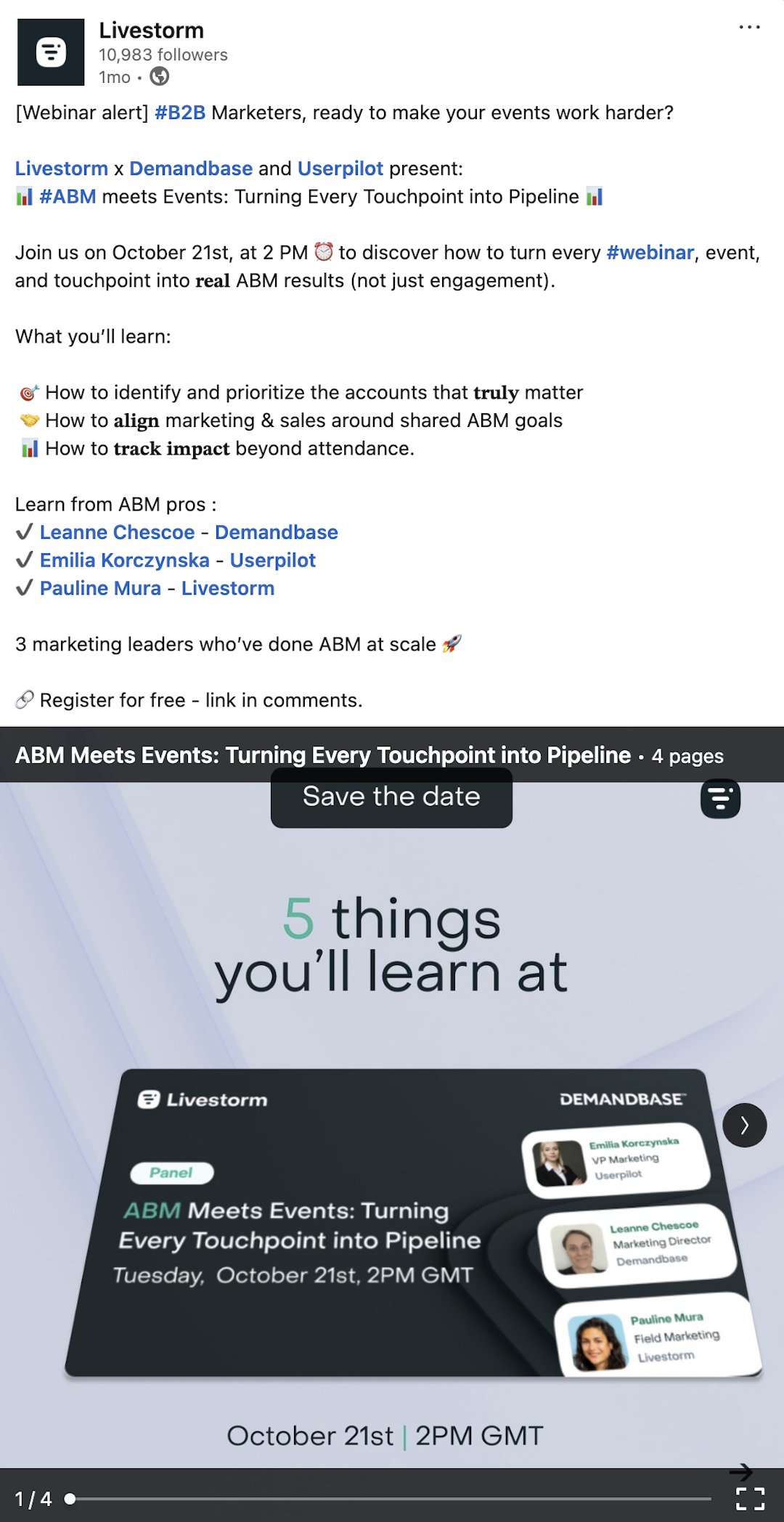
At Livestorm, we focus on social media promotion for our webinars. As an example, this LinkedIn post includes a carousel that highlights five things attendees will learn at an upcoming webinar.
If you promote with a LinkedIn Event, LinkedIn adds its own reminders on top of your emails: registrants get a reminder before the session and, if the Event is a LinkedIn Live stream, a notification the moment you go live. Treat the two as one sequence. LinkedIn keeps the event visible in the feed, and your email puts it in the calendar with a join link that works outside the LinkedIn app. For the full setup, see how to run a webinar on LinkedIn.
Make live attendance worth it
Create exclusive incentives for live attendees
Give your audience a clear reason to attend live rather than waiting for the replay. Offer resources that attendees can only get during the live session, such as:
Templates and checklists shared only during the session
Research reports or early access to new data
Free or extended software trials
Live-only Q&A with the speaker, or a 1:1 office-hours slot
A certificate of attendance, for training and professional audiences
Announce the incentive on the registration page and in your reminder emails, not just during the session. That way, it actually changes whether people show up.
Make the event interactive so attendees feel like contributors
Organize webinars that invite your audience to contribute rather than just watch and listen. Use polls throughout the event to gather experiences and opinions. Then, share the results in real time.
Host live Q&A sessions with your speakers. Give attendees a chance to interact directly with thought leaders and get answers to their biggest questions.
Bring the live session to where your audience already is
Some of your audience will never open the join link, but they will scroll LinkedIn. Restreaming your webinar to LinkedIn Live broadcasts the same session to your followers while registered attendees watch in the Livestorm room. Assign a moderator to relay LinkedIn comments into your Livestorm Q&A so both audiences feel heard. The free 3-Phase LinkedIn Playbook for B2B Webinars, built with Sparkforce, covers this setup along with promotion and repurposing.
Drive additional views after the event
Send replay links
Even if your main priority is to improve your webinar attendance during the live event, replays can still help you meet lead generation goals and increase ROI. But instead of sending a generic follow-up with a replay link once the event ends, take a moment to customize your email.
"Time is everything. You want to be saying thank you to registrants immediately after the event. And not just that generic 'thank you for attending.' You need to tailor it to the content from the session and also have a very clear call to action." – Kathryn Hurley, Events and Partner Marketing Manager at ChartMogul
How you distribute the replay also has a major impact. Public replays get 3.7x as many views as gated ones (14.60 vs. 3.97 average views per session), yet 62% of teams restrict replays to registered users.
For no-shows who never open the replay email, retarget them on LinkedIn instead. A short highlight clip, or a LinkedIn Document Ad built from your slides and gated with a Lead Gen Form, brings them back to the on-demand session.
Repurpose webinar content across channels
Another way to drive more registrations and views after the event is to repurpose webinar content across your marketing channels. For example, create short clips for social media, upload a longer clip to YouTube, or turn the transcript into a blog post.
Repurposing can multiply your reach by up to 19.5x. A single webinar can produce 13+ content assets, from blog posts and social clips to podcast episodes and FAQs.
With Livestorm's AI features, you can instantly transform webinars into emails, blog posts, and social media posts.
How AI can improve webinar attendance
AI won't replace a relevant topic and a good speaker, but it can take on a lot of the manual work that affects turnout:
Personalized invitations and reminders: draft reminder emails tailored to each segment's role or industry instead of one generic message.
Better topics and titles: mine sales calls, support tickets, and past webinar questions for the problems your audience wants solved, then test several title options.
Smarter follow-up for no-shows: generate a written recap, key takeaways, and short clips from the recording so people who missed the live session still engage.
Faster repurposing: turn each session into social clips and posts that promote your next webinar.
Livestorm's AI features cover the last two: AI content repurposing creates emails, blog posts, and social posts from the transcript, and AI Studio turns replays into short clips.
What to track when measuring webinar attendance
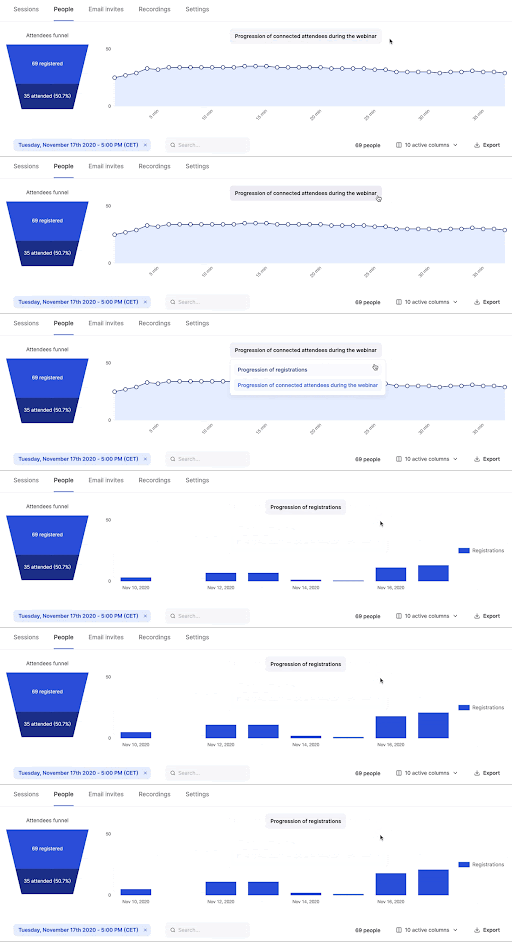
As you take steps to increase attendance, pay attention to your webinar metrics so you know what's working — and what still needs work. Here are the metrics my team measures with Livestorm’s analytics dashboard:
Webinar registrations: The number of people who signed up for your event. A low number suggests an issue with how you promoted your webinar.
Registration conversion rate: The percentage of people who signed up for your event after visiting your registration landing page. A low percentage indicates an issue with your webinar topic, speakers, or timing.
Webinar attendees: The number of people who attended your live event. A low number suggests an issue with your webinar timing, incentives, or reminders.
Attendance rate: The percentage of people who attended your event compared to those who signed up. A low number indicates a problem with your timing, incentives, or reminders.
Replay viewers: The number of people who watched the webinar recording. If this number is much higher than the number of live attendees, it could be an issue with your timing, incentives, or reminders.
Livestorm for higher webinar attendance
Higher attendance starts with removing friction from the webinar registration and joining process. Livestorm gives you the tools to attract and convert the right audience — and make it easy for them to show up.
Here's how Livestorm helps you boost attendance:
Customizable landing pages that simplify registration
Automated email sequences to keep your event top of mind
Browser-based platform that doesn't require attendees to download an app
Interactive Q&A sessions, polls, and live chat for better audience engagement
Flexible replay options so you control how and when you share recordings
Ready to try our webinar platform for yourself? Sign up for a free Livestorm account and set up your first event in just a few minutes.
Frequently asked questions
How can I increase my webinar attendance rate?
What is a good attendance rate for webinars?
The average webinar attendance rate is 47.7% of registrants, according to Livestorm's 2026 benchmark of 33,786 sessions. Anything above 50% is a strong result, while rates below 35% usually point to a timing, targeting, or reminder problem. Track your own baseline by segment, such as customers versus prospects.
How many reminder emails should I send before a webinar?
Send 3–4 reminder emails: a confirmation immediately after registration, one 24 hours before the event, one 1 hour before, and a final "starting now" message. This cadence keeps your webinar top-of-mind without overwhelming registrants.
Why do people register for webinars but not attend?
Common reasons include unclear value propositions, too many steps in the registration process, lack of reminders, and poor timing. Reducing friction and reinforcing the webinar's benefits through targeted reminders can significantly improve show-up rates.
What incentives increase webinar attendance?
Offer something people only get by attending live: templates or checklists shared during the session, early access to research, an extended trial, live Q&A with the speaker, or a certificate of attendance. Mention the incentive on the registration page and in your reminders so it influences show-up.
When is the best time to host a webinar?
Livestorm's 2026 benchmark shows Tuesday has the highest show-up rate (51.7%) and Wednesday draws the largest live audience. Monday to Wednesday at 11 a.m. or 2 p.m. ET tends to work best, but test against your own audience's time zones.
Should I make my webinar registration page short or detailed?
Balance brevity with clarity by clearly stating the webinar's outcomes and value while keeping form fields minimal. A focused page that sets clear expectations improves both registration quality and attendance rates.


Ebooks
Webinar Promotion Handbook
Everything you need to promote your webinars and increase attendance.

About the author
Brillixa Herdhiana - Senior Growth Manager
Brillixa joined Livestorm as Growth Manager in 2021. Her experience enables her to contribute to business growth through lead generation from ads and organic channels.
Related categories
Featured resource
Ebooks
Webinar Promotion Handbook
Everything you need to promote your webinars and increase attendance.
Newsletter