There is no single best AI for event planning; it depends on the task. A general assistant like ChatGPT is best for ideas, copy, and checklists. Design generators handle visuals. Dedicated AI event platforms handle registration and check-in, and a webinar platform with built-in AI covers virtual and hybrid delivery plus repurposing. Most planners combine two or three.
AI
AI for event planning: tools and workflows that work
Published on October 15, 2026 • About 5 min. read
Written by Brillixa Herdhiana
The Pipeline Truth: 2026 Webinar Benchmark Report

Table of content
Share this article
Key Takeaways
AI is a first-draft engine for events: copy, agendas, follow-up. It is not judgment or negotiation.
Match the tool to the task, not to the brand on the box.
The highest-ROI stage is the one most planners skip: repurposing the recording.
Keep a human reviewing anything AI produces, especially facts and vendor decisions.
For virtual and hybrid events, a webinar platform with built-in AI covers what general tools can't.
Connected through an MCP server, an assistant can set up the event and report on it, not just draft copy.
AI for event planning is the use of artificial-intelligence tools to speed up or automate planning work, from drafting promotion emails and building agendas to answering registrant questions and turning the recording into clips. It assists the planner; it does not replace the judgment, relationships, and taste a good event still needs. This guide covers what AI genuinely does well, what it cannot do yet, the tools worth using by task, and a stage-by-stage workflow you can copy.
What is AI for event planning?
AI for event planning is software that automates or assists the planning work behind an event: generating ideas and copy, building schedules, handling registration questions, drafting follow-ups, and repurposing the recording afterward. Think of it as an assistant that produces fast first drafts, not a planner that owns the outcome.
It helps to see where AI fits across the whole lifecycle, because that is how the rest of this guide is organized. There are five stages: promotion, registration, agenda and content, live engagement, and follow-up plus repurposing. AI can touch every one of them, but it earns its place at some more than others. Adoption is already mainstream in marketing broadly, at 80.2% general AI use versus 59.8% for webinar-specific AI, according to Livestorm's 2026 Webinar Benchmark Report, so the question is no longer whether to use AI but where. For the non-AI baseline, our event planning process still holds; AI just removes the busywork inside it.
What AI can (and can't) do for event planning
This is the part most tool roundups skip, and it is the one that saves you from a bad launch. AI is genuinely good at the repetitive, first-draft work, and handing it over gets you hours back. What it cannot do is the part that actually makes an event good.
| Stage | Hand it to AI | Keep it human |
|---|---|---|
| Promotion | Writing promotion copy and subject-line variants | Approving what goes out under your name |
| Agenda and speakers | Suggesting agendas and session themes, drafting speaker outreach | Choosing the topic and building the relationship with each speaker |
| Event setup | Creating the event and registering contacts through an MCP connection | Checking session settings and registration emails before the page goes live |
| Venue and vendors | Drafting checklists and vendor requests | Negotiating with the venue and vendors |
| Live session | Triaging attendee questions | Reading the room and adjusting on the fly |
| Follow-up | Summarizing post-event feedback | Owning the numbers and correcting them when they are wrong |
AI will also state a wrong fact with total confidence, so a human has to review anything that ships. This is not hand-wringing: teams rate their own webinar-AI maturity at just 2.54 out of 5, and about half of their concerns are about trust and accuracy rather than features. Use AI for speed, keep a person in the loop for judgment.
AI tools for event planners, by task
The fastest way to choose AI event tools is to match the tool to the task, not to pick one brand and force everything through it. Roughly five categories cover what planners actually need:
Planning and ideation. A general assistant like ChatGPT is strong for briefs, themes, checklists, and run-of-show drafts. It is the cheapest place to start.
Design and content. Image, video, and deck generators produce visuals and social assets without a designer for every item.
Registration, ticketing, and check-in. Dedicated AI event platforms handle sign-ups and on-site logistics.
Virtual and hybrid delivery. A webinar platform with built-in AI runs the live session and repurposes it afterward, which general tools cannot do.
Connected assistants. Through an MCP server, an assistant like Claude or ChatGPT can work inside your event platform: create the event, register contacts, and pull attendance. Our guide to what an MCP server is explains how that connection works.
One caution before you buy: tool features, free tiers, and pricing change constantly, so treat any vendor's current claims as something to verify, not gospel. The selection test that lasts is simpler than a feature comparison: does it integrate with your CRM and webinar stack, how does it handle your data, is there a free tier to test fit, and does it leave room for human review? If a tool fails those, a longer feature list will not save it. For the webinar and virtual side specifically, Livestorm's AI features answer the "which tool for which job" question.
An AI event-planning workflow, stage by stage
Here is where AI stops being a novelty and starts saving real hours, run across the five stages of an actual event.
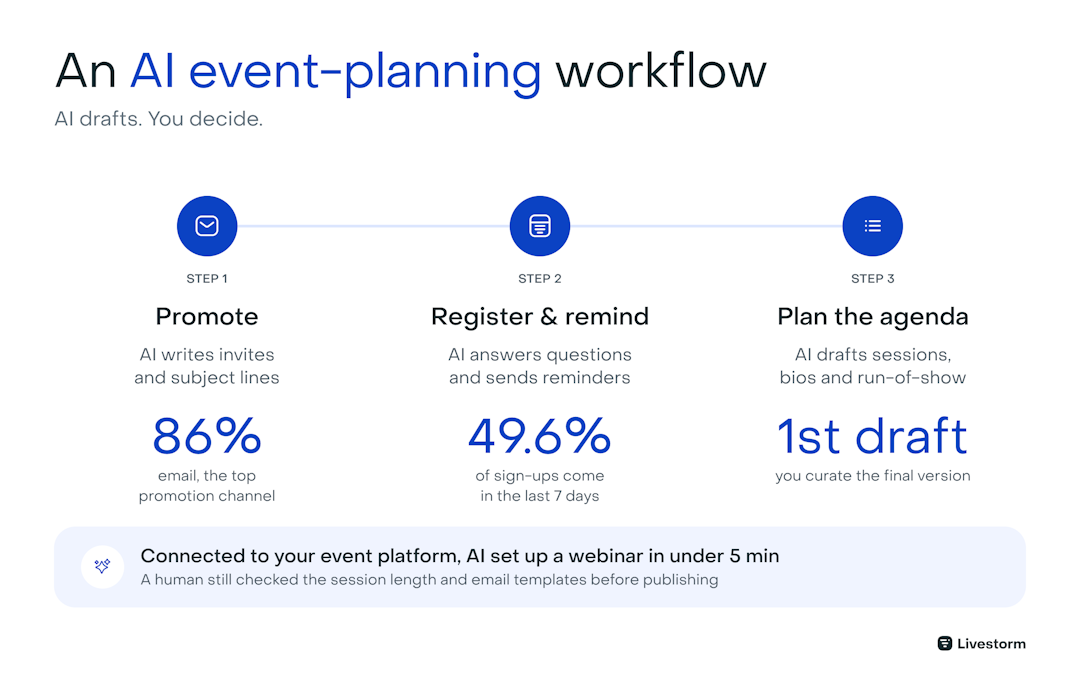
Promotion and audience building. AI drafts your invite copy, subject-line variants, and audience segments in minutes. Point it at your best-performing past emails so the output starts on-brand. Keep email at the center, since it is still the top webinar promotion channel at 86%, and let AI widen it, not replace it. See our B2B event marketing guide for the promotion side in full.
Registration and reminders. An AI chat assistant can answer common registrant questions around the clock, and automated sequences handle the reminders that actually get people to show up. Timing matters more than most planners think: about 49.6% of registrations arrive in the final seven days, so the reminders you send that last week are doing the heavy lifting.
Agenda, speakers, and run-of-show. AI is a fast thinking partner for session ideas, speaker bios, and a first-pass run-of-show. Treat it as a whiteboard, not a decision-maker: it drafts, you curate.
Connected to your event platform, an assistant can do more than draft. For Livestorm's October 15 webinar, Building an agentic webinar system, Tata Maytesyan, founder of Grow Global Tech, handed the setup to Claude through Livestorm's MCP server. She asked it to create the event at her chosen time, invite Benoit Leggieri as co-host, prepare stats and questions from her previous webinars, and draft a run of show. The event page was live in under five minutes. Claude still flagged two fixes for a human: the session came out at 30 minutes instead of 45, and it couldn't add a custom registration question.
One catch she hit: on Livestorm, registration emails start going out as soon as the event page is live, and they can't be edited through the MCP. Her first email went out before she could change it, so check your templates before you let an assistant publish.
The topic stayed her call:
"I don't create a topic just because Claude told me so, or the Livestorm MCP said so. It's a bizarre thing to do. It stays human."
Here is the run-of-show part in practice: Tata used a Claude skill to build it, from the tech check to the live Q&A.
Live engagement. During the session, AI can help surface and organize audience questions and suggest poll prompts, so a moderator spends less time triaging and more time keeping the room warm. Attendance is the hard part, average show-up sits at 47.7%, so open with your strongest material.
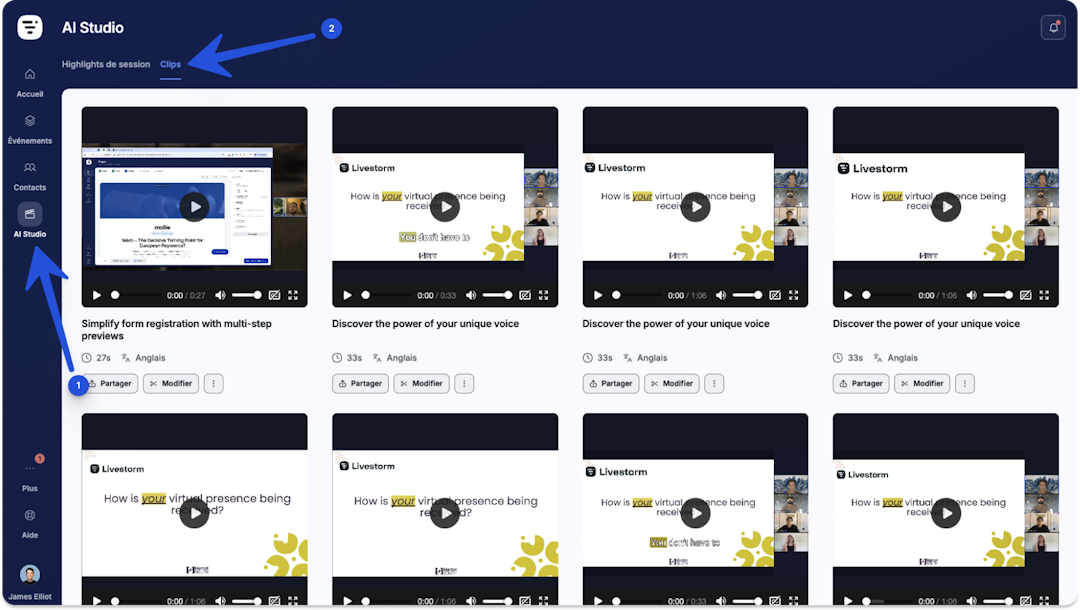
Follow-up and content repurposing. This is the stage nobody else covers and the one with the highest return. AI turns one recording into clips, a blog post, social posts, and a follow-up email. Based on Livestorm's benchmark data, repurposing a webinar with AI Studio can produce about 13 times more content assets from a single session, save roughly 6 hours of work, and cut video-creation cost by around 78%. The event is over; the content it produced is not.
A connected assistant takes on the reporting too. Tata built her engagement report in Claude on the same Livestorm MCP connection: it compared the session with four earlier ones, broke signups down by source, company, and region, and showed she should have opened registration earlier.
Where Livestorm fits: AI for virtual and hybrid events
Most AI-for-events coverage assumes an in-person, venue-first event. If yours are virtual or hybrid, that leaves out the part that matters most to you, and it is exactly the part Livestorm covers. Livestorm, the webinar platform with AI Studio, runs the live session, hosts the registration pages, and automates the reminders, so the delivery layer general AI tools cannot touch is handled.
Then it does the thing almost no one is doing yet. AI Studio turns the recording into clips, transcripts, and captions automatically, so your event keeps producing content for weeks. That edge is still wide open: only 11.5% of teams currently use AI to create clips from their webinars.
If you run any volume of virtual or hybrid events, that is the cheapest pipeline you are not yet claiming. Livestorm covers the webinar and virtual-event side; pair it with a dedicated planning or ticketing tool for large in-person logistics rather than expecting one platform to do everything.
Whatever you pair it with, you can run the Livestorm side from the AI assistant you already use. Livestorm runs an official MCP server and is a verified connector in Claude's directory, so Claude, ChatGPT, or Microsoft 365 Copilot can create sessions, register lists, and report on attendance for you. It's included on every Livestorm plan, including Free. Our comparison of webinar platforms with an MCP server shows how that access differs from one platform to the next.
Plan smarter events with AI
AI will not run your event for you, but it will hand back hours across promotion, registration, and follow-up, and it will keep your best recording working long after the room clears. The planners getting the most from it are the ones who use it for speed and keep their own judgment for everything that matters.
To see how AI fits a virtual or hybrid event end to end, from registration to repurposing, start a free trial.
Frequently asked questions
What is the best AI for event planning?
Can AI replace an event planner?
No. AI speeds up the repetitive work, drafting copy, suggesting agendas, summarizing feedback, but it cannot negotiate with vendors, read a room, build relationships, or own the outcome when something goes wrong. It also states wrong facts confidently, so a human has to review its work. Think of it as a fast assistant, not a replacement.
What is the best free app for event planning?
It depends on the job. Several general AI assistants offer free tiers that cover ideation, copy, and checklists, which is where most planners start. Dedicated event and webinar platforms often have free plans with limits on attendees or features. Test a free tier against your actual workflow before paying, and check that it connects to the rest of your stack.
How can I use ChatGPT for events?
Use ChatGPT for the first-draft work: promotion emails and subject lines, agenda and session ideas, speaker bios and outreach, attendee FAQ answers, and post-event summaries. Give it your audience, your goal, and your own past material so the output is on-brand. Always review what it produces before it ships, especially anything with a fact or a name in it.
Can ChatGPT or Claude set up an event for you?
Yes, once they are connected to your event platform through an MCP server. With Livestorm connected, Claude or ChatGPT can create the event and session, register a list of contacts, and report on attendance when you ask. Keep a person on the decisions and the checks: the topic, the session settings, and the registration emails before the page goes live.
What are the 5 C's of an event?
The 5 C's are a commonly cited event-management framework: Concept, Coordination, Control, Culmination, and Closeout. Concept is the idea and goal, Coordination is the planning and logistics, Control is keeping things on track, Culmination is the event itself, and Closeout is the follow-up and review. AI can assist most of these, but the judgment behind them stays human.
How much do AI event planning tools cost?
It ranges widely. General AI assistants have free tiers and paid plans that are inexpensive to start. Dedicated AI event and webinar platforms price by attendees, features, or seats, from free plans up to enterprise contracts. The useful number is not the sticker price but the time saved per event, so weigh cost against the hours AI hands back across promotion, registration, and follow-up.
Is AI worth it for event management?
Yes, if you use it for the right jobs. AI is worth it for the repetitive, high-volume work: drafting copy, answering registrant questions, and repurposing the recording, where it saves real hours. It is not worth treating as a decision-maker or an unattended autopilot. Used as an assistant with a human reviewing the output, it pays for itself quickly.


Reports
The Pipeline Truth: 2026 Webinar Benchmark Report
Drive more registrations, boost attendance & multiply content 13x. Based on 7M+ registrations, 33K sessions + 850 go-to-market leader insights.

About the author
Brillixa Herdhiana - Senior Growth Manager
Brillixa joined Livestorm as Growth Manager in 2021. Her experience enables her to contribute to business growth through lead generation from ads and organic channels.
Related categories
Featured resource
Reports
The Pipeline Truth: 2026 Webinar Benchmark Report
Drive more registrations, boost attendance & multiply content 13x. Based on 7M+ registrations, 33K sessions + 850 go-to-market leader insights.
Newsletter