As of October 2026, Livestorm, Zoho Webinar and Sequel run official MCP servers that cover webinar data, and Zoom runs an official server documented for meetings. GoTo Webinar, WebinarJam, EverWebinar, Demio, BigMarker and WebinarGeek connect only through third-party bridges such as Zapier or Pipedream. We found no official MCP server for ON24.
AI
Webinar platforms with an MCP server: 2026 comparison
Published on October 15, 2026 • About 11 min. read
Written by Brillixa Herdhiana
The Pipeline Truth: 2026 Webinar Benchmark Report

Table of content
Share this article
Key Takeaways
Only a few webinar platforms maintain their own MCP server today.
An official server exposes the vendor's API; a bridge exposes preset actions.
Livestorm's MCP server is a verified connector in Claude's directory.
Zoom's MCP server is documented for meetings, not webinars.
Check permissions and plan availability before you connect anything.
Your AI assistant already reads your CRM and your ad accounts. Your webinar platform is often where it stops. As of October 2026, Livestorm, Zoho Webinar and Sequel run official MCP servers built for webinar data, and Zoom runs one focused on meetings. GoTo Webinar, WebinarJam, Demio, BigMarker and WebinarGeek connect to AI assistants only through third-party bridges such as Zapier or Pipedream.
If you're comparing webinar platform MCP options, that split matters more than any feature list. We checked each vendor's own pages in October 2026. Below you'll find a comparison table, what separates an official server from a bridge, and a short review of all 11 platforms.
Which webinar platforms have an MCP server?
Four of the 11 platforms below run an official MCP server, and three of those document webinar data. The other six either connect through Zapier or Pipedream, which expose one to five preset actions per platform, or have no MCP access we could find.
| Platform | MCP type | Maintained by | What your AI assistant can do | Plans |
|---|---|---|---|---|
| Livestorm | Official remote server | Livestorm | Create, update and delete events and sessions, register attendees (bulk too), tag people, read attendance, chat, Q&A and recordings | All plans, including Free |
| Zoho Webinar | Official, through Zoho MCP | Zoho | Engagement analytics, polls, attendee and CRM comparisons, read-only or write access | Every plan, including the free tier |
| Sequel | Official, read-only | Sequel | Transcripts, leads, engagement history, account analytics | All plans |
| Zoom | Official remote server | Zoom | Meeting search, recordings, AI meeting summaries (webinars not documented) | Zoom account |
| Webex | Official servers | Cisco | Messaging and meeting examples (webinars not documented) | Webex account |
| GoTo Webinar | Third-party bridge | Zapier, Pipedream | 5 Zapier actions: create or find a webinar, create, find or remove a registrant | Zapier or Pipedream account |
| WebinarJam / EverWebinar | Third-party bridge | Zapier | 1 action: register a person to a webinar | Zapier account |
| Demio | Third-party bridge | Zapier | 1 action: create a registration | Zapier account |
| BigMarker | Third-party bridge | Zapier | 1 action: register a member to an event | Zapier account |
| WebinarGeek | Third-party bridge | Zapier | 4 actions: create a broadcast, subscribe to a webinar or series, unsubscribe | Zapier account |
| ON24 / Goldcast | None found | n/a | n/a | n/a |
MCP support changes fast. Every row was checked on the vendor's or integration platform's own page in October 2026, and each section below links its source so you can re-check before you commit.
What an MCP server does for a webinar platform
MCP (Model Context Protocol) is an open standard that lets an AI assistant connect to another tool, read its data and take actions in it. Claude, ChatGPT, Microsoft Copilot, Cursor and Gemini CLI all support it.
For a webinar team, that means typing "List my webinars this month" or "Register these 40 contacts to Thursday's session" and having the assistant do it through the platform's API. No CSV export. No copy-paste between tabs.
It matters more than it sounds. Webinar-specific AI adoption (59.8%) still trails general marketing AI use (80.2%) by more than 20 points, according to our 2026 Webinar Benchmark Report. Our read: when the assistant can't reach webinar data, people stop asking it webinar questions.
For a deeper look at the protocol itself, see how Livestorm MCP makes webinar planning easier.
Official MCP server vs third-party bridge: why it matters
Both get you a connection. They don't get you the same connection.
An official MCP server is built and maintained by the webinar vendor. It sits on the vendor's own API, so its tools follow what the product can do, and the vendor answers for it when something breaks.
In Livestorm's October 15 webinar, Building an agentic webinar system, Benoit Leggieri described Livestorm's server that way:
"[The MCP] allows you to connect your Claude or AI assistant to the Livestorm API and all the endpoints we expose, so that you can query your data, you can prompt, you can get answers and also visualize."
A bridge such as Zapier MCP or Pipedream wraps actions the integration platform has already built for that app. That's enough to add a lead to a session. It won't tell you which accounts stayed for the whole demo.
Who maintains it
With an official server, the webinar vendor ships the updates. With a bridge, the integration platform decides which actions exist and when they change. WebinarGeek's MCP access, for example, is a Zapier-hosted listing rather than a server WebinarGeek maintains itself.
That matters the week a product changes. When a vendor adds something to its API, an official server can expose it. A bridge waits until the integration platform builds a new action.
How much of the platform you can reach
This is where the numbers get stark. On Zapier MCP, GoTo Webinar gets five actions, WebinarGeek four, and WebinarJam, Demio and BigMarker one each, almost all about registrations. Livestorm's official server covers events, sessions, people, attendance, chat, Q&A, recordings, team members and webhooks.
Permissions and sign-in
Official servers from Livestorm and Zoho use OAuth, so the assistant works with the same permissions as the person who connected it, and you can revoke access whenever you want. A bridge adds a second account in the middle (your Zapier or Pipedream workspace), which is one more set of credentials your IT team will ask about.
Data depth
Reporting is where the gap shows. Livestorm and Sequel let the assistant read attendance and engagement data. The Zapier listings for GoTo Webinar, WebinarJam, Demio, BigMarker and WebinarGeek handle registrations and webinar records, not who watched what.
| Official MCP server | Third-party bridge | |
|---|---|---|
| Built by | The webinar vendor | An integration platform (Zapier, Pipedream) |
| Scope | The vendor's own API | Preset actions, often 1 to 5 per app |
| Sign-in | OAuth with your platform permissions | Your integration-platform account plus the app connection |
| Updates | Ship with the product | Depend on the integration platform |
| Best for | Reporting, follow-up and event operations from the assistant | Simple registration automations |
If you plan to ask your assistant reporting questions, start with the platforms in the first column.
1. Livestorm: official MCP server and verified Claude connector
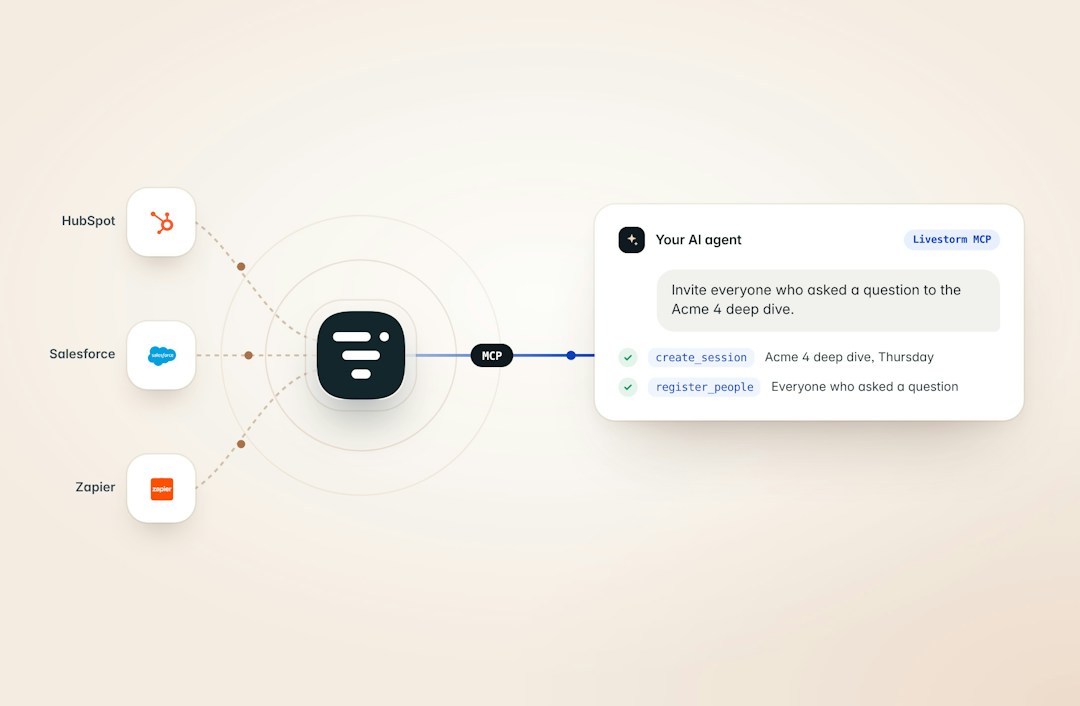
Livestorm, the webinar platform with AI Studio, runs its own remote MCP server at mcp.livestorm.co/mcp. It uses Streamable HTTP and OAuth 2.1 with dynamic client registration. The assistant gets exactly the permissions of the Livestorm user who connects it, and you can disconnect at any time.
In August 2026, Livestorm became a verified connector in Claude's directory, which means Anthropic reviewed it for quality and compatibility. You can connect it from Claude on the web or desktop (Free, Pro, Team and Enterprise plans) and from Claude Code.
Outside Claude, the same server works with ChatGPT as a custom connector, Microsoft 365 Copilot through Copilot Studio, GitHub Copilot in VS Code, Cursor, Gemini CLI and Dust. Any other MCP client can connect through the mcp-remote bridge, the only setup that needs Node.js.
The scope is the widest on this list. Your assistant can list, create, update and delete events and sessions, register attendees one by one or in bulk, look up and tag people per event or session, and read attendance, chat, Q&A and recordings. It can also manage team members, set up webhooks and check the status of bulk jobs.
In practice, the assistant can handle the whole loop for a recurring webinar: set up next month's session, register the people who missed this one, and report on who showed up.
Two limits to know before you start. Only workspace owners and admins can connect it, so a marketer without admin rights needs a quick ask. And the server doesn't write to your CRM directly: CRM sync runs through Livestorm webhooks or your CRM's own connector, and engagement scoring is the assistant's analysis combined with Livestorm tags.
Livestorm's October 15 webinar flagged three more: the event-page template doesn't allow a custom visual, transcripts aren't available through the API (download the JSON or SRT file after the session), and registration emails can't be edited through the MCP. Tata Maytesyan, who set up that session through Claude, explained the catch:
"The moment I create a page [...] the emails start going out. So the first email actually went out and I wasn't able to edit it. [...] If you haven't done it in a while, go and check your emails."
The MCP server is available on every Livestorm plan, including Free. If the Public API isn't enabled on your workspace yet, contact support. The Livestorm for Claude page has the one-click setup.
2. Zoho Webinar: official MCP through Zoho MCP
If your company already runs on Zoho, this is the natural pick. Zoho Webinar connects through Zoho MCP: you create a server in Zoho MCP, add Zoho Webinar as a tool and paste the generated URL into your AI client.
Access runs through OAuth, and you choose read-only or write access per tool. Zoho names Claude, ChatGPT and Cursor as supported clients and lists tasks like pulling engagement analytics, comparing attendees with CRM lead status and creating polls. It's free on every Zoho Webinar plan, including the free tier (per Zoho's MCP page, checked Oct 2026).
The catch is setup. You assemble the server yourself before any assistant can use it, which is routine for a Zoho admin and a detour for a marketer working alone.
3. Sequel: official, read-only MCP server
Sequel treats its MCP server as an audience-intelligence feed. The assistant can query event transcripts, pull participant lists by attendance status, search leads by engagement and rank your most engaged accounts.
Sequel says the server is included in all plans (Starter, Growth and Enterprise) at no extra cost, and names Claude, ChatGPT, Microsoft Copilot and Gemini among the tools that can connect (per Sequel's MCP page and help center, checked Oct 2026).
It's read-only for now. You can ask questions, but you can't create an event or register anyone from the chat, and Sequel lists write actions as planned for a future release. Strong for analysis; you'll still run the program by hand.
Sequel's help center also describes connecting HubSpot alongside Sequel in Claude, so you can ask questions that span both systems. For account-based teams, that pairing is the real draw.
4. Zoom: official MCP server, webinar scope unclear
Zoom has the most familiar name here and the least clarity on webinars. It runs an official remote MCP server, documented for meeting search, recording retrieval and AI meeting summaries (mcpservers.org listing). Zoom's own MCP documentation doesn't mention webinars (checked Oct 2026).
If your team runs Zoom Webinars, don't assume the server covers registrants or webinar reports. Test it on your own account first. For internal meetings and recordings, it's a solid connection. For a webinar program, it's unproven. For the full picture, see Livestorm vs Zoom.
5. Webex: official MCP servers, webinars not documented
Cisco documents official Webex MCP servers that let AI agents work inside Webex, with examples centered on messaging and scheduling meetings (per Webex's developer docs, checked Oct 2026). Webinars aren't mentioned.
Keep an eye on it if your company standardizes on Webex. Today, it isn't a webinar MCP option. Comparing the two for webinars? See Livestorm vs Webex.
6. GoTo Webinar: Zapier and Pipedream bridges
GoTo Webinar has no official MCP server that we could find, so the route is a bridge. Zapier MCP lists five GoTo Webinar actions: create a webinar, find a webinar, and create, find or remove a registrant (Zapier, checked Oct 2026). Pipedream also hosts a GoTo Webinar MCP server (Pipedream).
That covers scheduling and registrant lists. None of the Zapier actions read attendance or engagement data, so the assistant can set the session up but can't tell you how it went. Our Livestorm vs GoTo Webinar comparison covers the rest of the feature set.
7. WebinarJam and EverWebinar: Zapier MCP
One listing, one action. WebinarJam and EverWebinar share a Zapier MCP listing whose only action is to register a person to a specific webinar (Zapier, checked Oct 2026).
If your goal is moving leads from a conversation into a webinar, it does the job. For reporting or event setup, there's nothing for the assistant to call. The Livestorm vs WebinarJam comparison goes beyond AI access.
8. Demio: Zapier MCP
Demio's AI access comes down to a single Zapier action, "Create Registration for Webinar" (Zapier, checked Oct 2026). We didn't find an MCP server maintained by Demio itself.
That's handy for adding registrants from a chat. Session management and attendance reporting stay in the Demio dashboard. For a side-by-side, see Livestorm vs Demio.
9. BigMarker: Zapier MCP
BigMarker follows the same pattern with a different verb. Its Zapier MCP listing has one action, "Register Member to an Event" (Zapier, checked Oct 2026).
If you chose BigMarker for its event formats, treat AI access as a registration shortcut and plan your reporting somewhere else. Livestorm vs BigMarker compares the two in detail.
10. WebinarGeek: Zapier MCP
WebinarGeek has the fullest listing in the bridge-only group. Zapier MCP offers four actions: create a broadcast for an existing webinar, subscribe someone to a single webinar, subscribe them to a whole series, and unsubscribe them (Zapier, checked Oct 2026).
It's a Zapier-hosted integration, not a server WebinarGeek maintains. Teams running recurring series will get real use out of the series actions; anyone who wants reporting from the assistant won't. See Livestorm vs WebinarGeek for the full comparison.
11. ON24 and Goldcast: no official MCP server found
We found no official MCP server for ON24 in October 2026, and an independent May 2026 review of webinar software reached the same conclusion. We didn't find one for Goldcast either.
Both now belong to Cvent, which acquired Goldcast in December 2025 and closed its ON24 acquisition on April 1, 2026 (ZoomInfo). If MCP access is on your requirements list, ask Cvent for a date in writing. If you're weighing a move, our Livestorm vs ON24 comparison and our list of ON24 alternatives are good places to start.
How to choose a webinar platform for AI workflows
Picture the first real request you'll give the assistant: "Who attended Tuesday's webinar but hasn't booked a demo?" Then check which platforms can answer it. Six questions sort the list quickly.
Is it an official server or a bridge?
Start here, because it decides most of what follows. An official server tracks the product. A bridge tracks whatever the integration platform has built.
Can the assistant read and write?
Reporting needs read access to attendance, chat and Q&A. Running the program needs write access to events, sessions and registrations. Livestorm offers both, Sequel is read-only, and the Zapier listings mostly handle registrations.
Who can connect it, and with which permissions?
Look for OAuth and a clear rule on who connects. Our benchmark report puts average webinar-AI maturity at 2.54 out of 5, with about half of concerns tied to trust and accuracy. An assistant that inherits your platform permissions, and that you can disconnect at any time, answers part of that worry.
Which AI clients does it support?
If your company standardized on Microsoft 365 Copilot or Gemini, check that the server supports it, not only Claude. Livestorm's server covers Claude, ChatGPT, Microsoft 365 Copilot, GitHub Copilot, Cursor, Gemini CLI and Dust.
Is it on your plan?
Livestorm, Zoho Webinar and Sequel all include MCP access across their plans, so you won't need an upgrade to test it. With a bridge, check the integration platform's plan too, since the MCP access runs through your Zapier or Pipedream account.
Is there enough data for reporting?
Only 7% of webinar-influenced pipeline is actually tracked, per our benchmark. An assistant that can read attendance and tag engaged people helps close that gap. One that can only add registrants can't.
For the wider AI feature set (transcripts, captions, repurposing), see our guide to the best webinar platform with AI features. For everything beyond AI, from pricing to engagement features, browse our webinar software comparisons.
What you can do with a webinar MCP server
Here's what it looks like in practice, with prompts you can paste into Claude once Livestorm is connected.
Plan and schedule
Skip the form-filling. Ask: "Create a webinar next Tuesday at 3pm and register these contacts." The assistant creates the event and session, then registers the list in one pass, in bulk if it's long. Recurring programs benefit most: a monthly product webinar becomes one sentence to the assistant instead of a setup checklist.
Tata Maytesyan, who runs webinars for her own business, set up Livestorm's October 15 webinar this way. She asked Claude to create the event at her chosen time, invite Benoit Leggieri as co-host, prepare stats and questions from her previous webinars, and draft a run of show. The page was live in under five minutes. Claude flagged two fixes for a human: the session length (30 minutes instead of 45) and a custom registration question the MCP couldn't add.
Report without exports
Ask: "List my webinars this month," then follow with "Compare attendance and chat activity for the last three sessions."
In the same October 15 webinar, Tata singled out reporting:
"For me, the biggest one was actually the engagement report and the analytics. I hate when I don't know the data and I have to go manually check how many emails I sent, what was the open rate, what was the click rate, [how many] people signed up [...] So I worked with Claude to create an artifact based on the MCP connector and, honestly, my mind is blown."
Her report compared the session with four earlier ones and showed she should have opened registration earlier.
Follow up while the leads are warm
Lead generation is the top webinar use case for marketers (69.4%, per our benchmark), and follow-up is where it pays off or doesn't. Ask: "Who attended my last webinar but did not convert?" Then have the assistant tag those people in Livestorm and pass them on through a webhook or your CRM's own connector.
Repurpose a session
Ask the assistant to read a past session's chat and Q&A and draft a recap email that answers the questions you ran out of time for. Your attendees get a better follow-up, and you get an afternoon back.
How to connect Livestorm to Claude in three steps
Open the connectors directory in Claude, or go straight to Livestorm in Claude's directory.
Click Connect and sign in to Livestorm to authorize access.
Ask your first question, such as "List my webinars this month."
For ChatGPT, Microsoft 365 Copilot, Cursor, Gemini CLI and other clients, the Livestorm MCP help article and the developer documentation walk through each setup.
Which webinar platform should you pick for MCP?
Pick by the job you want the assistant to do.
If you want it to run real webinar work (create events, register lists, read attendance and chat, tag the right people) with an official, verified connector, choose Livestorm. If your company runs on Zoho, Zoho Webinar's free MCP access is the easy path. If you only need read-only audience analysis, Sequel fits. Zoom suits teams whose AI questions are about meetings. And if you're staying on GoTo Webinar, WebinarJam, Demio, BigMarker or WebinarGeek, a Zapier bridge will handle registrations while reporting stays manual.
The fastest way to judge is to try it. Start a free Livestorm plan, connect it to Claude, and ask it about your last webinar.
Frequently asked questions
Which webinar platforms have an MCP server?
What is an MCP server for a webinar platform?
It's a connection point that lets an AI assistant such as Claude or ChatGPT read your webinar data and act on it through the Model Context Protocol. With one in place, you can ask the assistant to create events, register attendees or summarize attendance in plain language instead of exporting data by hand.
What is the difference between an official MCP server and a Zapier MCP connection?
An official MCP server is built and maintained by the webinar vendor and exposes its own API. A Zapier MCP connection exposes the handful of actions Zapier has built for that app, often one to five, mostly registrations. Official servers usually give the assistant more scope and deeper data.
Does Zoom have an MCP server for webinars?
No, not one documented for webinars. Zoom runs an official MCP server, but its documentation covers meeting search, recordings and AI meeting summaries and doesn't mention webinars (checked October 2026). If you run Zoom Webinars, test the server on your own account before relying on it for webinar tasks.
Is the Livestorm MCP server free?
Yes. The Livestorm MCP server is available on every Livestorm plan, including Free. If the Public API isn't enabled on your workspace yet, contact Livestorm support to switch it on.
Which AI assistants work with the Livestorm MCP server?
Claude works on the web and desktop (Free, Pro, Team and Enterprise) through the verified connector, and in Claude Code. The server also works with ChatGPT, Microsoft 365 Copilot through Copilot Studio, GitHub Copilot in VS Code, Cursor, Gemini CLI and Dust, and with any other MCP client through the mcp-remote bridge.
Is it safe to connect a webinar platform to Claude or ChatGPT?
Yes, if the server uses OAuth and inherits your permissions. Livestorm's MCP server signs in with OAuth, gives the assistant the same permissions as the Livestorm user who connects it, and can be disconnected at any time. Only workspace owners and admins can connect it.


Reports
The Pipeline Truth: 2026 Webinar Benchmark Report
Drive more registrations, boost attendance & multiply content 13x. Based on 7M+ registrations, 33K sessions + 850 go-to-market leader insights.

About the author
Brillixa Herdhiana - Senior Growth Manager
Brillixa joined Livestorm as Growth Manager in 2021. Her experience enables her to contribute to business growth through lead generation from ads and organic channels.
Featured resource
Reports
The Pipeline Truth: 2026 Webinar Benchmark Report
Drive more registrations, boost attendance & multiply content 13x. Based on 7M+ registrations, 33K sessions + 850 go-to-market leader insights.
Newsletter