A webinar should be 30 to 45 minutes of core content, with time left for Q&A. Most webinars run 45 to 60 minutes, but attendees only watch 26 minutes on average, according to our 2026 Webinar Benchmark Report. Shorter, focused sessions tend to hold attention better.
Webinar
What Is a Webinar? Meaning, How It Works & Types
Published on September 17, 2026 • About 12 min. read
Written by Brillixa Herdhiana
Webinar Promotion Handbook

Table of content
Share this article
Key Takeaways
Webinars are rated critical or very important for GTM strategy by 51.2% of practitioners and serve goals like lead generation (69.4%) and product demos (61.9%).
Live, evergreen, automated, on-demand, and paid webinars offer tailored content delivery options for different business and audience needs.
Browser-based access, customizable registration, email automation, robust analytics, and CRM integrations are core features to seek in webinar platforms.
Interactive features like polls, chat, and Q&A increase engagement, while optimal scheduling and content front-loading maximize attendee retention.
Whether you've been invited to one or you're planning your own, this guide explains webinars in plain terms: what they are, how they work for attendees and hosts, the main types and formats, and what businesses use them for.
What is a webinar?
A webinar is a live online presentation, class, or discussion that people join through a link, usually right in their web browser. One or more speakers present to an audience that watches, listens, and takes part through chat, Q&A, and polls, typically without turning on their own camera or microphone. The word is a blend of "web" and "seminar."
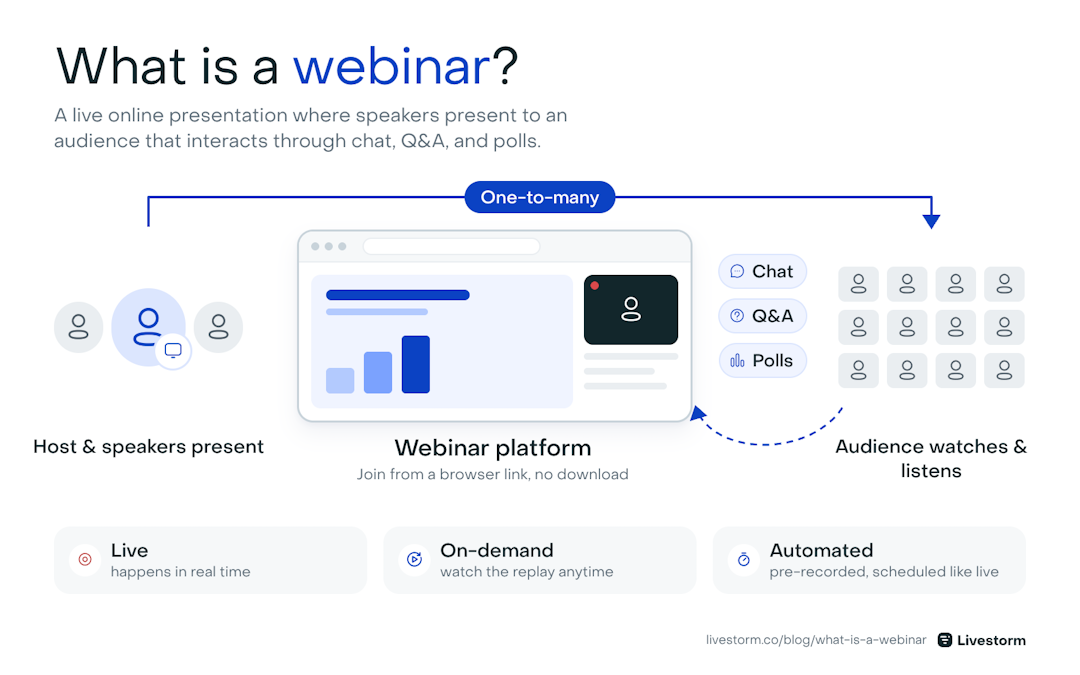
How a webinar works: one-to-many presentation, two-way interaction.
Most webinars are business-related. Marketers, salespeople, and customer experience professionals use them to transmit knowledge, expertise, or tips with a targeted audience. Common use cases include lead generation, product demos, customer training, and thought leadership. Over half (51.2%) of go-to-market practitioners rate webinars as critical or very important to their strategy, according to Livestorm's 2026 Webinar Benchmark Report.
What separates a webinar from a standard video or recorded lecture is interactivity. Attendees can ask questions, participate in polls, and engage through live chat. With the right speakers and format, webinars can be highly informative and engaging.
Webinar vs online meeting vs webcast
Webinars, meetings, and webcasts all use video to communicate. But they serve different purposes and work in different ways.
Online meetings are two-way conversations. Everyone can speak, share their camera, and collaborate in real time using video conferencing software. Meetings work well for small groups like team syncs or client calls, but they don't scale well beyond a few dozen participants.
Webinars are one-to-many presentations with structured interactions. One or more speakers present to a larger audience, and attendees participate through chat, Q&A, and polls.
Webcasts are broadcasts designed for large audiences with minimal or no interaction. Webcasts can reach thousands or tens of thousands of viewers. But these live streams trade interactivity for scale, as attendees are mostly passive.
Here's how the three formats compare:
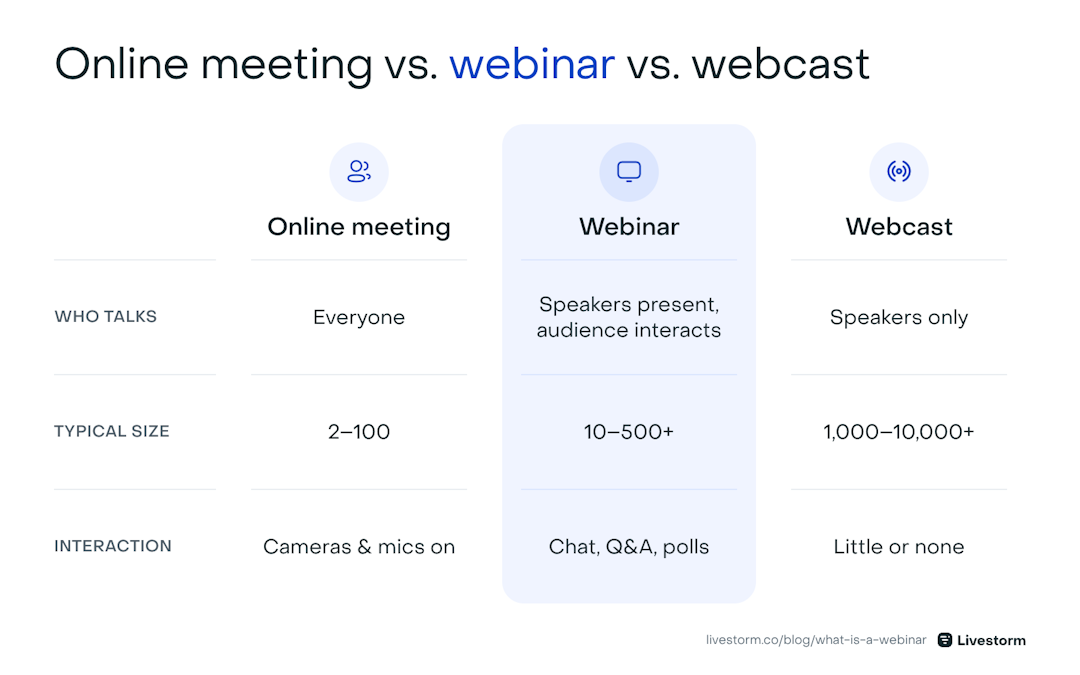
Online meeting vs. webinar vs. webcast at a glance.
| Features | Online meeting | Webinar | Webcast |
|---|---|---|---|
| Typical audience size | 2–100 | 10–500+ | 1,000–10,000+ |
| Communication flow | Two-way | One-to-many with structured interaction | One-way |
| Attendee participation | Camera, mic, screen share | Chat, Q&A, polls | Limited or none |
| Registration required | Rarely | Yes | Sometimes |
| Primary use cases | Team calls, client meetings, brainstorms | Lead gen, demos, training, thought leadership | Keynotes, product launches, all-hands |
| Recording and replay | Optional | Standard | Standard |
How does a webinar work?
A webinar follows a structured process, from planning through follow-up. Whether you're attending or hosting a webinar, the basic mechanics are the same.
Planning and audience targeting
Every webinar starts with a goal. The host decides what they want to achieve. For example: generating leads, demoing a product, training customers, or sharing expertise on a specific topic. That goal determines the format to use, the speakers to lead the event, and the audience to invite.
Promotion and outreach
The webinar host promotes the virtual event through email, social media, blog posts, ads, and partner networks. Most webinar promotion starts at least two or three weeks before the event. Potential attendees learn about the webinar through one of these channels, which directs them to a registration page.
Registration and sign-up
To attend a webinar, you typically need to register in advance. The landing page describes the topic, speakers, date, and time. Attendees fill out a form with their name, email, and sometimes additional details like job title or company. The webinar platform stores this information and uses it for communication before and after the event.
Reminder emails
After registering, webinar attendees receive confirmation and reminder emails leading up to the event. These usually include a link to join the session, along with the date and time. Most platforms automate this process, sending reminders a few days before, the day before, and the morning of the webinar.
The live session
When the live webinar begins, attendees click a link to join through their browser or a dedicated app. The host or speaker presents using slides, screen sharing, or a live demo, while attendees watch and listen.
Unlike a meeting, attendees don't turn on their cameras or microphones. Instead, the live audience interacts through built-in tools:
Live chat lets them comment in real time
Q&A features let them submit and upvote questions
Polls let the host gather feedback or check understanding during the session
The host manages the flow of the event and introduces speakers. Many webinars also include a moderator to manage audience interaction.
Post-event follow-up
After the event, attendees typically receive a follow-up email with the recording, presentation slides, and any additional resources mentioned during the session. People who registered but didn't attend usually receive a link to the replay.
For hosts, the webinar platform provides analytics on who attended, how long they watched, what questions they asked, and how they responded to polls. This data helps the team evaluate the session and plan next steps, whether that's a sales follow-up, a nurture sequence, or planning the next webinar.
What to expect when you attend a webinar
If you've been invited to a webinar, here's what joining one looks like.
How do you join a webinar?
You usually register first on the event's landing page with your name and email. You then get a confirmation email with a personal link, plus reminders before the start time. At the scheduled time, click the link to enter the webinar room. Many platforms, including Livestorm, run entirely in the browser, while others ask you to install an app first.
Can people see you during a webinar?
Usually not. Attendees join in view-only mode with their camera and microphone off, so the audience only sees and hears the speakers. The host can invite an attendee to speak on stage, but you'd have to accept and turn on your own camera or mic. Keep in mind that the host can see who registered and attended, and your name may appear next to anything you post in the chat or Q&A.
Do you have to talk in a webinar?
No. You can simply watch and listen. If you want to take part, you can type in the chat, submit or upvote questions in the Q&A, vote in polls, or react with emojis.
Is a webinar the same as a Zoom meeting?
Not quite. Zoom is a company that makes both meeting and webinar software. In a meeting, everyone can talk and share their video. In a webinar, a few presenters speak to a larger, mostly view-only audience. The comparison table above shows how webinars differ from meetings and webcasts.
Are webinars live or recorded?
Both. Many webinars happen live at a set time, and most hosts also record them so registrants can watch the replay later. Some are pre-recorded and streamed on a schedule, called automated webinars, or available anytime as on-demand webinars.
Are webinars free to attend?
Most are. Companies often run free webinars to educate their audience or generate leads. Paid webinars exist too, mostly for training, certifications, and expert workshops.
What are the different types of webinars?
Webinar types refer to how you deliver online event content. Most webinar platforms support several different types:
Live webinars happen in real time. The host and speakers present to attendees who join at a scheduled time. A live webinar offers the most options to interact, since attendees can ask questions, respond to polls, and chat as the event unfolds.
Evergreen webinars are designed to stay relevant over a long period. The content covers topics that don't become outdated quickly, like foundational training or industry best practices. They're typically delivered on-demand or as automated sessions.
On-demand webinars are recorded sessions that attendees can watch whenever they want. After registering, they get immediate access to the recording. This type works well for product tutorials, onboarding sessions, and other content that doesn't require a live presenter.
Automated webinars use a pre-recorded session but deliver it on a set schedule, simulating the feel of a live event. Some platforms support live chat alongside the recording, so a moderator can answer questions without the speakers needing to present in real time.
Paid webinars require attendees to purchase a ticket or subscription before accessing the session. This model works well for specialized training, certification programs, and expert-led workshops where the content has clear standalone value.
What are the best webinar formats?
A webinar's format determines how you structure and present the content. The right choice depends on your goal, the number of speakers, and how much audience interaction you want.
Solo presentations
A solo presentation features a single speaker delivering content to the audience, often using a slide deck. The speaker controls the pace and can tailor the content to a specific audience segment.
This format works well for thought leadership, product walkthroughs, and educational content where one expert can cover the topic in depth.
Panel discussions
Panel discussions bring together three or more speakers to share different perspectives on a topic. A webinar moderator guides the conversation with prepared questions and manages audience participation.
This format works well for exploring industry trends, debating approaches, or presenting multiple viewpoints on a complex subject. Panels also make promotion easier, since each speaker can share the event with their own network.
Roundtables
Roundtables are similar to panels but less structured. Rather than following a set list of questions, participants have a more open conversation.
The format tends to feel more casual and collaborative. As a result, roundtables work well for smaller audiences and topics that benefit from back-and-forth discussion rather than prepared talking points.

Seminars
A seminar-style webinar focuses on educating the audience on a specific subject. It's often in more depth than a standard presentation.
Seminars may run longer, cover more material, and include multiple segments or speakers. Organizations typically use them for professional development, certification programs, and in-depth training on complex topics.
Interviews
An interview format features a host directing questions to one or two guests. It's conversational and works well for featuring industry experts, customers, or internal leaders.
Interviews are relatively easy to produce since the guest provides most of the content. From an audience perspective, they tend to feel more personal and engaging than a slide-driven presentation.
Workshops
Workshops are hands-on sessions where attendees learn by doing instead of just listening. The speaker demonstrates a process or technique, and attendees follow along in real time.
This format suits product training, technical tutorials, and skill-building sessions. Workshops often require more preparation, but they tend to drive higher engagement because attendees are actively participating.
What are webinars used for?
Webinars serve a wide range of business goals. Our data shows that lead generation is the top planned use case (69.4%) for webinar hosts in 2026, followed by product demos (61.9%) and customer training (42.8%).
Lead generation
Webinars naturally attract people who care about your topic, product, or service enough to register and show up. That intent makes them more qualified than many inbound leads.
Registration gives you their contact information, and the webinar platform tracks how they engaged: how long they watched, which polls they responded to, and what questions they asked. Your sales team can use those signals to prioritize follow-up.
Maxim Beaten, Marketing Automation Expert at Teamleader, puts it simply: "We use webinars as our go-to lead-generation machine."
Product demos and launches
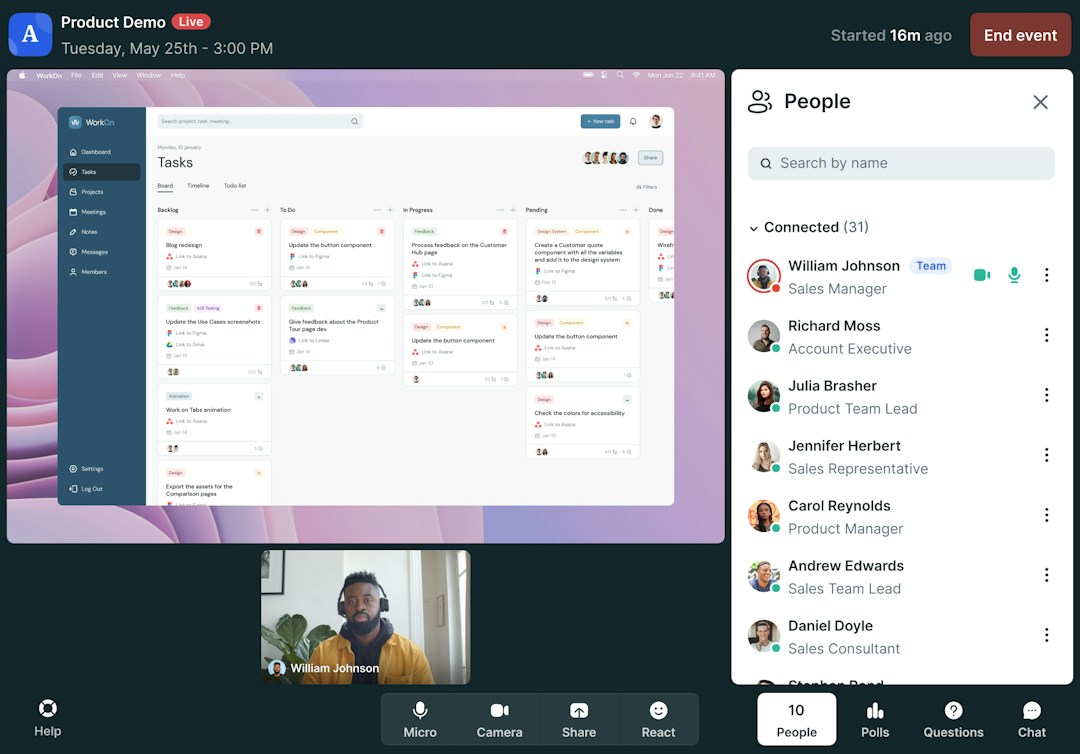
Webinars are an effective way to demo a product in front of an interested audience. Hosts can highlight key features, answer questions in real time, and connect with prospects through polls and interactive chat.
Engagement data from the session, like which features generated the most questions, gives your sales team concrete context for follow-up conversations. For product launches, webinars create a focused moment to introduce something new to both prospects and existing customers.
Bill Miksich, Director of Demand Generation at Customer.io, has seen this pay off firsthand: "With product demo webinars, for every hour spent, we get a factor of 10 in terms of ROI."
Customer onboarding and training
Onboarding webinars help users achieve their aha moment with your product. Video helps users retain information, which is important for products with a steep learning curve.
Rather than scheduling one-on-one sessions with every new customer, your team can run group training webinars. You can record these customer onboarding sessions and make them available for on-demand access afterward.
Nick DeSimone, Customer Education Lead at Workable, used this approach to scale: "By adjusting the training to better fit a wider audience and by utilizing support experts to moderate a chat and keep users engaged, we scaled [our] training program tremendously."
Thought leadership
Webinars let you showcase your expertise through unique and valuable content. You can speak directly to a problem your audience is facing and walk them through the solution. Panel discussions and interview formats work particularly well here, since they bring in outside voices that add credibility and broaden your reach.
Internal communication
Webinars aren't limited to customer-facing use cases. They can replace traditional internal meetings, which is especially valuable for remote work and distributed teams. Companies use them for all-hands meetings, company updates, policy changes, and employee training.
The interactive tools (polls, Q&A, chat) give employees a way to engage with leadership rather than passively reading an email. Recording these sessions also helps you create a library that employees can reference later.
Education and professional development
Organizations in education, healthcare, government, and professional services use webinars to deliver courses, certifications, and continuing education programs. The format makes it possible to train large groups across different locations without the cost of in-person events.
What features should you look for in a webinar platform?
If you're planning to host, the platform shapes the experience for everyone. These are the features that matter most:
Browser-based access, so attendees can join from a link without downloads or plugins
Customizable registration pages with your branding and the form fields you need
Email automation for confirmations, reminders, and follow-ups. Email is the top promotion channel, used by 86.3% of marketers
Screen sharing, slides, and video playback that presenters can switch between smoothly
Engagement tools: live chat, Q&A with upvoting, polls, and emoji reactions
Automatic recording and on-demand replays. Public replays get 3.7x as many views as gated ones
Analytics on attendance, watch time, and engagement, synced to your CRM
AI features such as live transcription, automated summaries, and content repurposing
TJ Landrum, Vice President of Marketing at Basler Electric, explains why browser access matters: "Besides not needing to download any programs, [Livestorm's] browser support is also big, as a lot of folks in our industry are slower to update their IT systems."
To compare tools side by side, see the best webinar platforms by use case, price, and attendee limits.
What are some webinar best practices?
A successful webinar that drives measurable results requires preparation and timing. Here are the webinar best practices make the biggest impact, based on lessons from common mistakes and data from our 2026 Webinar Benchmark Report.
Schedule strategically: The optimal scheduling window is Monday through Wednesday at 11 a.m. or 2 p.m. ET. Tuesday delivers the highest show-up rate at 51.7%, while Fridays and weekends have significantly lower turnout.
Keep seasonality in mind: January has the highest show-up rate at 50.4%, while August drops to 42.9%. If you're planning a flagship webinar or a product launch event, schedule it during a stronger month. Save lighter content or recurring sessions for the summer slump.
Test your setup before going live: Poor audio, video issues, and platform glitches undermine even the best content. Do a dry run with your speakers before the event so everyone is comfortable with the platform and knows how to use the engagement features.
Front-load your best content: Attendees watch an average of 26 minutes, about 38% of the total runtime. If your webinar runs 60 minutes, most people will leave before the halfway mark. Don't save your most valuable insights for the end.
Don't make it a sales pitch: While your webinar might support a sales goal, your audience shouldn't feel like they're sitting through a pitch. Focus on helping people solve their problems and delivering real value. Save the product-specific messaging for follow-up emails and calls, where it's more welcome.
Use interactive features throughout: A little engagement goes a long way. Polls, live Q&A, and chat keep your audience alert and involved. Don't wait until the end to engage attendees. Plan interactive moments at regular intervals throughout the session to maintain attention and gather useful feedback.
Follow up with everyone: Share the replay with no-shows so they can still engage with your content. For attendees, send the recording, slides, and any resources mentioned during the session. Personalize your follow-up based on engagement data like poll responses and questions asked.
Set up attribution from day one: 92% of teams can't prove webinar ROI to their CFO, and an estimated 93% of webinar-sourced pipeline gets misattributed to other channels. This usually happens because webinar data stays siloed, so the pipeline they generate gets labeled as direct or organic search instead.
Get started with Livestorm
When it comes to hosting webinars, video engagement is critical. An audience that isn’t engaged with the material won’t retain the information or take any meaningful action after the webinar is over.
Livestorm is designed specifically to help you keep the audience engaged before, during, and after a webinar so you can guide attendees through your webinar funnel.
Automated emails make it easy to invite contact lists and remind registrants to attend
Pre-built registration pages can be customized to meet your exact needs
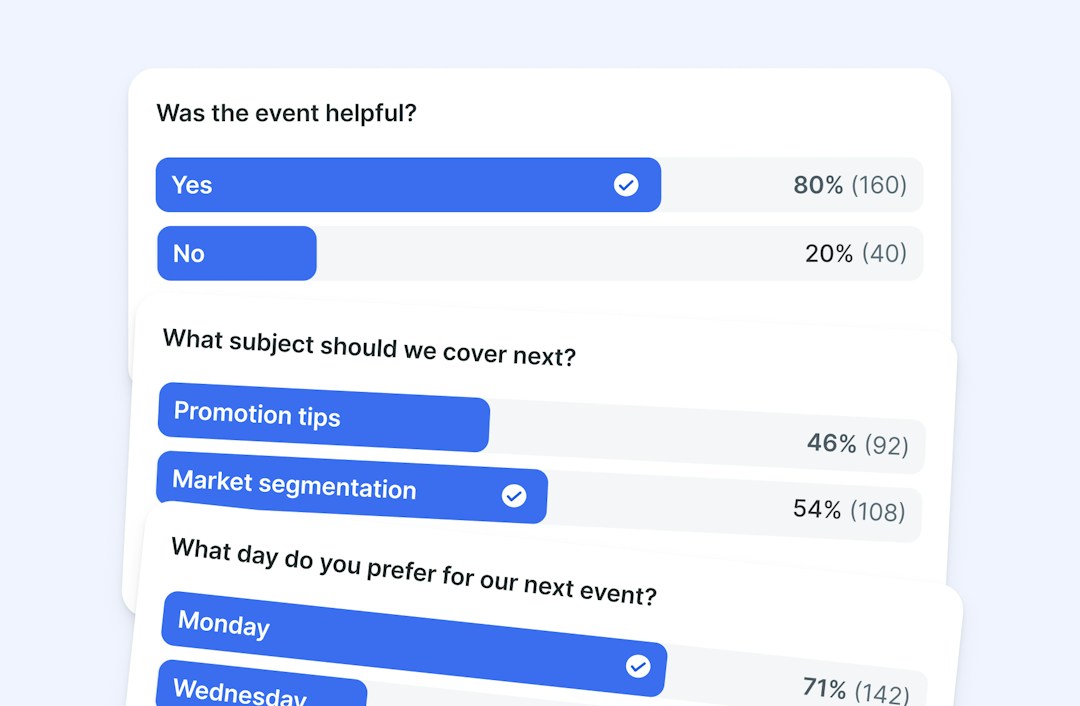
Polls, chat tabs, Q&A, emoji reactions, and virtual backgrounds help to activate attendees
Automated recordings take the guesswork out of following up with registrants
Native integrations with HubSpot and other CRM tools to simplify follow-ups
Ready to see how Livestorm can transform your webinar program? Sign up for Livestorm and create your first event in less than three minutes.
Frequently asked questions
How long should a webinar be?
Do I need to download software to join or host a webinar?
It depends on the platform. Some require a desktop app, while browser-based platforms like Livestorm let you join and host directly from your web browser with no downloads or plugins.
Can a webinar be pre-recorded?
Yes, you can pre-record a webinar. Platforms like Livestorm support on-demand and automated webinars that use pre-recorded content. Automated webinars run on a set schedule and can include live chat, while on-demand webinars are available for viewers to watch anytime after registering.
How many people can attend a webinar?
Most webinar platforms support anywhere from 20 to several thousand concurrent attendees, depending on the plan. Enterprise webinar plans typically offer the highest capacity.
What equipment do I need to host a webinar?
At minimum, you need a computer with a stable internet connection, a microphone, and a webcam to host a webinar. For better production quality, consider an external USB microphone and a ring light or desk lamp for even lighting. Test your audio and video before every session.


Ebooks
Webinar Promotion Handbook
Everything you need to promote your webinars and increase attendance.

About the author
Brillixa Herdhiana - Senior Growth Manager
Brillixa joined Livestorm as Growth Manager in 2021. Her experience enables her to contribute to business growth through lead generation from ads and organic channels.
Related categories
Featured resource
Ebooks
Webinar Promotion Handbook
Everything you need to promote your webinars and increase attendance.
Newsletter