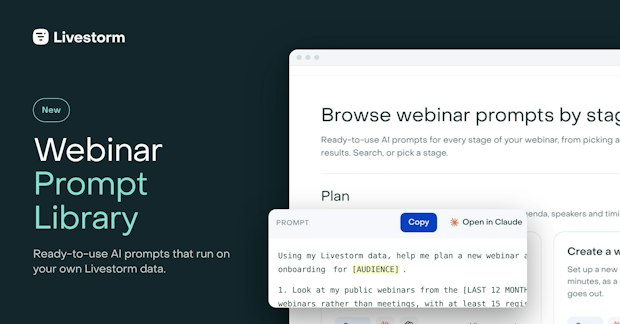
It's a growing collection of ready-to-use AI prompts for webinars run on Livestorm. Each prompt reads your Livestorm data through the Livestorm MCP and answers from your real events, registrants and engagement. The prompts are sorted by stage: plan, promote, animate, repurpose and analyze.
Company updates
Introducing the Webinar Prompt Library
Published on November 12, 2026 • About 2 min. read
Written by Brillixa Herdhiana
The Pipeline Truth: 2026 Webinar Benchmark Report
Table of content
Share this article
Key Takeaways
The Webinar Prompt Library is the next step after the Livestorm MCP.
It packages the use cases our customers, partners and teams shared with us.
Every prompt has the checks a reliable answer needs and was tested on real data.
Connect the Livestorm MCP, pick a prompt for your stage, and ask your webinars.
You've connected your AI assistant. Now what?
You've connected Livestorm to Claude or ChatGPT through the Livestorm MCP. Your assistant can now read your events, your registrants, the questions people asked and how long they stayed.
Then you open a new chat, and you're looking at an empty box.
Ask a broad question, like "which of my webinars did best?", and your assistant answers it broadly. Your internal all-hands counts as a webinar. Your own team counts as attendees. A test event with three registrants and a perfect show-up rate tops the ranking. And the answer arrives in a clean table, with total confidence.
Your webinars hold the answers you need: which topics bring people in, which channels fill the room, who's ready for a sales call. The hard part is asking your AI the right questions, in a way that gets you a useful answer and not a vague one.
"Once everything is connected, the hardest part is knowing what the MCP can do for you. Which use cases? Where do you start? You hit a 'now what?' moment, like staring at a blank page. We built the library for anyone stuck at that stage: ready-to-use prompts that get you going and show you what's possible."
From shared ideas to a library
The Webinar Prompt Library is the natural next step after the Livestorm MCP. Once the MCP was live, customers, partners and our own teams started sharing their use cases with us, along with the prompts that worked for them.
"The Prompt Library is the logical next step after our MCP launch. Our customers, partners and teams kept sharing their use cases and prompt ideas with us. Rather than keep them to ourselves, we chose to package them and share them with everyone. The goal is simple: help more of our customers adopt the MCP, get more out of Livestorm, and bring real intelligence to their webinars through AI."
So we packaged them, and turned each idea into a prompt anyone can run on their own data.
What the Webinar Prompt Library is
The Webinar Prompt Library is a growing collection of ready-to-use AI prompts, built for webinars run on Livestorm. Each prompt reads your own Livestorm data through the Livestorm MCP and gives you an answer built on your real events, not on averages from somewhere else.
The prompts are sorted by the stage of your webinar: plan, promote, animate, repurpose and analyze. You can search them, copy them, or open them straight in Claude or ChatGPT.
How it works
Connect the Livestorm MCP to Claude or ChatGPT. A Livestorm admin or workspace owner does it once, in about two minutes. The setup guide walks through each assistant.
Pick a prompt. Browse by stage or search for what you need. Each prompt has its own page: what it's for, what it needs, and what you'll get back.
Add your context. The words in square brackets are the only part you change, like the name of your webinar or the audience you're writing for.
Run it. Open it in Claude or ChatGPT in one click. Your assistant reads your Livestorm data and answers.
Copy. Paste. Ask your webinars.
Made by experts. Tested. Approved.
Every idea that goes into the library is written out by our webinar experts and tested on real Livestorm data first. The details are already handled: internal meetings and test events are left out, your own team isn't counted as attendees, the numbers behind each conclusion are shown, and when there isn't enough data, the prompt says so instead of guessing.
And nothing happens without you. When a prompt is about to change something, like creating an event or registering a list, it shows you exactly what it will do and waits for your OK. New events are created as drafts, so no registration email goes out until you publish.
Three prompts to start with
Write follow-up emails for attendees and no-shows builds both emails from what people asked during the session.
Write a webinar moderator script gives your moderator the opening lines, the Q&A rules and a plan for when a speaker loses audio.
Score webinar leads for sales follow-up sorts every registrant into a tier and hands sales a CSV for the CRM.
The library keeps growing as we write and test new prompts, so check back often.
Get started
Pick the stage you're at, open a prompt, and ask your webinars.
Haven't connected your AI assistant yet? Start with the Livestorm MCP, then come back to the library. To see what else the MCP can do, read how the Livestorm MCP makes webinar planning easier.
Frequently asked questions
What is the Webinar Prompt Library?
Which AI assistants work with the library?
Claude and ChatGPT. Each prompt opens in either one in a click, and the Livestorm MCP also works with other assistants that support MCP.
Do I need the Livestorm MCP to use the prompts?
Yes. The prompts read your Livestorm data through the MCP, so without it your assistant has nothing to work with. A Livestorm admin or workspace owner connects it once, in about two minutes.


Reports
The Pipeline Truth: 2026 Webinar Benchmark Report
Drive more registrations, boost attendance & multiply content 13x. Based on 7M+ registrations, 33K sessions + 850 go-to-market leader insights.

About the author
Brillixa Herdhiana - Senior Growth Manager
Brillixa joined Livestorm as Growth Manager in 2021. Her experience enables her to contribute to business growth through lead generation from ads and organic channels.
Related categories
Featured resource
Reports
The Pipeline Truth: 2026 Webinar Benchmark Report
Drive more registrations, boost attendance & multiply content 13x. Based on 7M+ registrations, 33K sessions + 850 go-to-market leader insights.
Newsletter