LinkedIn Thought Leader Ads are sponsored posts from an individual's profile rather than a company Page. A company pays to show a person's post, such as an executive's or a speaker's, to a chosen audience, and the ad keeps the author's name, photo, and original wording.
Lead Generation
LinkedIn Thought Leader Ads: a B2B guide with real data
Published on October 26, 2026 • About 4 min. read
Written by Brillixa Herdhiana
The 3-Phase LinkedIn Playbook for B2B Webinars
Table of content
Share this article
Key Takeaways
A Thought Leader Ad is a person's organic post, sponsored by a company and shown to an audience the company chooses.
You can't add a headline, a CTA button, or a URL. Any link has to be in the original post.
Posts with multiple images, polls, or documents can't be promoted as Thought Leader Ads.
Sponsor posts that already performed organically: around 100 likes is Sparkforce's rough floor.
Judge them on views and engagement first: most LinkedIn members never click.
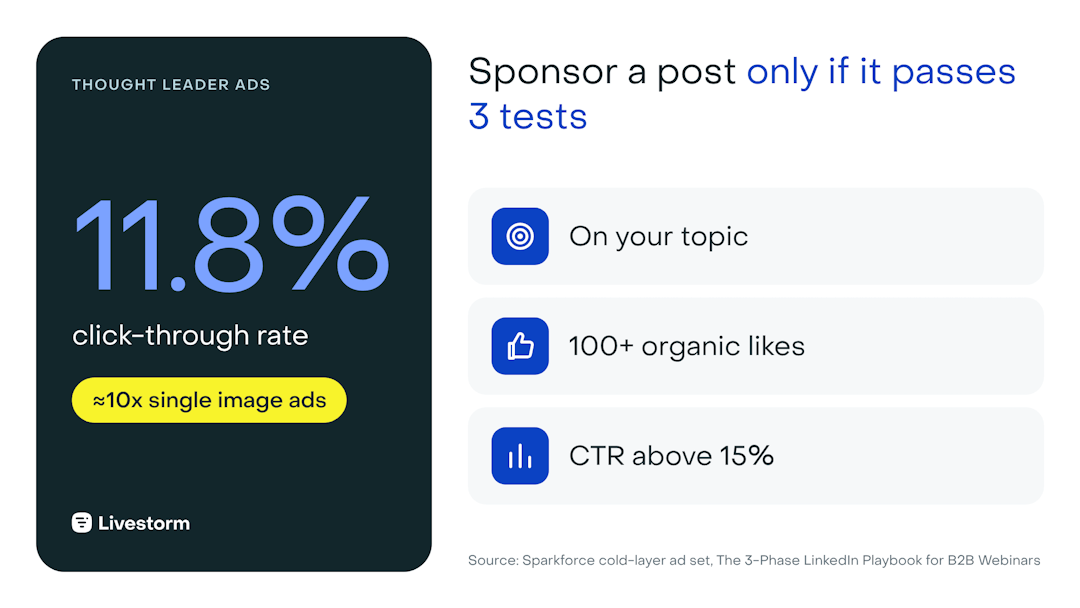
LinkedIn Thought Leader Ads let a company sponsor a post written by a person, such as an employee, an executive, or a partner, so it appears in the feed under that person's name rather than the company logo. Because they read like content rather than ads, they tend to outperform branded formats. In a cold-layer ad set run by Sparkforce, a LinkedIn Ads Certified agency, Thought Leader Ads reached an 11.8% click-through rate, roughly ten times the agency's single image and text ad sets.
This guide covers how Thought Leader Ads work, the rules and specs, how to set one up, which posts deserve budget, and how to use them to fill a B2B webinar.
What are LinkedIn Thought Leader Ads?
A Thought Leader Ad is a sponsored version of a post that a person published on their own profile. The company pays to show it to a target audience, but the ad still displays the author's name, photo, and words, with a small label showing it is promoted.
example of Livestorm Thoughtleader ads
That is the difference from regular Sponsored Content, which runs from your company Page. With a Thought Leader Ad, the creative is the person's post, exactly as they wrote it. It's also why the format fits thought leadership so well: the expertise is attached to a human, not a logo.
Most companies sponsor posts from employees, especially founders, executives, and subject-matter experts. A post from someone outside the company, such as a partner or a webinar speaker, can also be sponsored once its author approves: LinkedIn lists employees, industry experts, customers and content creators as eligible authors.
Why Thought Leader Ads work (and when they don't)
Thought Leader Ads work because they don't look like ads. People scroll past logos, but they stop for a person they recognize or a sharp point of view.
"Thought leader ads get really high engagement, a lot of click-through rates. It's just natural. It feels less like an ad, and that's why it works really well."
They also fit how LinkedIn is actually used. Casper estimates that 99% of LinkedIn members never post or comment: they read and move on. A sponsored post from a credible person still shapes what those readers think, even when it collects few clicks.
The trade-offs are real, though:
You depend on the author. Only they can edit the post, and they can withdraw permission.
There is no CTA button. The registration or download link has to live in the post itself, or in a comment.
Weak posts stay weak. Sponsoring a post that didn't resonate organically rarely fixes it.
Thought Leader Ads specs and rules
The ad specs for Thought Leader Ads are the same as for regular image and video ads, because the creative is the original post. The rules below are what makes the format different.
| Element | Rule |
|---|---|
| Creative | The member's post, as published |
| Headline and intro text | Can't be added. Edits must come from the post's author |
| URL | Can't be added. Links in the original post stay clickable when sponsored |
| Call-to-action button | None |
| Post types you can promote | Single image and video posts |
| Post types you can't promote | Multiple images, polls, and documents |
| Campaign objectives | Brand awareness, engagement, and video views |
| Permission | The author approves the request in LinkedIn, and can revoke it |
Source: LinkedIn Thought Leader Ads specifications.
Because documents can't be promoted this way, turn decks and guides into a LinkedIn Document Ad instead.
How to set up a Thought Leader Ad in Campaign Manager
Once you have the right post, setup takes a few steps in Campaign Manager:
Pick the post. Choose a recent post from your speaker or executive that passes the three tests below.
Create a campaign in Campaign Manager with an eligible objective, usually engagement or video views for a cold audience.
Choose Thought Leader Ad as the format and search for the author's post.
Request permission. The author gets a request in LinkedIn and approves it. Brief them first so it doesn't look like spam.
Set the audience. Aim for people who resemble the post's organic audience but sit outside the author's network.
Rotate 2 to 3 posts. Activate more than one voice and refresh creative across the campaign window.
Which posts should you sponsor? Sparkforce's three tests
Not every post deserves budget. Before promoting one, Sparkforce checks three things:
It talks about the topic. It educates, or names a pain the audience recognizes, on a subject related to what the company does. For a webinar, the speaker's own posts about the session topic are the strongest candidates.
It already performed organically. Around 100 likes is a rough floor, from an audience that looks like the one you'll pay to reach.
The metrics clear the bar. Above 15% CTR, and of those, more than 10% clicking through to the landing page from the in-post link.
If a post fails the first two tests, don't sponsor it. If it fails the third after launch, swap it for the next candidate.
How to use Thought Leader Ads to fill a webinar
Thought Leader Ads are the backbone of the cold layer: the part of a LinkedIn campaign that reaches people who have never heard of you. The goal there isn't the registration. It's to get on people's radar, so they move into retargeting where the registration ask lands.
Time the spend to how people actually register. Across 7 million webinar registrations, 49.7% happened in the final seven days and only 16.4% three or more weeks out.
| When | What to sponsor |
|---|---|
| 3 to 2 weeks out | Speakers' posts that tease one insight or one claim from the session |
| Final week | Your heaviest spend: speaker posts with the registration link, plus a LinkedIn Event |
| After the live | Speaker clips from the recording, retargeted to people who engaged |
Livestorm ran this play for its own LinkedIn webinar with Sparkforce. Posts promoting the session were sponsored as Thought Leader Ads and brought in registrants. The webinar reached about 250 registrations, half of them in the final week.
After the session, cut the recording into short clips, post them from the speaker's profile, and sponsor the best performers. The complete before, during, and after plan is in our guide to running a webinar on LinkedIn.
How to measure Thought Leader Ads
Measure Thought Leader Ads on the job they do. In a cold layer, most people read without clicking, so a low click count doesn't mean the ad failed.
Cold layer: video views, view rate, engagement, and cost per engagement.
Post quality: click-through rate above 15%, and above 10% of clicks reaching the landing page.
Downstream: how many people who engaged later register, attend, or enter pipeline from retargeting.
For the full two-layer model, see our guide to LinkedIn lead generation.
Thought Leader Ads vs other LinkedIn ad formats
| Format | Best for | Watch out for |
|---|---|---|
| Thought Leader Ads | Cold audiences, trust, reach through a person | No CTA button; depends on the author |
| Single image ads | Simple offers, agenda highlights | Static images blend in: a 3 to 5 second GIF lifts performance 2 to 4x in Sparkforce's tests |
| Video ads | Speaker previews and teasers | Keep them short and always subtitled |
| Document Ads | Gated guides, decks, and reports | Can't run as a Thought Leader Ad |
| Event Ads | Promoting a LinkedIn Event | Need a precise audience to justify the cost |
| Message Ads | Personal invites to priority accounts | Test sending from a speaker profile vs the brand |
Are LinkedIn Thought Leader Ads worth it?
For most B2B teams, yes, especially for reaching new audiences. They earn attention that branded ads struggle to get, and in a Sparkforce cold-layer ad set they produced around ten times the click-through rate of single image and text ads.
They're less useful when you have no credible voices posting regularly, or when the goal is a hard conversion that needs a form. In that case, pair them with Lead Gen Forms or a gated Document Ad in the retargeting layer.
Get the full LinkedIn playbook
The 3-Phase LinkedIn Playbook for B2B Webinars, built by Livestorm and Sparkforce, covers every ad format with benchmarks, the Thought Leader Ad tests, and a before, during, and after checklist for your next webinar.
Frequently asked questions
What are LinkedIn Thought Leader Ads?
Are LinkedIn Thought Leader Ads worth it?
For B2B teams reaching new audiences, usually yes. In a Sparkforce cold-layer ad set, Thought Leader Ads reached an 11.8% click-through rate, about ten times the single image and text ad sets. They work best when you have credible people already posting useful content.
How much do LinkedIn Thought Leader Ads cost?
They're bought in Campaign Manager like other sponsored content, so cost depends on your audience, bid, and objective. There's no separate price list.
Can you add a CTA button or link to a Thought Leader Ad?
No. You can't add a headline, a URL, or a CTA button. Any link must be in the author's original post, where it stays clickable once sponsored. Many teams put the registration link in the post or the first comment.
Can you promote a document or multi-image post as a Thought Leader Ad?
No. Posts with multiple images, polls, or documents can't be promoted as Thought Leader Ads. For a deck or guide, use a LinkedIn Document Ad instead.
What makes a good Thought Leader Ad?
A good Thought Leader Ad talks about a topic your buyers care about, already performed organically (around 100 likes is a rough floor), and clears a click-through rate above 15%. Speaker posts about an upcoming webinar topic are strong candidates.


Ebooks
The 3-Phase LinkedIn Playbook for B2B Webinars
Promote, host and repurpose your webinars on LinkedIn: ad formats, timing data and frameworks from Livestorm × SparkForce. Free playbook.

About the author
Brillixa Herdhiana - Senior Growth Manager
Brillixa joined Livestorm as Growth Manager in 2021. Her experience enables her to contribute to business growth through lead generation from ads and organic channels.
Related categories
Featured resource
Ebooks
The 3-Phase LinkedIn Playbook for B2B Webinars
Promote, host and repurpose your webinars on LinkedIn: ad formats, timing data and frameworks from Livestorm × SparkForce. Free playbook.
Newsletter