LinkedIn Events are free event pages you create on LinkedIn, as a person or a company Page, to promote and organize a gathering online or in person. People can find the Event, RSVP, and see who else is attending. For marketers, they work best as a promotion channel that drives sign-ups to a webinar hosted on a dedicated platform.
Webinar
How to create a LinkedIn Event for your webinar
Published on October 26, 2026 • About 5 min. read
Written by Brillixa Herdhiana
The 3-Phase LinkedIn Playbook for B2B Webinars
Table of content
Share this article
Key Takeaways
A LinkedIn Event collects sign-ups, but connect it to your webinar platform so registrants get your reminders and reach your CRM.
An unconnected LinkedIn sign-up never reaches your CRM and triggers none of your reminder emails.
49.7% of webinar registrations happen in the final seven days, so save the biggest push and any ad budget for that week.
LinkedIn Event Ads pay off with a precise audience; for cold audiences, speakers' Thought Leader Ads usually perform better.
The replay is the payoff: post it in the Event feed and clip it to promote your next Event.
To create a LinkedIn Event, select Create an event from your profile or company Page, choose Online, add the title, date, description and speakers, then publish.
LinkedIn Events are free event pages you create on LinkedIn, from a personal profile or a company Page, to promote a gathering online or in person. For a B2B webinar, their real job is promotion: they put the session in front of your network, collect sign-ups, and keep it visible in the feed until you go live. Create the Event, connect it to your webinar registration, promote it in waves with the heaviest push in the final week, then follow up with the replay. This guide walks through each step, plus when LinkedIn Event Ads are worth the spend.
What are LinkedIn Events, and how do they help fill a webinar?
A LinkedIn Event is a free, public event page that a person or a company Page creates to promote a gathering, online or offline. People can find it, register, see which of their connections are attending, and get reminders from LinkedIn as the date approaches. For a marketer, that makes it a promotion layer that sits on top of your webinar, not a replacement for it.
Why lean on it at all? Because your organic network is the one audience you don't pay for twice, and for B2B that network mostly lives on LinkedIn. In Livestorm's 2026 Webinar Benchmark Report, 43.3% of go-to-market teams name organic social as a top-3 channel for webinar registrations, second only to email at 86.3%. Keep it in proportion: email still does the heavy lifting on sign-ups, and LinkedIn is the channel that widens reach.
LinkedIn Events vs LinkedIn Live: which one do you need?
People use the two names interchangeably, and they are not the same thing. A LinkedIn Event is the page people register for. LinkedIn Live is a video broadcast. One is the invitation, the other is the stream, and you can use them together.
| LinkedIn Events | LinkedIn Live | |
|---|---|---|
| What it is | A public event page for RSVPs and promotion | A live video broadcast to your feed |
| Main job | Gather interest and drive sign-ups | Stream the session itself |
| Registration | LinkedIn sign-ups, plus an optional registration form on Page-hosted Events | Through its LinkedIn Event |
| Best for | Promoting a webinar you host elsewhere | A quick broadcast to your existing following |
For a hosted B2B webinar, the pattern that works is simple: promote with an Event and run the session on your webinar platform. If you also want the stream in the feed, you can restream your webinar to LinkedIn Live. For the full decision between native LinkedIn and a webinar platform, see how to run a webinar on LinkedIn.
How to create a LinkedIn Event, step by step
Creating the Event takes a few minutes. The choices you make here decide how far it travels.
Pick the host. A personal profile usually earns more organic reach, while a company Page keeps the event on the brand. Choose based on which audience you want to pull from. To use LinkedIn's registration form and Livestorm's registration integration, host it from your company Page.
Choose the format. Select Online as the event type. Point to an external event link if you host the webinar elsewhere, or choose LinkedIn Live if you will stream into the feed.
Write a benefit-led title and description. Lead with what attendees will walk away with, in sentence case, and put your registration link in the description.
Design the cover around your speakers. Faces and names, not a logo and a date. The people presenting are the reason anyone attends.
Add your speakers' profiles. Tagging them puts the event on their networks' radar, not just yours.
If you choose LinkedIn Live as the format, double-check the title, image, date, and time before you publish: they can't be edited once the stream is scheduled.
Connect the LinkedIn Event to your webinar registration
This is the step most guides skip, and it decides whether the Event builds pipeline. A LinkedIn registration and a filled seat are not the same thing. Unless you connect the two, the sign-up stays inside LinkedIn: it doesn't reach your CRM, and it doesn't trigger the reminder emails that get people to show up.
You have two ways to route it. The simplest is to point the Event's link at a dedicated webinar registration page, capture the email there, and let your platform send the confirmation and reminders. The cleaner way is Livestorm's LinkedIn Event registration integration, set up through Zapier: when your Event is hosted by your company Page and uses LinkedIn's registration form, each sign-up is registered to your Livestorm session automatically, with no second URL to maintain.
Either way, the sign-up inherits your session's reminder sequence. That matters, because 49.7% of registrations arrive in the final seven days and 15.3% on the day itself. Sync those registrants into your CRM through an integration like HubSpot so sales sees them without a CSV. Our guide to LinkedIn lead generation shows how this fits a wider LinkedIn pipeline.
How to promote your webinar with a LinkedIn Event
Promote in three waves, not one burst.
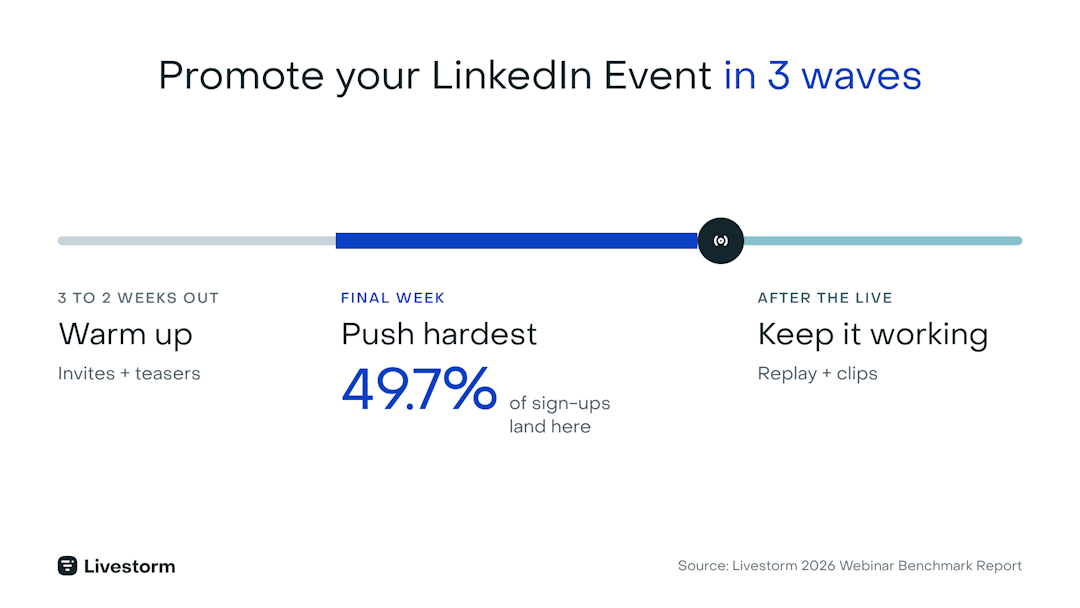
Before: invite relevant connections, post from the Event feed, and tease one slide or one claim from the session rather than just announcing the date. Ask speakers and colleagues to share it to their own networks.
Final week: concentrate your reminders and any paid budget here. Only 16.4% of registrants sign up three or more weeks out, while almost half sign up in the last seven days. The full timing playbook is in our guide on how to run a webinar on LinkedIn.
After: keep posting in the Event feed. It's still a channel, and it's where registrants look for the replay.
Timing helps too. In our analysis of 33,000+ sessions, Tuesday had the highest show-up rate at 51.7% and January was the strongest month at 50.4%. More in our guide to the best time to host a webinar.
Personal reach compounds the Event. Here is how Custify runs it:
"Our Custify LinkedIn page is the primary hub where we share webinar announcements, highlight clips, and takeaways. Team members then amplify those posts through their own networks to extend reach. In addition, I use direct message outreach to personally invite relevant prospects to upcoming webinars."
When are LinkedIn Event Ads worth it?
LinkedIn Event Ads promote your LinkedIn Event in the feed, with the event details and a call to register. According to Livestorm and Sparkforce's LinkedIn playbook, it is LinkedIn's purpose-built format for events, and it covers the whole before, during, and after cycle without extra setup.
They are worth the spend in three situations:
The audience is precise. LinkedIn clicks are not cheap, so target job titles and accounts you actually sell to rather than a broad interest audience.
You are in the final week. Put the budget where half of your registrations happen, not 30 days out.
The organic posts are already working. Retarget the people who engaged with your Event posts first.
For colder audiences, a speaker's own post sponsored as a Thought Leader Ad usually beats a branded ad. In a Sparkforce cold-layer ad set, Thought Leader Ads reached an 11.8% click-through rate, roughly ten times the single image and text ad sets.
Drive attendance and follow up after the event
Getting the registration is barely the starting line. The average webinar show-up rate is 47.7%, so 175 registrants become roughly 83 live attendees, and converting registrants into attendees is marketers' number-one webinar challenge at 54.2%.
Lift the show rate by treating LinkedIn's reminders and your emails as one sequence: LinkedIn reminds Event registrants before the session (and, for a LinkedIn Live event, notifies them when you go live), and your email puts the session in their calendar. More tactics are in our guide to boosting webinar attendance.
Then follow up as seriously as you promoted. Send a recap with the right follow-up email, post the replay in the Event feed, and turn the recording into social clips to promote your next Event.
Common LinkedIn Events mistakes to avoid
Most LinkedIn Event failures come down to a handful of avoidable habits:
Leaving LinkedIn sign-ups unconnected. If they never reach your webinar platform, they get no reminders and no join link.
Promoting once, then going quiet. One post is not a campaign. Keep a cadence, and save the biggest push for the final week.
Closing registration early. About 15% of registrants sign up on the day itself.
Skipping the follow-up. The replay and recap are where no-shows convert.
Leaning on LinkedIn alone. It complements email, which 86.3% of teams still name as a top registration channel.
How Livestorm complements LinkedIn Events
LinkedIn Events get people interested. Livestorm, the webinar platform with AI Studio, handles the rest of the loop: the registration page your Event links to, the automated reminders, the live session with chat and polls, and an on-demand replay. Public replays get 3.7x as many on-demand views as gated ones, so an open replay keeps working long after the Event ends.
This guide covers the Event itself. The full play, with the LinkedIn ad frameworks, the go-live checklist, and Sparkforce's campaign data, is in our free 3-Phase LinkedIn Playbook for B2B Webinars. To run the registration, reminders, and replay behind your next LinkedIn Event, start a free trial.
Frequently asked questions
What are LinkedIn Events?
Where do I find LinkedIn Events?
You can find LinkedIn Events from the Events section on your LinkedIn homepage, usually in the left-hand panel, and on company Pages that have published one. Events you have been invited to or have RSVP'd to also appear there. The exact placement shifts as LinkedIn updates its interface.
How do I attend a LinkedIn event?
Open the Event page and select Attend or Register. If the session is hosted on a webinar platform, follow the registration link on the Event to sign up and receive the join details and reminders by email.
Are LinkedIn Events worth it?
Yes, as a promotion layer. They give you free reach into a professional audience and make your webinar discoverable, which complements email rather than replacing it. A basic RSVP stays inside LinkedIn, and Page-hosted Events can add LinkedIn's registration form. Either way, connect the sign-ups to your webinar platform or CRM so people get your reminders and join link.
What is the difference between LinkedIn Events and LinkedIn Live?
A LinkedIn Event is the page people RSVP to. LinkedIn Live is a live video broadcast. They are separate tools that can work together: you can promote with an Event and broadcast with Live. For a B2B webinar, most teams use an Event to gather interest, run the session on a webinar platform, and optionally restream the video to LinkedIn.
How do I create an event on LinkedIn?
From your homepage or company Page, open the Events section and choose to create an event, then add the name, date and time, format, description, and cover image. Add your webinar registration link so RSVPs flow into your platform, and choose whether your profile or your Page hosts it (host from your Page if you want LinkedIn's registration form). Publish, then start inviting connections.
How do I promote an event on LinkedIn?
Promote in three waves: invite relevant connections and post from the Event feed early, concentrate reminders and any ad budget in the final week (when 49.7% of registrations arrive), and keep posting the replay afterward. Ask speakers and colleagues to share, and sponsor the best speaker posts as Thought Leader Ads.
What are LinkedIn Event Ads?
LinkedIn Event Ads are a sponsored format that promotes a LinkedIn Event in the feed, with the event details and a call to register. They work best with a precise audience and in the final week before the session. For audiences who don't know you yet, speakers' posts sponsored as Thought Leader Ads usually perform better.


Ebooks
The 3-Phase LinkedIn Playbook for B2B Webinars
Promote, host and repurpose your webinars on LinkedIn: ad formats, timing data and frameworks from Livestorm × SparkForce. Free playbook.

About the author
Brillixa Herdhiana - Senior Growth Manager
Brillixa joined Livestorm as Growth Manager in 2021. Her experience enables her to contribute to business growth through lead generation from ads and organic channels.
Related categories
Featured resource
Ebooks
The 3-Phase LinkedIn Playbook for B2B Webinars
Promote, host and repurpose your webinars on LinkedIn: ad formats, timing data and frameworks from Livestorm × SparkForce. Free playbook.
Newsletter