You host a webinar on LinkedIn through LinkedIn Events or LinkedIn Live. An Event creates a sign-up page; LinkedIn Live broadcasts video but needs a connected third-party streaming tool. For registration, polls, and analytics, run the session on a dedicated webinar platform and restream it to LinkedIn, so you keep the audience and the data.
Webinar
How to run a webinar on LinkedIn: a B2B playbook
Published on October 26, 2026 • About 8 min. read
Written by Brillixa Herdhiana
The 3-Phase LinkedIn Playbook for B2B Webinars
Table of content
Share this article
Key Takeaways
You can run a webinar on LinkedIn through Events or Live, but LinkedIn Live needs a third-party streaming tool.
43.3% of go-to-market teams name organic social as a top-3 registration channel, second only to email. For B2B, that mostly means LinkedIn.
Thought Leader Ads are the strongest promotion format: 11.8% click-through rate in a Sparkforce cold-layer ad set.
49.7% of registrations land in the final week, so keep promoting until D-day.
Judge top-of-funnel LinkedIn activity on views and engagement, not clicks.
The recording is your next campaign: the average webinar show-up rate is 47.7%.
You want your webinar in front of LinkedIn's audience, and you are not sure whether LinkedIn can host it or only help you promote it. Short answer: yes, you can run a webinar on LinkedIn, with one important catch. LinkedIn is a broadcast and promotion layer, not a full webinar platform.
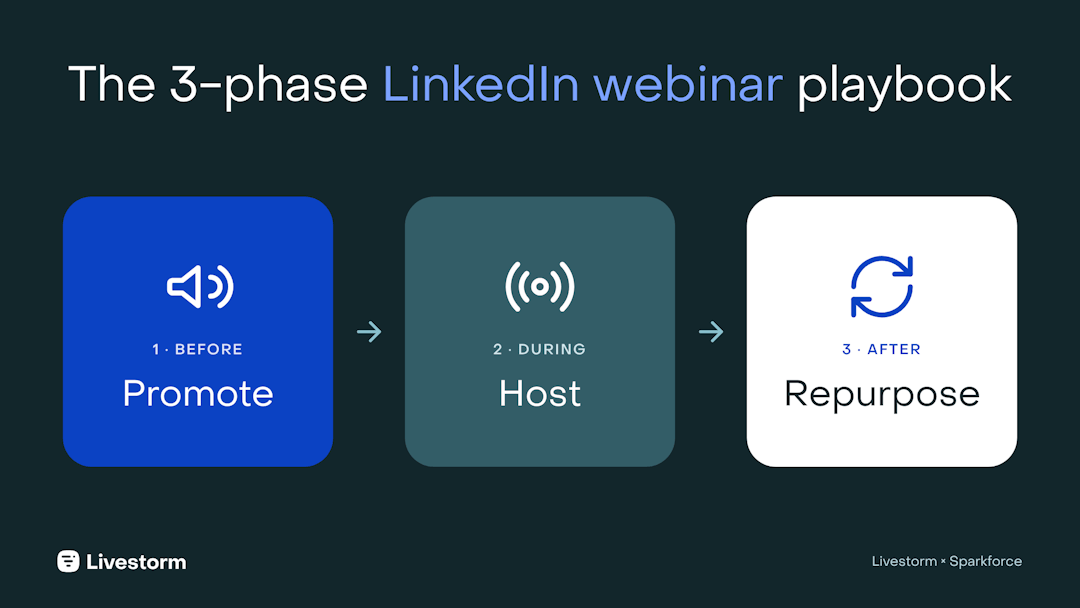
That catch shapes everything else. Most B2B teams run the session on a dedicated webinar platform, then use LinkedIn before, during, and after the live: to fill the room, to restream the session to a second audience, and to keep the recording working for months. This playbook walks through all three phases, with data from 7 million webinar registrations and campaign results from Sparkforce, a LinkedIn Ads Certified agency.
Can you actually run a webinar on LinkedIn?
Yes. You can run a webinar on LinkedIn using LinkedIn Events, LinkedIn Live, or both. What LinkedIn gives you is reach into a professional audience. What it does not give you is the plumbing: registration pages, gating, polls, structured Q&A, and analytics are limited or absent.
The reach is real, though. When Livestorm surveyed 853 go-to-market professionals for its Webinar Benchmark Report, 43.3% named organic social as a top-3 channel for driving registrations and 20.4% named paid social, ahead of sales outreach and paid search. For B2B, both overwhelmingly mean LinkedIn.
"In the demand gen framework we build for B2B SaaS, LinkedIn is where attention starts and webinars are where it turns into intent. One gets the right people to care, the other gives them a reason to raise their hand."
LinkedIn Live vs LinkedIn Events vs a webinar platform
Three options get blurred together. A LinkedIn Event creates a sign-up page inside LinkedIn. LinkedIn Live broadcasts video but needs an external streaming tool. A dedicated webinar platform gives you registration, polls, chat, and analytics, then restreams to LinkedIn so you keep both the data and the reach.
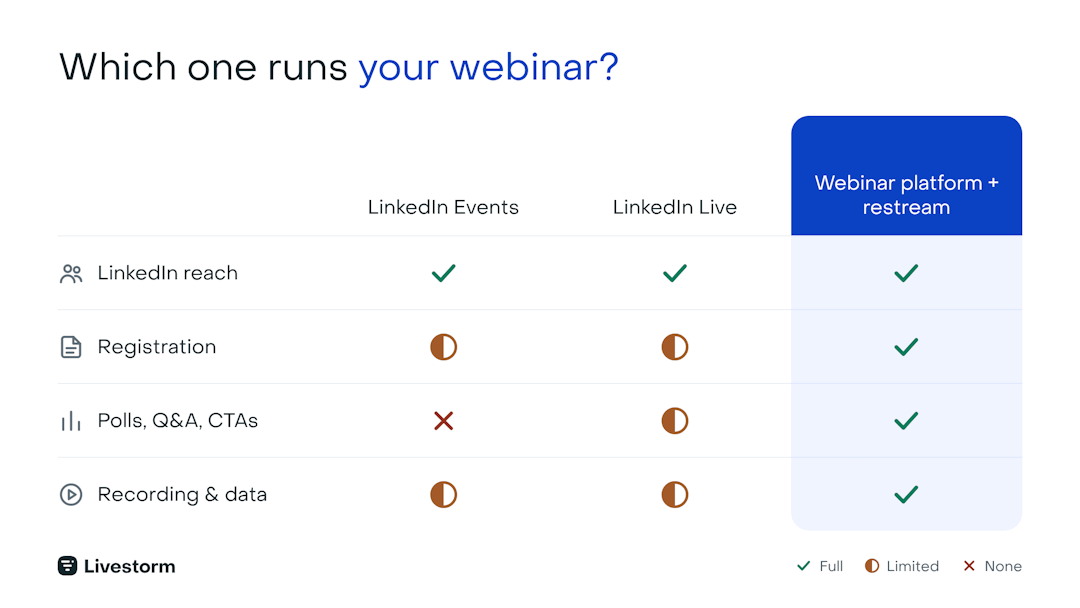
| Native reach | Registration + gating | Engagement + polls | Recording + analytics | |
|---|---|---|---|---|
| LinkedIn Events | Yes | RSVP only | Minimal | Limited |
| LinkedIn Live | Yes | Through its LinkedIn Event | Comments only | Limited |
| Webinar platform + restream | Yes, via LinkedIn | Full | Full | Full |
The rule of thumb: pick native LinkedIn for a quick broadcast to an audience you already have, and a webinar platform when the webinar has to convert.
How to set up a webinar on LinkedIn, step by step
1. Create your LinkedIn Event and connect it to registration
Create the Event from your company Page, choose Online as the event type, and tag your speakers so it reaches their networks too. Then connect its registrations to your webinar platform, so every LinkedIn sign-up gets your confirmation and reminder emails. Livestorm does this through a Zapier integration when the Event is hosted by your Page and uses LinkedIn's registration form.
The full walkthrough, from the cover image to registration routing, is in our guide on how to create a LinkedIn Event.
2. Set up LinkedIn Live, or restream from your webinar platform
LinkedIn's own getting-started guide lists five steps: choose a streaming tool, connect it, create the event, set up the livestream, and go live. The step people miss is the first one. LinkedIn Live does not stream on its own.
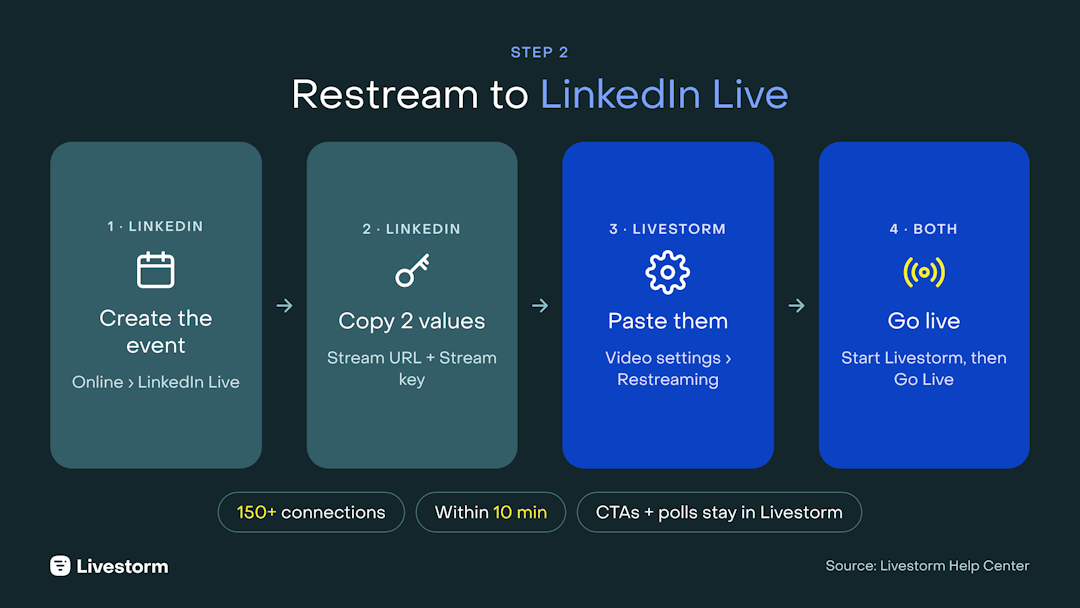
Your webinar platform can be that tool. Livestorm's restreaming to LinkedIn Live broadcasts your session to LinkedIn at the same time you run it in Livestorm, so registered attendees and LinkedIn followers watch one stream. According to Livestorm, LinkedIn is the number one restreaming destination among its customers.
Two rules matter most: the profile or Page going live needs at least 150 connections or followers, and your Livestorm session must start within 10 minutes of going live on LinkedIn. Slides, screen shares and multiple speakers restream cleanly, but CTAs and polls stay in the Livestorm room, so aim them at your registered audience.
The full walkthrough, from the LinkedIn preview room to the stream key, is in our guide to restreaming your webinar to LinkedIn Live.
How to promote a webinar on LinkedIn: warm up the cold layer
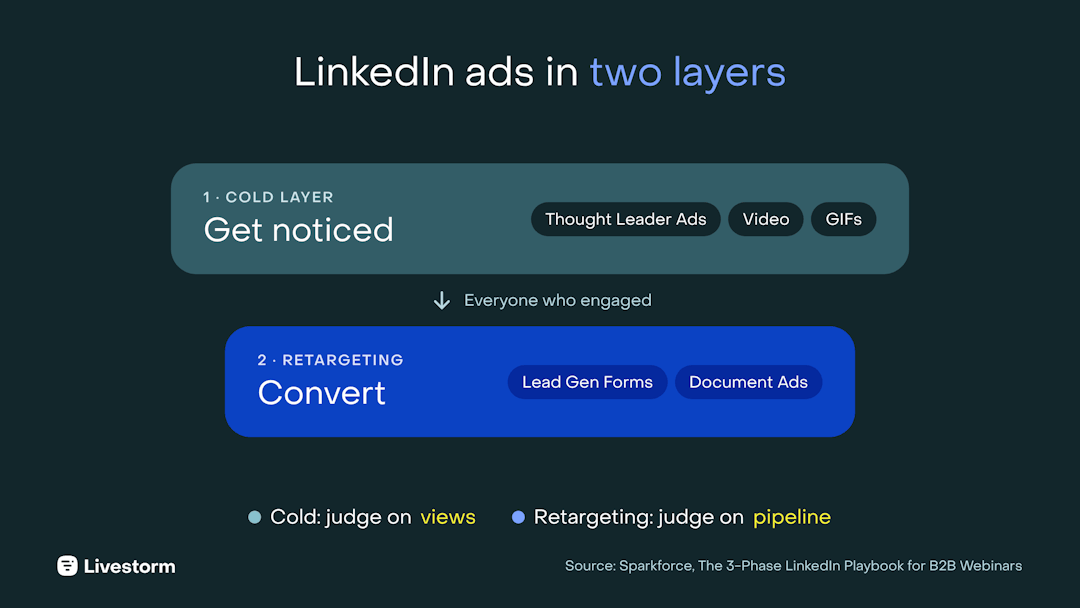
Before anyone registers, they have to care about the topic. Sparkforce calls this the cold layer: people who have never heard of you. Its job is not to convert them on the spot. It is to get on their radar, so they move into retargeting where the registration ask actually lands.
Sparkforce's two-layer structure (cold, then retargeting) is explained in more depth in our guide to LinkedIn lead generation.
That changes what the content should be about. Cold audiences do not care how your product works. They care about a pain they recognize ("Your Q3 pipeline missed? Here's how to fix Q4") or a result they want. Lead with pains, gains, and results, not with your company.
Drive organic discovery first
Casper has seen organic reach drop since LinkedIn's algorithm changed in early 2026, so make every post count before you pay to amplify it:
Tease the content, not the event. Post one slide, one chart, or one claim you plan to defend. A fragment of the real material beats an announcement that material exists.
Post from your Page and tag speakers and their companies so the post surfaces in their networks.
Notify your employees. A handful of team shares routinely out-reach the original post.
Bring in an outside voice. A respected creator, analyst, or partner extends reach into a network you do not own. Only 1.5% of teams name influencer promotion as a top-3 registration channel, which makes it either a bad bet or an open lane.
Custify runs exactly this play: its company Page is the hub for announcements and clips, the team amplifies each post, and personal DMs invite relevant prospects. More organic tactics are in our social media event promotion guide.
Then layer paid: the ad formats that work for webinars
Most webinar ads are a title and a headshot. That is your chance to stand out.
Thought Leader Ads sponsor a speaker's own post, so the ad appears under a person's name rather than a logo. It is the format that feels least like an ad, which is why it performs best: a Sparkforce cold-layer ad set saw an 11.8% click-through rate, roughly ten times the single image and text ad sets. Activate more than one voice and rotate 2 to 3 posts across the pre-webinar window.
Not every post deserves budget. Sparkforce sponsors a post only when it covers the webinar topic, has already performed organically, and clears a click-through bar once it runs. The exact thresholds are in our Thought Leader Ads guide.
The other formats each have a job:
| Format | Best use for a webinar | Tip |
|---|---|---|
| Video Ads | Preview an insight or speaker clip | Keep them 7 to 15 seconds, lead with a direct call to action, always add subtitles |
| Single image and Carousel Ads | Walk through agenda, outcomes, or speaker bios | Turn the image into a 3 to 5 second GIF: Sparkforce sees 2 to 4x performance from that motion alone |
| Message Ads | Personal invites to your highest-priority accounts | Test sending from a speaker's profile against the brand page |
| Event Ads | LinkedIn's purpose-built webinar format | Covers before, during, and after automatically |
Video does not need a studio. Sparkforce's own teasers are five-minute phone shoots: a strong hook in the first three seconds, a light touch of humor, real expertise on screen, and subtitles every time, because most people watch with the sound off.
Want the full ad framework, the cold and retargeting layer templates, and the go-live checklist? Get the 3-Phase LinkedIn Playbook for B2B Webinars.
When to promote: the 7-day rule
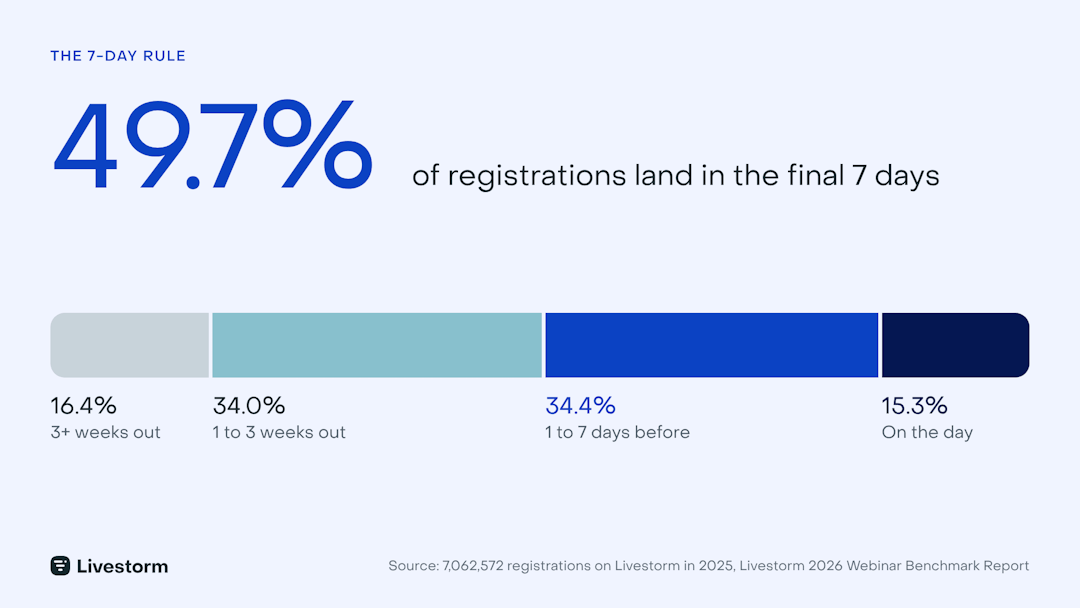
If your plan is six weeks of steady promotion, the data says rebalance it. Across 7,062,572 registrations on Livestorm in 2025, 49.7% happened in the final week. Only 16.4% registered three or more weeks out, and 15.3% registered on the day itself.
"I used to think before that we needed two months to promote a webinar. But the reality is that [half] of your registrants will register in the last week of your promotion."
Our launch webinar for this playbook proved the point: about 250 people registered, and half of them did so in the final week. Casper changed his own approach after seeing the data: "Maybe you just need two weeks, to be honest."
Three practical moves follow from it:
Front-load ad budget into the last 7 days, not 30 days out.
Never close registration early. About 15% of registrants sign up on the day itself.
Run LinkedIn and email as one reminder sequence. LinkedIn reminds Event registrants in the feed and, for a LinkedIn Live event, notifies them the moment you go live. Your email sequence puts the session in their calendar with a join link that works outside the LinkedIn app. More tactics in our guide to boosting webinar attendance.
Best day to promote a webinar
Within that final week, the day you push matters too. Livestorm's webinar statistics point to Tuesday and Wednesday as the best days to send webinar invitations, with Thursday as a fallback. Avoid weekends. Line up your invitation emails and your biggest LinkedIn push on those days, then keep reminders running until the live starts.
The day you host matters as much as the day you promote. We broke down 33,000+ sessions to find the best day, time and month to go live: watch the video below, or read our guide to the best time to host a webinar.
How to keep your LinkedIn webinar engaging
Native LinkedIn Live engagement runs almost entirely through the comment stream. That works if you plan for it: assign a moderator to surface questions, because there is no built-in polling or structured Q&A to lean on. If you need those, run the session on a platform and restream.
Keep the format tight and lively. Average watch time is 26 minutes, about 38% of the session, per Livestorm's benchmark, so deliver the core value in the first half hour instead of padding to sixty. Interviews, podcast-style conversations, live demos, and giveaways all help. Ask attendees for questions throughout: they become your follow-up email, your FAQ, and your next round of LinkedIn posts.
Measure LinkedIn webinar promotion the zero-click way
Most teams still judge a webinar by its sign-ups. Sign-ups matter, but they do not tell the full story.
As Casper puts it, 100 registrants who show up and engage beat 200 who don't (more on that in our webinar marketing strategy guide).
On LinkedIn, clicks are an even weaker signal. Casper calls it the zero-click mindset: buyers consume your video, image, or Thought Leader Ad in the feed and never click, and that does not mean it failed. His rule of thumb is that about 99% of LinkedIn members never post or comment. They lurk, and they are still the people you want to buy.
So measure each layer on what it is for:
| Layer | Judge it on |
|---|---|
| Cold layer (top of funnel) | Video views, view rate, cost per engagement, impression share |
| Retargeting layer | Clicks, registrations, conversions, pipeline |
| The webinar itself | Live attendance and engagement, not just registrations |
Turn one LinkedIn webinar into weeks of content
The average webinar show-up rate is 47.7%, so more than half of the people who raised their hand for your topic missed it live. That is not a loss. It is your next promotion.
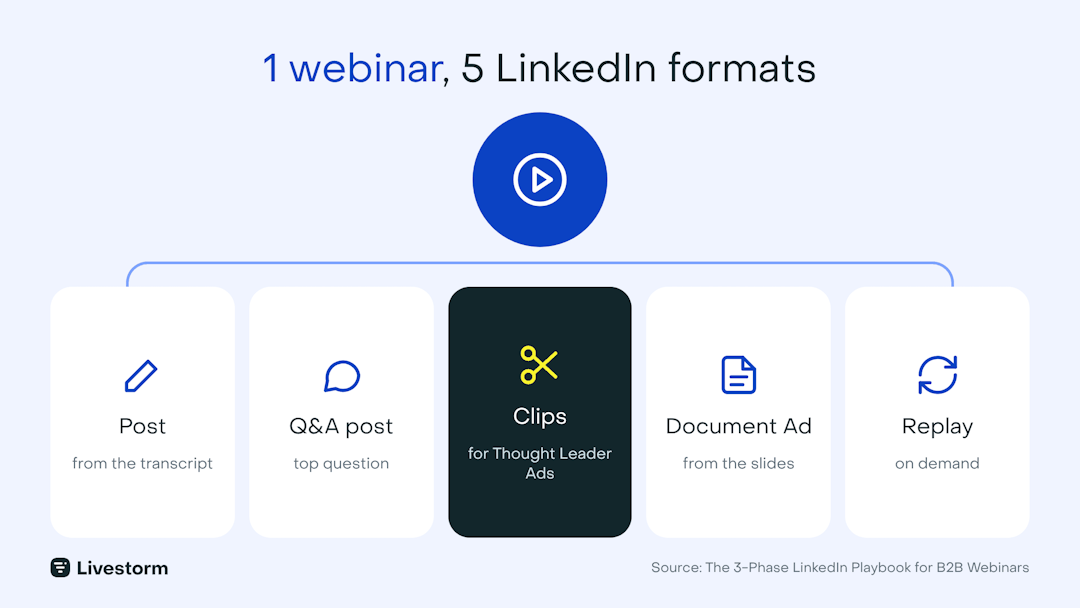
One recording feeds every format your audience already scrolls through:
| From the webinar | Becomes on LinkedIn |
|---|---|
| Transcript | A post covering the session's core argument, and a blog article |
| Audience Q&A | A short post built around the most-asked question |
| Speaker moments | Clips for Thought Leader and Video Ads |
| Slides and key data points | A Document Ad members can swipe through |
| Full recording | An on-demand replay or lead magnet |
Automate the grunt work and keep people for judgment. At Sparkforce, an internal AI agent turns each finished webinar into a blog post, newsletter, social posts, and ad snippets, and humans spend only 10 to 20% of the effort checking the cuts. Livestorm's AI Studio does the clipping natively: it reads engagement spikes, topic shifts, and speaker handoffs, then cuts auto-titled, captioned clips ready to publish.
The clip workflow itself (finding moments in the transcript, cutting, captioning, scheduling) is covered in our guide to repurposing webinars into social clips.
Keep engaged people in a retargeting layer
Everyone who engaged with your cold-layer content moves into retargeting, and this is where pipeline gets built. LinkedIn Campaign Manager turns each interaction into a segment, and each deserves a different message:
Attendees: a recap, a key takeaway, or a next-step offer.
Registrants who did not show: the replay or a highlight clip. They are among the warmest audiences in B2B.
Video and LinkedIn Live viewers: deeper related content via Video or Document Ads. For video ads, LinkedIn can segment viewers by watch depth, from 3 seconds to 97% completion.
Turn your deck into a Document Ad gated by a LinkedIn Lead Gen Form, and route the form to your on-demand session with Livestorm's Lead Gen Forms integration (Business and Enterprise plans), so every download is also registered for the replay. Then keep it running: Sparkforce typically uses a strong webinar for at least three months after the live. With an audience over roughly 40,000 people, add a separate mid-funnel layer; below that, a top and bottom layer is enough.
The playbook includes the full retargeting framework and the Lead Gen Form setup, step by step. Download it free.
Native LinkedIn vs a webinar platform: honest pros and cons
Use native LinkedIn Live when you want a fast, low-friction broadcast to an existing following and you do not need registration or lead data. It is genuinely good for thought-leadership moments where reach matters more than capture.
Use a dedicated webinar platform and restream to LinkedIn when the webinar has to convert. You get sign-up pages, polls, analytics, and a reusable recording, plus LinkedIn's audience. Livestorm is the webinar platform with AI Studio that runs the session, restreams it to LinkedIn, and repurposes it afterward.
Get the full 3-phase LinkedIn playbook
This article is the short version. The 3-Phase LinkedIn Playbook for B2B Webinars, built by Livestorm and Sparkforce, gives you the cold and retargeting layer frameworks, every ad format with benchmarks, the Thought Leader Ad tests, and a before, during, and after checklist.
Ready to run your next LinkedIn webinar with real registration, engagement, and a reusable recording? Start a free trial. For definition-level basics, see what a LinkedIn webinar is.
Frequently asked questions
How do you host a webinar on LinkedIn?
How far in advance should you promote a webinar on LinkedIn?
Two to four weeks is enough for most B2B webinars. Across more than 7 million registrations, 49.7% happened in the final week and only 16.4% three or more weeks out. Start warming up the topic early, but concentrate ad budget and reminders in the last seven days, and keep registration open until the session starts.
Should you run a webinar natively on LinkedIn or on a webinar platform?
Use LinkedIn natively when reach matters more than data: a LinkedIn Event with LinkedIn Live puts the session in the feed, but you get limited attendee data and fewer ways to interact. Use a webinar platform when you need registrations in your CRM, polls, CTAs and analytics. Most B2B teams combine both: they promote with a LinkedIn Event, run the session on their webinar platform, and restream it to LinkedIn Live.
Do you need a certain number of followers to host a LinkedIn webinar?
A LinkedIn Event page has no follower minimum. LinkedIn requires at least 150 connections or followers to go live, including when you restream from Livestorm, and it has other eligibility requirements that change over time, so check LinkedIn's current criteria before you plan a broadcast.
How do you measure LinkedIn webinar promotion?
Measure each layer on its job. For cold, top-of-funnel content, track video views, view rate, and cost per engagement, because most LinkedIn members watch without clicking. For retargeting, track clicks, registrations, and pipeline. For the webinar itself, track live attendance and engagement rather than registrations alone.
Is a LinkedIn webinar recording saved automatically?
A LinkedIn Live broadcast is typically available on your feed afterward, but native recording, editing, and repurposing options are limited. For a reusable recording with a transcript and clips, run the webinar on a platform that records automatically. Livestorm's AI Studio turns the recording into captioned clips you can publish right away.
Can you charge for a webinar on LinkedIn?
Not natively. LinkedIn Events and LinkedIn Live have no built-in paywall or ticketing. To charge, run the webinar on a platform that supports gated registration or payment, then use LinkedIn to promote it.


Ebooks
The 3-Phase LinkedIn Playbook for B2B Webinars
Promote, host and repurpose your webinars on LinkedIn: ad formats, timing data and frameworks from Livestorm × SparkForce. Free playbook.

About the author
Brillixa Herdhiana - Senior Growth Manager
Brillixa joined Livestorm as Growth Manager in 2021. Her experience enables her to contribute to business growth through lead generation from ads and organic channels.
Related categories
Featured resource
Ebooks
The 3-Phase LinkedIn Playbook for B2B Webinars
Promote, host and repurpose your webinars on LinkedIn: ad formats, timing data and frameworks from Livestorm × SparkForce. Free playbook.
Newsletter