
No, Salesforce is a CRM platform, not a webinar tool. To run webinars and sync the data back to your CRM, you need a separate webinar tool with a Salesforce integration.
Webinar
8 Best Webinar Platforms with Salesforce Integration (2026)
Published on October 1, 2026 • About 9 min. read
Written by Brillixa Herdhiana
Webinar Promotion Handbook
Table of content
Share this article
Key Takeaways
Significant differences exist among Salesforce webinar integrations in terms of data depth, setup complexity, and pricing models.
Native Salesforce integrations have direct, fast syncing and reduced dependencies, while middleware solutions often add ongoing costs and latency.
Most Salesforce webinar integrations are restricted to premium subscription tiers; additional costs or add-ons are common for full functionality.
According to Livestorm's 2026 Webinar Benchmark Report, only 6–8% of customers leverage native CRM integrations, with manual tracking still prevalent.
A Salesforce webinar integration is table stakes for enterprise webinar software. But the depth and quality of the most popular connections vary wildly.
Some sync registration data but ignore engagement signals. Others require middleware, adding cost and complexity. And many lock the integration behind the most expensive subscription tier.
To help you find the right option for your tech stack, I'll walk you through the best Salesforce webinar integrations on the market. We'll compare what data they sync, how the integration works, and how much it costs.
For a broader comparison beyond Salesforce integrations, see the best webinar platforms by use case.
Webinar platforms with Salesforce integration: comparison table
Here's how the 8 platforms in this guide compare on the five questions that matter most. Each fact comes from the vendor's own documentation, checked in October 2026.
| Platform | Native or Zapier | Campaign creation | Engagement data | Two-way registration | Plan required |
|---|---|---|---|---|---|
| Livestorm | Native (no managed package) | Automatic, one Campaign per session | Yes: attendance, replay views, questions, polls, chat | Yes: 2-way mode, works with Salesforce Flows | Enterprise plan + paid add-on |
| Webex Webinars | Native (managed package) | Manual import into a new or existing Campaign | No: attended or no-show status only | Not documented | Webex Webinars plan + Salesforce Enterprise Edition |
| Cvent | Native (managed package) | Link events to existing Campaigns | Yes: check-ins, questions, poll responses | Yes, for Cvent events (invite and register from Salesforce) | Cvent Salesforce App, from $2,450/year |
| Vimeo | Native (OAuth) | Link to an existing Campaign | Yes: watch time, polls, Q&A | Not documented | Enterprise plan |
| eWebinar | Native (OAuth) | Select an existing Campaign | Yes: watch time, polls, questions | No (Zapier or API only) | Paid add-on, $212/month billed annually |
| Airmeet | Native | Optional: one Campaign per event, or link an existing one | Yes: time spent, polls, questions, booth activity | Yes: auto-registers Leads or Contacts added to a Campaign | Paid plans (confirm the tier with Airmeet) |
| Zoom Webinars | Native (free managed package) | Optional: one Campaign per webinar | Attendance duration; Zoom also lists polls and Q&A | Yes: up to 10 Leads or Contacts at a time | Zoom Webinars license (Pro account or higher) |
| BigMarker | Native (OAuth) | Optional (needs webinar tags), or map to an existing Campaign | Yes: watch time, on-demand views; chat, Q&A and polls listed | Yes: auto-registers members of active Campaigns | Webcast Professional or higher |
What to look for in a Salesforce webinar integration
Before you begin comparing Salesforce webinar integrations side by side, get clear on which elements to look for. I recommend starting with this list:
Is it a native integration or does it require middleware? Native integrations connect directly to Salesforce. Middleware-based setups connect via Zapier or custom API, adding cost per transaction, introducing sync delays, and creating another dependency to maintain.
Which Salesforce objects does it support? Basic integrations only create or update Salesforce Leads. More capable connectors also write to Salesforce Contacts, Campaigns, Campaign Members, and Opportunities.
Does it sync engagement data or only registration data? Registration data tells you who signed up. Engagement data gives you more context around what they did during the event, including watch time, questions asked, poll responses, and replay views.
Are custom options available? Look for integrations that let you map custom fields, choose which events trigger a sync, and define how to handle duplicates. A rigid integration forces your team to adapt their customer relationship management (CRM) workflow to the webinar tool.
Is there bidirectional sync? One-way integrations push data from the webinar platform into Salesforce. Bidirectional sync also pulls CRM data back into the webinar software, so you can segment audiences and personalize follow-ups without exporting lists manually.
How complex is the setup? Some integrations are self-serve and take under an hour to configure. Others require a Salesforce admin or developer, which can add substantial time and cost to the equation.
What subscription tier does the integration require? Many platforms lock the Salesforce integration behind enterprise or premium tiers. Check whether it's available on your current plan and factor any upgrade cost into total cost of ownership.
What are the best Salesforce webinar integrations?
Here's a quick comparison of the top Salesforce webinar integrations, including the use case each one is best for and the relevant subscription tier:
| Platform | Best for | Subscription tier |
|---|---|---|
| Livestorm | Marketing, sales, and customer support teams running live, automated, or on-demand webinars with deep Salesforce engagement tracking | Enterprise plan + paid add-on |
| Webex | Teams already using the Webex suite for calling, meetings, and messaging who want everything embedded in Salesforce | Webex Webinars plan |
| Cvent | Large organizations running multi-format event programs (in-person, virtual, hybrid) alongside webinars | Cvent Salesforce App license (from $2,450/year) |
| Vimeo | Teams already using Vimeo for video hosting who want to capture leads from webinars and gated videos | Enterprise plan |
| eWebinar | Teams running automated, on-demand webinars for onboarding, demos, or training | Paid plan plus Salesforce add-on |
| Airmeet | Large teams running webinars, virtual conferences, and hybrid events who want two-way Salesforce registration | Paid plans (confirm the tier with Airmeet) |
| Zoom Webinars | Teams already running webinars on Zoom that want a free, Zoom-built Salesforce package with automatic Campaigns | Zoom Webinars license |
| BigMarker | Teams that want members of Salesforce Campaigns registered to webinars automatically | Webcast Professional or higher |
1. Livestorm
Livestorm is a browser-based webinar and virtual event platform designed for marketing, sales, and customer success teams. It supports live, automated, and on-demand webinars with built-in engagement features like polls, Q&A, chat, and call-to-action buttons. Livestorm also has AI-powered features for transcription and repurposing as well as integrations with popular CRM tools.
Livestorm's Salesforce integration is native, with no middleware or third-party tools required. Every webinar session you create in Livestorm automatically becomes a Salesforce Campaign. Registrants are added as Campaign Members, and their status updates on its own as they move through the event lifecycle, from registered to attended (or didn't attend) to watched the replay.
The engagement data is particularly useful for aligning sales and marketing, since it reflects how long attendees stayed, how many questions they asked, how many polls they answered, and whether they came back to watch the recording. This means sales reps get richer context for follow-ups, and marketing teams can build Salesforce dashboards that connect webinar engagement directly to pipeline.
The integration also deduplicates on sync, matching registrant emails against existing Leads and Contacts before creating new records. And because field mapping supports custom fields across Lead, Contact, and Campaign Member objects, you can route Livestorm webinar data into the fields your team already uses for scoring and segmentation.
Livestorm also supports two-way registration. Turn on 2-way mode, add Leads or Contacts to a Campaign linked to a Livestorm session (manually or with a Salesforce Flow), and set their Livestorm Status to To Register. Livestorm registers them to the session automatically and updates their status to Registered, so your sales team can register target accounts to a demo without leaving Salesforce.
Livestorm's Salesforce integration capabilities
| Livestorm Capabilities | Features |
|---|---|
| Data synced | Registration, live attendance, replay views, on-demand views, and engagement data (attendance duration, attendance rate, questions asked, messages sent, polls answered) |
| Salesforce objects supported | Leads, Contacts, Campaigns, and Campaign Members |
| Custom options available | Advanced field mapping for standard and custom fields on Lead, Contact, and Campaign Member objects. Can be enabled or disabled per event. |
| Setup complexity | Self-serve with expert support from the Livestorm Professional Services team |
| Two-way registration | Yes. With 2-way mode, Campaign Members set to To Register in Salesforce are registered to the linked Livestorm session, manually or with Salesforce Flows |
| Subscription tier required | Enterprise plan, as a paid add-on |
What customers say about Livestorm
"Previously, we were manually exporting CSV files and, in the end, we couldn't do anything with those contacts because of time constraints. Now, when someone registers for a webinar, we feed this data directly into our CRM. We don't need to connect multiple tools together to create registration pages or reminder emails. Livestorm offers a turnkey solution."
Aidan Wakefield, Customer Success, Jobber
"With Livestorm's CRM integrations, we can now identify whether a registrant is a prospect or already a customer."
Peter Sterkenburg, Customer Success Lead, Leadfeeder
"The integration with our CRM allows us to transfer leads easily to our Sales team to be worked on."
Miles De Paul, Marketing Manager at Mailjet
Livestorm pricing
The Salesforce integration is available on Livestorm's Enterprise plan as a paid add-on. Contact Livestorm for custom Enterprise pricing.
2. Webex Webinars
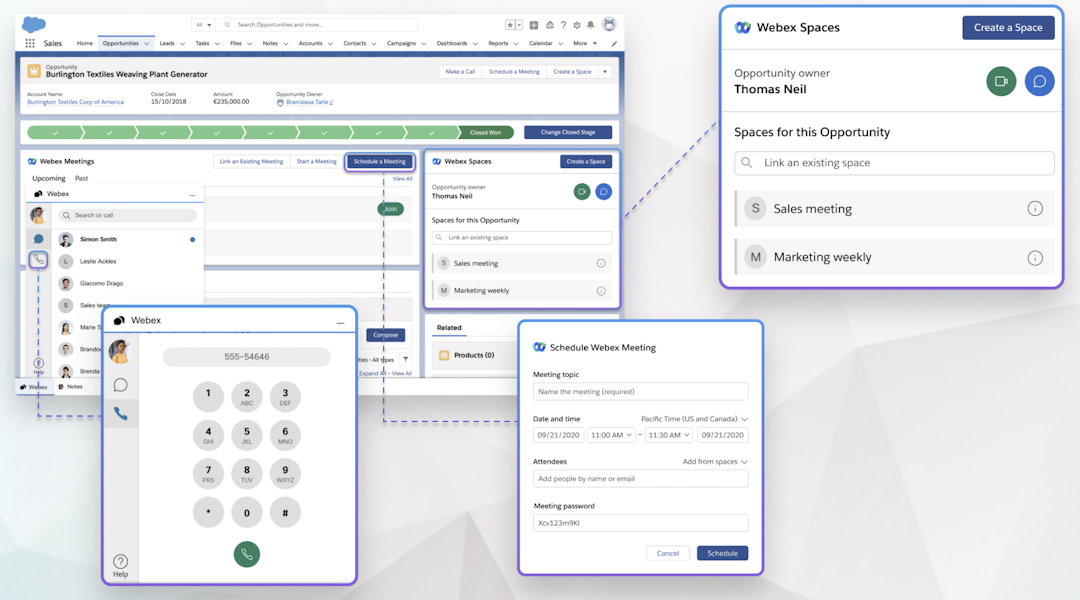
Webex Webinars is an enterprise webinar platform designed for global audiences. It's part of the Webex suite, which includes tools for internal and external communications, including calling, meetings, messaging, and events. Webex's Salesforce app lets teams collaborate on sales and marketing campaigns from within the CRM.
Webex Webinars' Salesforce integration capabilities
| Webex Capabilities | Features |
|---|---|
| Data synced | Invitees, registrants, and attendance status (attended or no-show) |
| Salesforce objects supported | Leads, Contacts, Campaigns, Campaign Members, and custom objects |
| Custom options available | Can map standard registration form fields but not custom webinar questions |
| Setup complexity | Standard AppExchange installation with Salesforce admin permissions |
| Subscription tier required | Webex Webinars plan, plus Salesforce Enterprise Edition or higher |
Pros and cons of Webex Webinars
The Salesforce app syncs more than just webinar data. It supports calling, messaging, and meeting features embedded in Salesforce, so teams already using Webex for internal collaboration and external sales get everything in one place.
Webinar data syncs require an authorized user to import data through a widget in Salesforce, selecting which webinar to pull in. Custom registration questions from Webex forms also can't be mapped to Salesforce fields.
Webex Webinars pricing
The Webex Webinars plan lists at $2,700 per license per year for up to 1,000 attendees, and Webex sometimes runs promotional discounts on its pricing page. Contact Webex sales for a quote.
3. Cvent
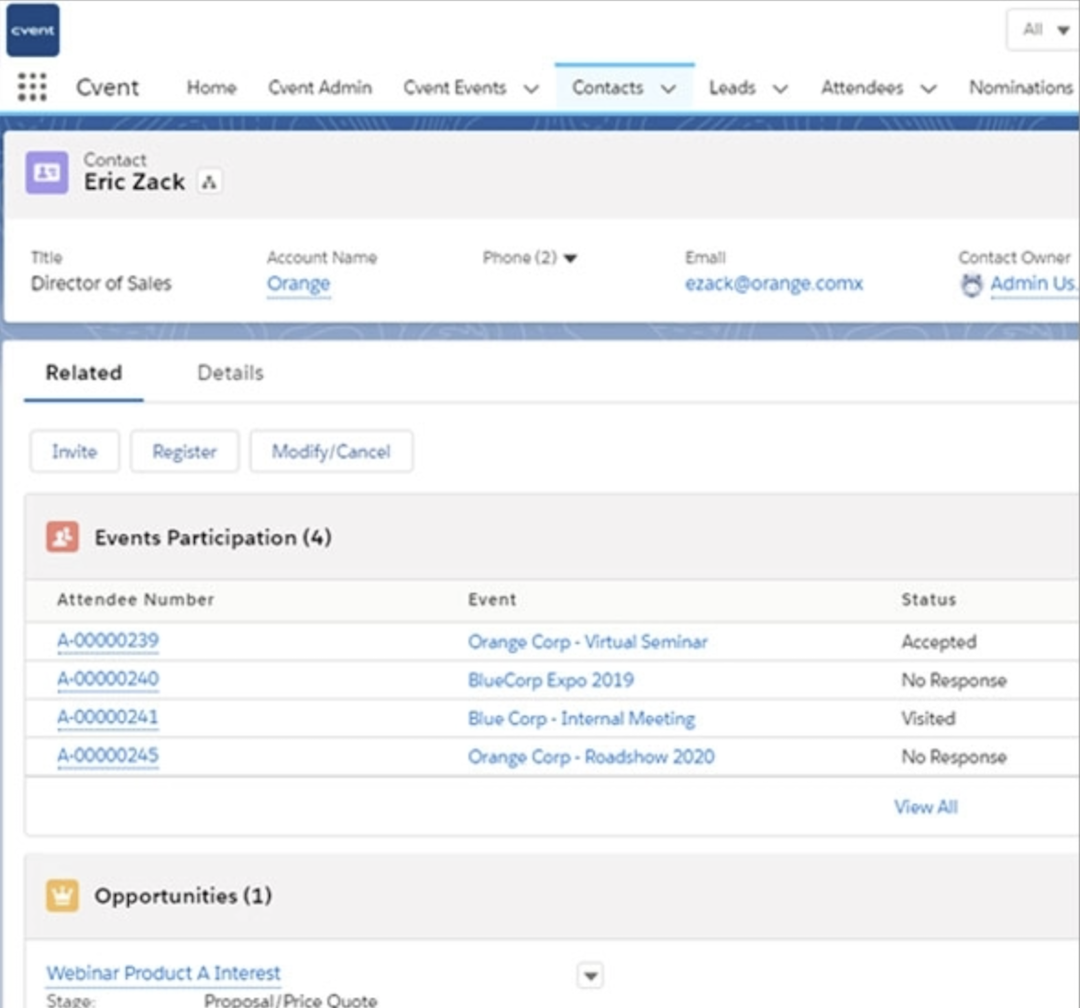
Cvent is a full-scale event management platform that covers in-person, virtual, and hybrid events as well as webinars. It also offers venue sourcing, check-in and badging, and speaker management. The Cvent Salesforce App is a native integration that lets admins control how and when event data syncs, including scheduled refreshes and filtering by user role.
Cvent's Salesforce integration capabilities
| Cvent Capabilities | Features |
|---|---|
| Data synced | Registration, check-ins, and webinar activity (questions asked, poll responses, question upvotes, event feedback) |
| Salesforce objects supported | Contacts, Leads, Campaigns, Campaign Members, Opportunities, and Activities |
| Custom options available | Record matching rules and scheduled or manual syncs |
| Setup complexity | Standard AppExchange installation with Salesforce admin permissions |
| Subscription tier required | Cvent Salesforce App license (from $2,450 per company per year), Sales Cloud required |
Pros and cons of Cvent
The Cvent Salesforce App lets sales reps view a contact's full event history, including past attendance and registration status, directly on the contact record. This added context can sharpen follow-up conversations and help reps prioritize outreach.
Cvent is built for teams running multi-format event programs across in-person, virtual, and hybrid. If your team only runs webinars, the platform's complexity and pricing may not justify the integration.
Cvent pricing
Cvent pricing is custom. On the Salesforce AppExchange, the Cvent Salesforce App is listed from $2,450 per company per year.
4. Vimeo
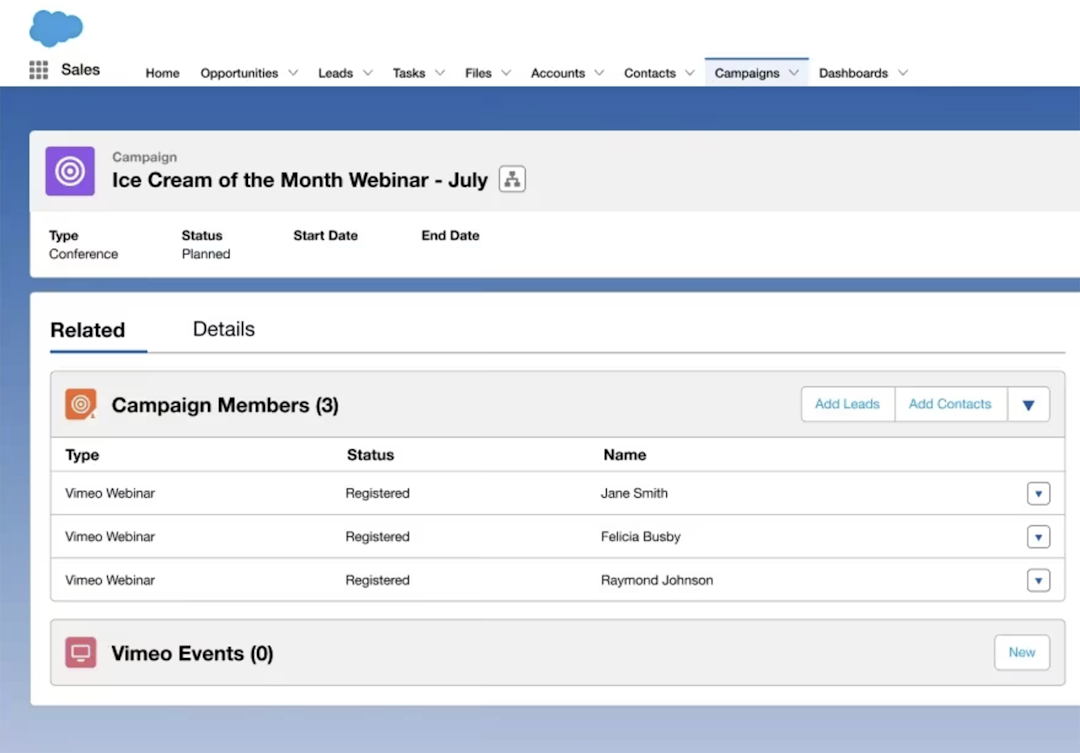
Vimeo is a video hosting and streaming platform that also offers webinar functionality, including live, pre-recorded, and simulive events. It's designed primarily for video management, with tools for hosting, editing, and analytics. Its Salesforce Sales Cloud integration focuses on syncing lead data captured through in-player registration forms.
Vimeo's Salesforce integration capabilities
| Vimeo Capabilities | Features |
|---|---|
| Data synced | Registration, Campaign Member status (invited, registered, attended live, no show), watch time, polls, Q&A, and UTM fields |
| Salesforce objects supported | Leads, Contacts, Campaign Members, and Vimeo custom objects |
| Custom options available | Custom registration and UTM fields sync. No field-mapping settings are documented. |
| Setup complexity | OAuth connection made by the Vimeo account Owner (a managed package is also listed on AppExchange) |
| Subscription tier required | Enterprise tier |
Pros and cons of Vimeo
If your team already uses Vimeo for video hosting and editing, the Salesforce integration lets you capture leads from webinars and gated videos without adding a separate webinar tool to your stack.
Vimeo is a video-first platform. Its webinar features are lighter than dedicated webinar tools, so teams that need robust engagement tools, lead generation funnels, or detailed post-event reporting may find it limiting.
Vimeo pricing
Vimeo doesn't publish Enterprise pricing. Contact Vimeo sales for a quote.
5. eWebinar
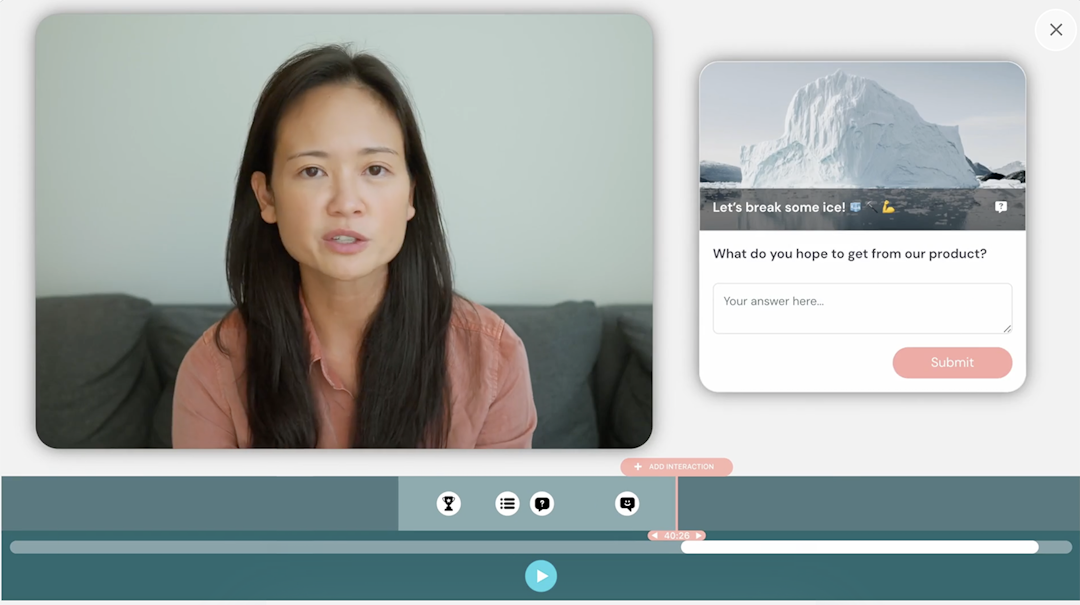
eWebinar is an automated webinar platform that turns pre-recorded videos into interactive, on-demand webinar experiences. It's designed for SaaS onboarding, product demos, and training rather than live events. Its Salesforce integration tracks attendee behavior and supports custom field mapping.
eWebinar's Salesforce integration capabilities
| eWebinar Capabilities | Features |
|---|---|
| Data synced | Registration, attendance, and engagement |
| Salesforce objects supported | Leads, Contacts, Events, and Campaign Members |
| Custom options available | Supports custom fields for registration form answers, poll responses, and other engagement data |
| Setup complexity | Self-serve |
| Subscription tier required | Level 1 plus paid add-on |
Pros and cons of eWebinar
eWebinar is purpose-built for automated and on-demand webinars. If your team runs the same webinar repeatedly for onboarding, demos, or training, it removes the need for a live presenter while still delivering interactive experiences.
The Salesforce integration isn't included in any standard eWebinar plan. It's a paid add-on that can more than double the cost of a base subscription.
eWebinar pricing
Starts at $84 per month (billed annually) for one active webinar and 1,000 registrants per month. The Salesforce integration is an add-on at $212 per month (billed annually).
6. Airmeet
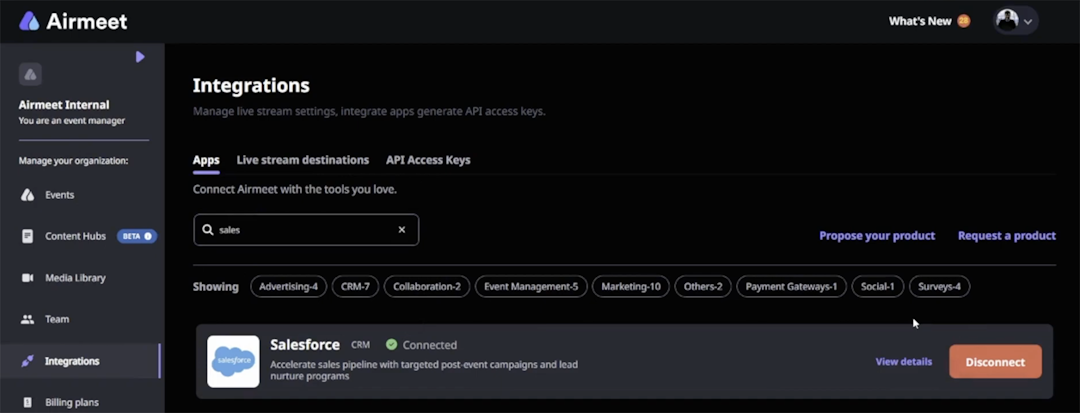
Airmeet is an online events platform that supports webinars, virtual conferences, and hybrid events. It also has a managed events service that handles much of the event planning, tech setup, and live support for busy event teams. Its native integration supports registration, attendance, and engagement data for webinars and events.
Airmeet's Salesforce integration capabilities
| Airmeet Capabilities | Features |
|---|---|
| Data synced | Invitations, registration, attendance and time spent, booth activity, and engagement (questions and polls) |
| Salesforce objects supported | Campaigns, Campaign Members, Contacts, and Leads |
| Custom fields | Not documented |
| Setup complexity | Self-serve. The Airmeet community or event manager must be a Salesforce admin. |
| Subscription tier required | Paid plans (confirm the tier with Airmeet) |
Pros and cons of Airmeet
Airmeet can create a Salesforce Campaign for each event automatically and auto-register new Leads or Contacts that you add to a linked Campaign, so registration works in both directions.
Airmeet has relatively robust built-in lead and engagement tracking. If your team already uses Salesforce for lead gen, this webinar software might be overkill.
Airmeet pricing
Starts at $167 per month (billed annually) for Premium Webinars. Events have custom pricing, and Managed Events are quoted per event, starting at $4,999 for a brand conference.
7. Zoom Webinars
Zoom Webinars is Zoom's add-on license for one-to-many online events, where hosts and panelists present to an audience. It includes chat, reactions, polls, Q&A, recordings, and reporting, with licenses that start at 500 attendees. Zoom's Salesforce integration, Zoom for Salesforce Lightning, is a free managed package built by Zoom and installed from the Salesforce AppExchange.
Once it's installed, admins can turn on settings that create a Salesforce Campaign for each new webinar, add registrants as Campaign Members, and create a new Lead for anyone who isn't in Salesforce yet. Webinar, registrant, and attendee records sync to Zoom custom objects, including join time, leave time, and attendance duration. Reps can also invite or register Leads and Contacts to a webinar from Salesforce.
Zoom Webinars' Salesforce integration capabilities
| Zoom Webinars Capabilities | Features |
|---|---|
| Data synced | Webinar details, registrants, panelists, and attendees, including join time, leave time, and duration. Zoom's AppExchange listing also mentions poll and Q&A sync. |
| Salesforce objects supported | Leads, Contacts, Campaigns, Campaign Members, and Zoom custom objects (webinars, registrants, attendees) |
| Custom options available | Admin settings for automatic Campaigns, Campaign Members, and Lead creation. Custom field mapping for webinar registration questions isn't documented. |
| Setup complexity | AppExchange managed package. Requires Salesforce Enterprise or Unlimited Edition, admins on both platforms, and per-user authorization. |
| Two-way registration | Invite or register Leads and Contacts from Salesforce, up to 10 at a time |
| Subscription tier required | Zoom Webinars license on a Pro, Business, or Enterprise account. The Salesforce app is free. |
Pros and cons of Zoom Webinars
The Salesforce package is built by Zoom and free to install. Admins can automate Campaign creation, Campaign Members, and Lead creation for every webinar, which suits teams that already run their webinars on Zoom.
Zoom's documentation notes that people who register through Zoom's own registration page aren't synced automatically and must be synced manually. Recurring webinars aren't supported in the Salesforce app, and you can only register up to 10 Leads or Contacts from Salesforce at a time.
Zoom Webinars pricing
Zoom Webinars starts at $66.67 per month billed annually ($89 billed monthly) for up to 500 attendees. The Salesforce app is free.
8. BigMarker
BigMarker is a browser-based platform for webinars and virtual, hybrid, and in-person events, with registration pages, live and on-demand webinars, and audience engagement tools. Its native Salesforce integration connects through OAuth and syncs in both directions: webinar data flows into Salesforce, and members of Salesforce Campaigns can be registered to BigMarker webinars automatically.
You can map each webinar to an existing Salesforce Campaign, or let BigMarker create one per event if you use webinar tags. Registrants, attendees, and on-demand viewers sync as Campaign Member statuses, and you can export live attendee data to a Salesforce custom object every five minutes. In the other direction, BigMarker imports contacts from active Salesforce Campaigns into a webinar's registrant list every 15 minutes by default, or as often as every minute.
BigMarker's Salesforce integration capabilities
| BigMarker Capabilities | Features |
|---|---|
| Data synced | Registration, attendance, watch time, and on-demand views. BigMarker's CRM documentation also lists chat, Q&A, polls, handouts, and offers as exportable engagement data. |
| Salesforce objects supported | Leads, Contacts, Campaigns, Campaign Members, and a custom object for live attendee data |
| Custom options available | Field mapping to Lead, Contact, and Campaign Member fields, rules for existing Leads, custom member statuses based on BigMarker segments, and a custom daily API call limit |
| Setup complexity | OAuth connection per channel or per webinar, with sandbox support. Live attendance tracking requires a Salesforce custom object you create and map yourself. |
| Two-way registration | Yes. Contacts in active Salesforce Campaigns are registered automatically, every 1 to 15 minutes |
| Subscription tier required | Webcast Professional (one CRM integration) or Webcast Enterprise |
Pros and cons of BigMarker
Registration works in both directions. Members of active Salesforce Campaigns are registered to your webinar automatically, and registrants, attendees, and on-demand viewers flow back as Campaign Member statuses.
The setup spans many separate settings. Live attendance tracking requires a custom object you build in Salesforce, and automatic Campaign creation depends on webinar tags.
BigMarker pricing
BigMarker doesn't publish prices. All Webcast plans are quote-based.
How to get started with Livestorm's Salesforce integration
Livestorm's native Salesforce integration syncs registration, attendance, and engagement data directly to your Salesforce org. Every webinar session automatically becomes a Salesforce Campaign, so your marketing team gets attribution without manual tracking.
That means sales reps can see who attended, how long they stayed, and whether they watched the replay, all on the Contact or Lead record. And because you can map custom fields between platforms, the integration fits your existing CRM workflow instead of forcing a new one.
Setup takes minutes and doesn't require a developer. You authenticate both platforms, configure your field mappings, and the integration handles the rest. If you also want to register people from Salesforce, turn on 2-way mode. The integration is available on the Enterprise plan as a paid add-on, and our Professional Services team is here to help.
Book a demo to see how Livestorm's Salesforce integration simplifies sales processes, boost conversion rates, and helps build pipeline.
Frequently asked questions
Does Salesforce have a native webinar tool?
What's the difference between a native Salesforce integration and a Zapier connection?
A native Salesforce integration (like Livestorm offers) connects your webinar platform directly to Salesforce. It's built and maintained by the webinar vendor. Native integrations tend to sync faster, support more Salesforce objects, and require less ongoing maintenance.
In contrast, a Zapier connection routes data through a third-party automation tool. Zapier connections can be more flexible for custom workflows but require more manual setup and maintenance.
As Livestorm's 2026 Webinar Benchmark Report reveals, only 6–8% of our customers teams use native CRM integrations to sync webinar data. The rest rely on manual exports or skip tracking altogether.
Can I sync webinar engagement data to Salesforce?
Syncing capabilities depend on the platform. Some integrations only push registration and attendance status. Others, like Livestorm's Salesforce integration, also sync engagement signals like watch time, poll responses, questions asked, and replay views.
If you want to sync more in-depth data, check whether the integration writes engagement data to Campaign Member fields or custom fields in Salesforce to enable lead scoring and personalized follow-up.
Which webinar platforms can register people from Salesforce?
Livestorm, Zoom Webinars, BigMarker, Cvent, and Airmeet all document a way to register people from Salesforce, but they work differently. Livestorm registers Campaign Members you set to To Register, manually or with a Salesforce Flow. BigMarker registers members of active Salesforce Campaigns automatically, every 1 to 15 minutes. Zoom Webinars lets reps invite or register up to 10 Leads or Contacts at a time. Cvent lets teams invite and register contacts to Cvent events from Salesforce, and Airmeet registers new Leads or Contacts added to a linked Campaign.
Webex Webinars, Vimeo, and eWebinar don't document two-way registration.


Ebooks
Webinar Promotion Handbook
Everything you need to promote your webinars and increase attendance.

About the author
Brillixa Herdhiana - Senior Growth Manager
Brillixa joined Livestorm as Growth Manager in 2021. Her experience enables her to contribute to business growth through lead generation from ads and organic channels.
Related categories
Featured resource
Ebooks
Webinar Promotion Handbook
Everything you need to promote your webinars and increase attendance.
Newsletter