Livestorm includes built-in AI features like script generation, automated transcription, and content repurposing, which limits the need for separate tools. For additional AI capabilities, use Livestorm's native integrations, including HubSpot, Meta Ads, and LinkedIn lead generation forms.
AI
How to Use AI in Your Webinars & Optimize Your Workflow
Published on January 30, 2026 • About 5 min. read
Written by Brillixa Herdhiana
AI Applied to Webinars: The Playbook

Table of content
Share this article
Key Takeaways
AI is increasingly used to streamline webinar workflows, from planning and promotion to analytics and repurposing content.
42% of marketers report time and resource constraints as their top webinar challenge, per Livestorm's 2024 Webinar Marketing Report.
Built-in webinar AI features enable automated title, script, and outline generation as well as real-time captions and analytics within platforms like Livestorm.
Effective AI integration hinges on thoughtful tool selection, phased adoption, and ongoing human oversight to maintain quality and brand alignment.
For many marketers, running webinars is incredibly time-consuming. Between planning, promoting, and repurposing, the work piles up fast. It's no wonder 42% of marketers say their top challenge with webinar production is limited time and resources, according to the Livestorm 2024 Webinar Marketing Report.
AI tools can handle a lot of the work for you, taking promotional copy, content repurposing, and webinar analytics off your to-do list. I'll show you how these tools help you create better webinars faster, leaving you with more time to develop an impactful webinar strategy that generates leads and builds trust with customers.
How to use AI in your webinars and simplify your workflow
Let's walk through a typical webinar workflow and look at how AI can help with each step. Download Livestorm’s AI Applied to Webinars playbook for tool suggestions and detailed checklists for each step.
How to use AI to plan webinar content
With the right AI tools, you can research webinar topics, brainstorm eye-catching titles, and even generate webinar scripts and slides.
Say you want to find the ideal topic for your webinar, ideally one that appeals to your target audience. Start by reviewing your sales team's recent discovery calls or subreddits where your customers spend time.
Ask the built-in AI tools to identify relevant topics. For example, you can ask Reddit's AI assistant for answers:
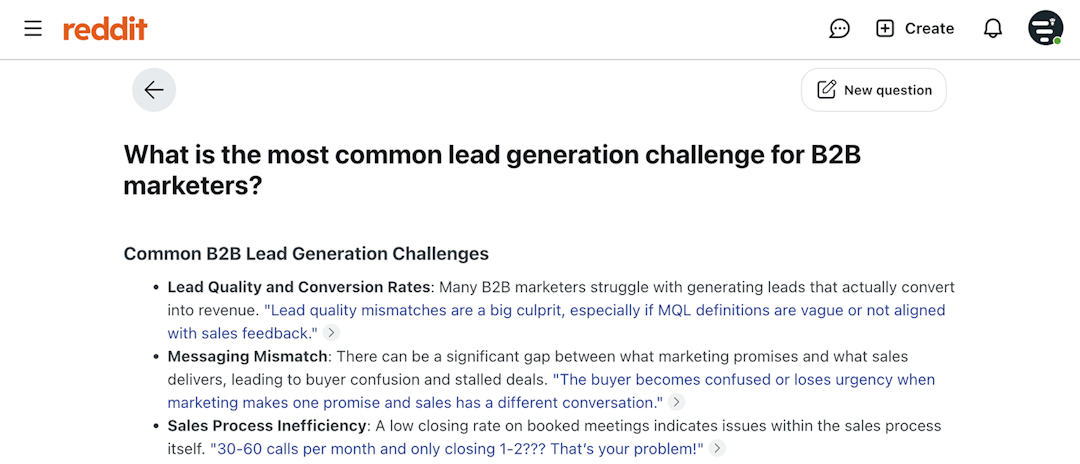
Then, compile the information and plug it into ChatGPT, Mistral, or any other large language model (LLM) you prefer. Ask the LLM to analyze the content and suggest webinar topics or provide key takeaways.
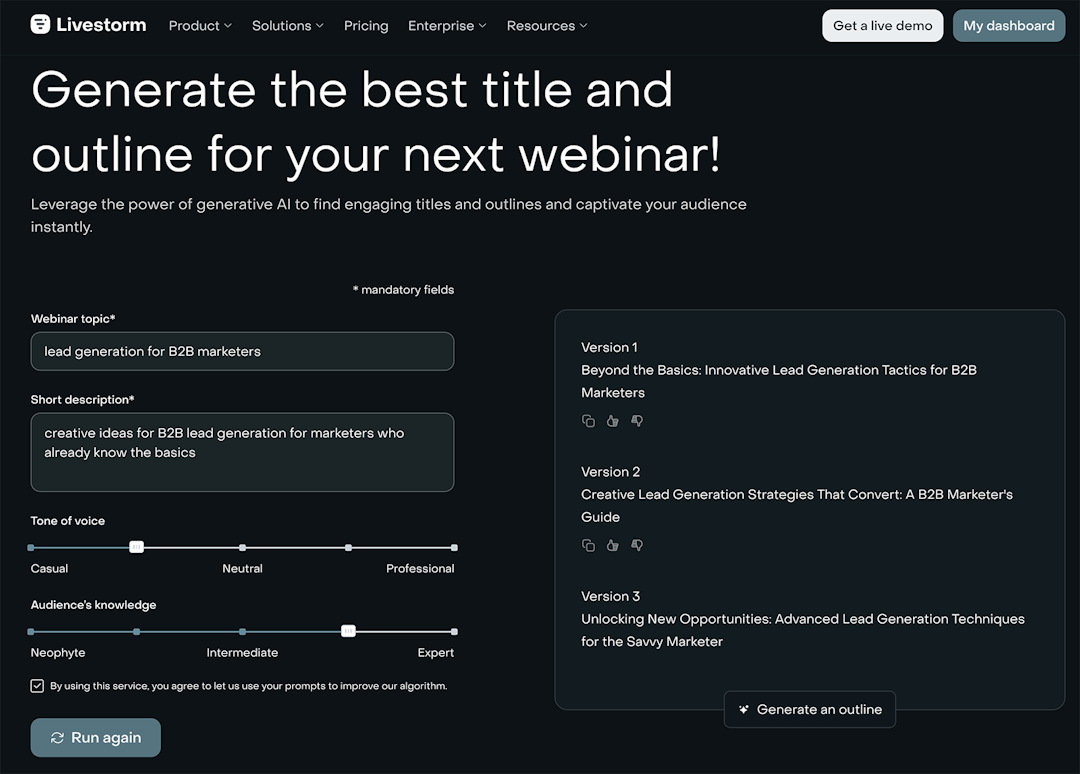
Once you have ideas to guide your webinar, use AI tools to build out the content. Livestorm's AI-powered webinar title generator suggests titles and outlines based on your topic. Just input a description and select the tone of voice and audience knowledge level to get multiple ideas.
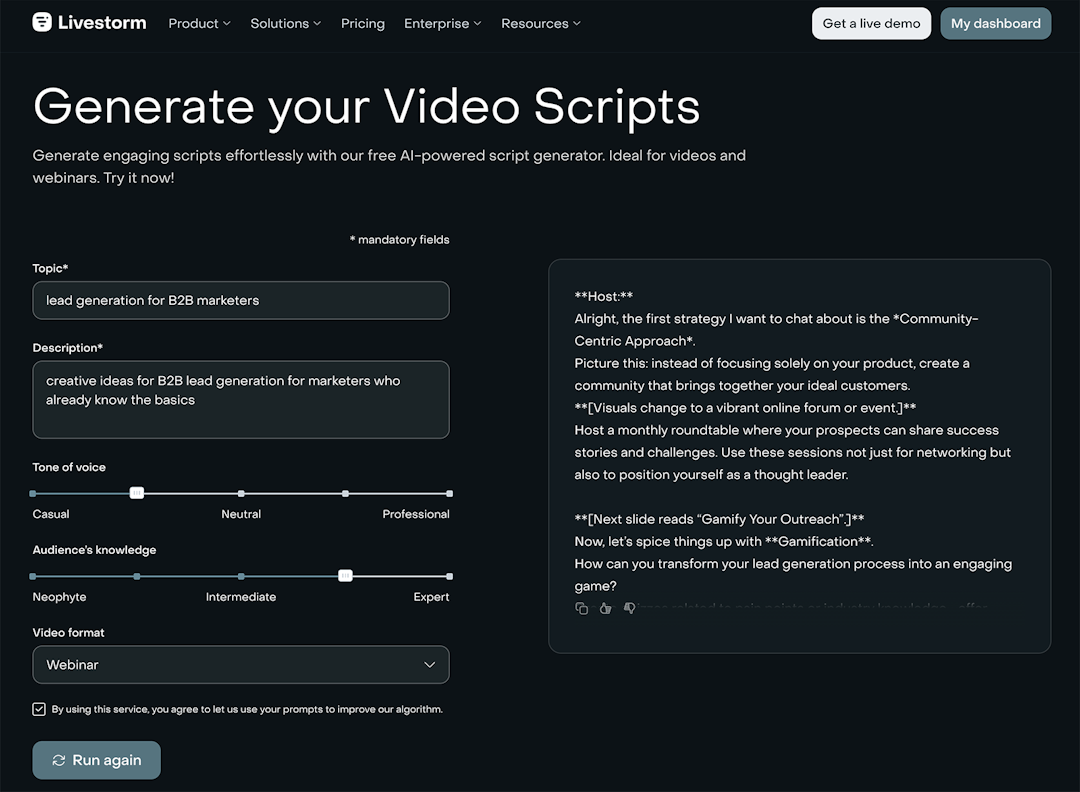
Livestorm helps with webinar content creation, too. Plan out what to say in your webinar with Livestorm's AI-powered script generator. Select "webinar" as the video format. Then, copy and paste the draft and add your own insights and expertise to the script.
Want to add visuals to your webinar or use AI to improve your slides? Tools like Canva and Gamma generate slides using text-based prompts.
After researching and planning your webinar using AI, you're ready to start incorporating AI into your webinar marketing strategy.
How to use AI to promote webinars
AI marketing tools and writing assistants can help with everything from drafting emails to suggesting social media posts to writing ad copy.
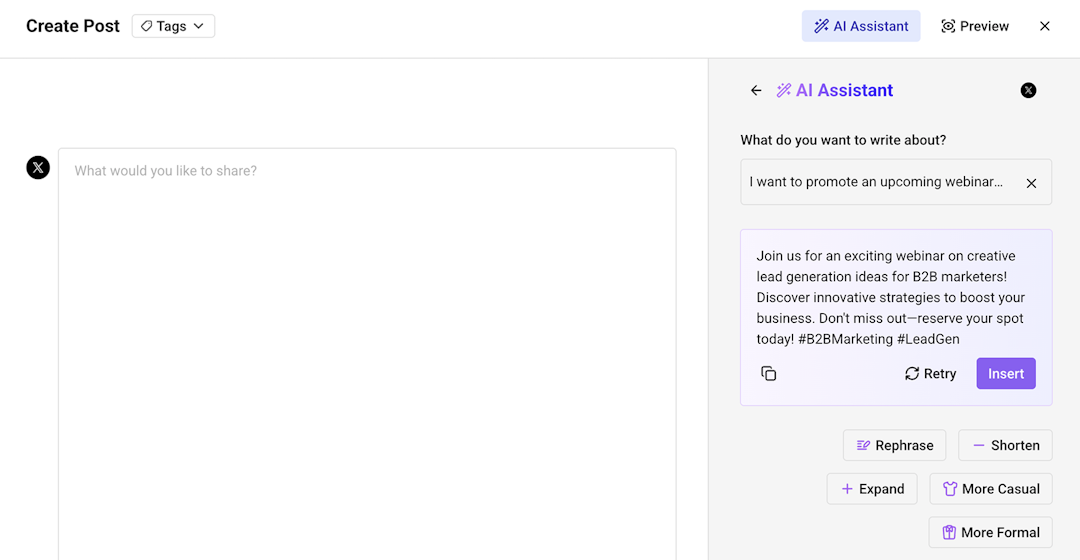
Prompt your LLM of choice or try the AI-powered tools within your email marketing or social media management platform. For example, Buffer's AI assistant generates social media copy based on your prompts. You can adjust the length and tone to fit your brand.
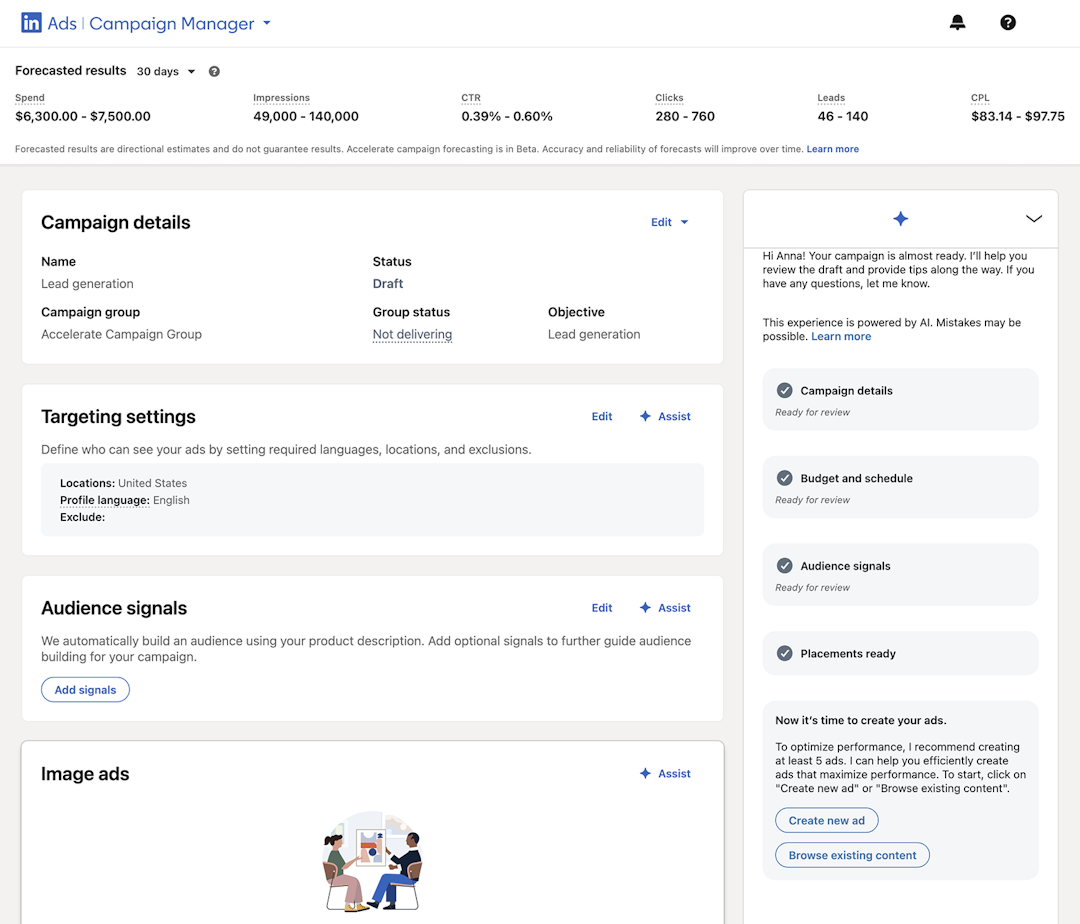
Most ad platforms have time-saving AI capabilities, too. For example, LinkedIn Ads uses AI to structure ad campaigns. The platform also has an AI assistant for almost every ad element, including targeting, audience signals, images, and copy.
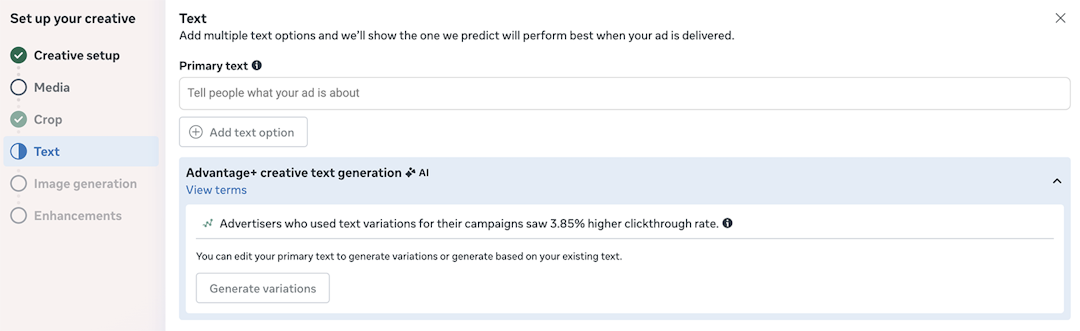
Likewise, Meta's AI assistant generates variations of your ad copy and predicts which one will perform best with your target audience.
Before event day, choose a webinar platform that helps you communicate with attendees.
How to use AI to communicate with webinar viewers
AI tools simplify communication during webinars, so viewers can easily follow along with your content.
When you host webinars with Livestorm, the software platform automatically generates captions using AI. The captions appear during the live webinar, which means viewers can understand with or without sound.
Livestorm also provides AI-powered transcripts for both live events and replays. These transcripts are searchable, so attendees can easily find key moments or topics in the webinar.
When watching replays, viewers can translate transcripts into 100+ languages. It's an easy way to make webinars more accessible to a wider audience
How to use AI to engage with webinar attendees
Some webinar platforms offer AI-driven tools to chat with viewers. With these tools in place, your team can focus on presenting great content while still hosting engaging webinars.
AI moderators can answer questions in real time using your company's knowledge base or generative AI. Some tools work with on-demand and automated webinars, so they can provide responses around the clock.
Others assist with moderation, which can be helpful if you struggle to keep up with the live chat. They automatically identify questions in the chat and add them to the Q&A tab so presenters can answer.
How to use AI to repurpose webinar content
With AI tools, your team can save time by turning webinar content into multiple other formats. Then, you can distribute the repurposed content across marketing channels.
Livestorm repurposes content based on webinar transcripts. From the transcript, it generates:
Email drafts to reconnect with attendees or prospects
Blog drafts that break down the webinar content into an easy-to-read article
Social media posts that share the webinar's best insights and takeaways
Does your audience respond better to video? Use a tool like Veed or Descript to create short-form video clips. Then, upload them to YouTube or share on social media.
The more you use AI to speed up your webinar repurposing, the more value you can get from the webinar. Sharing repurposed content helps you expand reach, boost awareness, increase replays, and improve conversions.
How to use AI to analyze webinar performance
AI tools analyze webinar metrics, provide summaries, and help your team understand webinar outcomes. With Livestorm MCP, you connect your webinar analytics directly to your AI tool of choice.
From there, use ChatGPT, Claude, Cursor, or other tools to review your data. Ask questions using natural language, like:
Who attended the webinar?
Which webinar topics got the most engagement?
What questions did attendees ask most often?
"We like using Livestorm for content creation and online events because of its advanced analytics. We can measure and track data with Livestorm and learn what is most impactful for our audiences by simply looking at the dashboard."
Use the insights to inform future webinar creation and refine your strategy. For example, you may want to host exclusive events for certain audience segments or create webinars that address popular topics.
How to use AI to follow up with webinar participants
Finally, use native or third-party AI tools to improve follow-ups and lead nurturing. Customize your messaging based on behavior: attendees, no-shows, and people who left early.
Then, prompt AI to write personalized follow-up emails. For example, you may want to thank attendees and share an exclusive resource. For those who left early, you may want to catch them up on what they missed.
The marketing team at Harmonie Mutuelle shares:
"Since we started using Livestorm to broadcast our webinars, the number of registrants has tripled thanks to the reminder features. The simplicity of the tool has also saved us precious time and allowed us to double the number of workshops in the year."
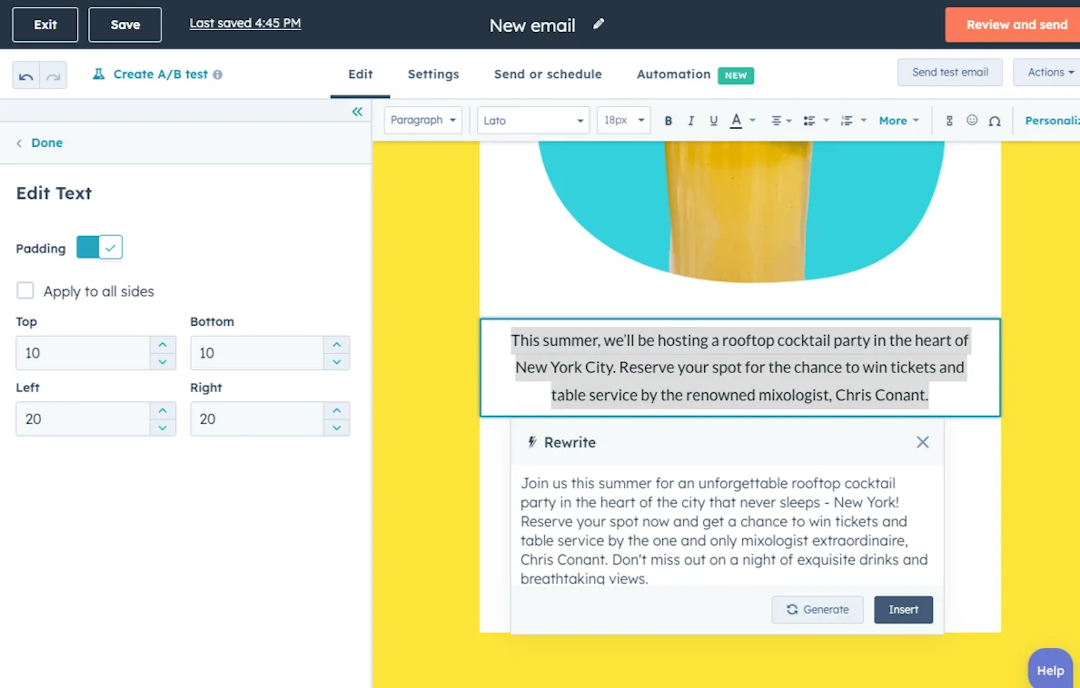
Tools like HubSpot's AI email writer generate outreach emails in a fraction of the time. This means you can follow up faster and nurture leads more efficiently.
Speed up the process with Livestorm's HubSpot integration. With this integration, it's easy to sync your webinar data and build automated workflows in HubSpot.
3 Tips to create an AI-powered webinar strategy
Use these tips to incorporate artificial intelligence into your webinars the right way.
1. Start by adding AI to one element of your webinars
Pick a single pain point and solve it with AI. For example, if you spend hours drafting webinar scripts, start there. If repurposing takes too long, automate that first.
Test your AI workflow of choice on at least one webinar before you add another AI process. This way, you can measure results and adjust your approach. You'll also avoid overwhelming your team with too many new tools at once.
2. Know when to use AI and when to rely on human oversight
AI chatbots excel at tasks like transcribing audio, generating drafts, and analyzing results. But human oversight matters for brand voice, nuanced Q&A responses, and relationship building with attendees.
Always review AI-generated content before it reaches your audience. Set clear boundaries for what AI can handle independently versus what requires human review. Build these checks into your workflow every time you host webinars.
3. Use the right AI tools for your team and your workflows
Choose AI tools that integrate with your existing tech stack. I recommend prioritizing tools that are built into the tech you already use, like your webinar, social media, and CRM tools. Otherwise, you'll create extra work when you have to manually move data between systems.
When selecting tools, consider your team's technical skills. After all, the most powerful AI solution won't help if your team can't use it effectively. Remember, the goal is hosting more successful webinars using AI.
Frequently asked questions
How can I integrate AI tools to enhance my webinars?
Where can I find AI-powered webinar hosting software?
Livestorm offers AI-powered webinar hosting with features like real-time transcription, automated summaries, and intelligent analytics built directly into the platform. With an advanced webinar platform like Livestorm, you can also use AI to create blog posts, email drafts, and social media content based on your webinars.
How do you use AI to summarize a webinar?
Livestorm uses the power of AI to automatically generate summaries of your webinar content, highlighting key points and notable quotes. You can copy the summary to share with colleagues or turn it into marketing content.
What AI platforms offer real-time transcription services for webinars?
Livestorm provides real-time transcription in 118 languages as a built-in feature during your webinars. The transcript appears automatically. You can search it, save it, or repurpose it into other content formats.
How can AI improve webinar workflows?
AI removes repetitive work across planning, delivery, and follow-up by generating webinar outlines and promo copy faster, segmenting registrants for smarter reminders, and summarizing sessions for post-event content.
What webinar tasks can AI automate?
AI can automate copywriting for titles and descriptions, transcription and summarization of recordings, audience segmentation, and CRM enrichment. Combined with Livestorm's integrations and email workflows, these outputs can be operationalized quickly.
How do you use an AI agent in webinar workflows?
Use an AI agent to execute defined tasks like drafting agendas, creating audience Q&A themes, or producing follow-up assets. Keep a human in the loop for final review, especially for claims and brand voice.
What is AI workflow optimization for webinars?
AI workflow optimization uses AI to analyze and streamline the steps that create, run, and measure webinars. It can highlight drop-off points, suggest better audience targeting, and speed up content repurposing.
Which AI tools work best for webinar automation?
The best AI tools fit your stack and automate high-impact tasks like copywriting, transcription, summarization, and CRM enrichment. Many teams combine a general LLM with automation tools like Zapier or Make to connect systems.
What is the 30% rule in AI for webinar content?
The 30% rule is a guideline to limit AI-generated content so human expertise stays primary. Treat AI as a first draft for titles, abstracts, and follow-up emails, then add original insights and verify accuracy.


Ebooks
AI Applied to Webinars: The Playbook
Boost efficiency and maximize impact with our 15 strategies for integrating AI into your webinar approach.

About the author
Brillixa Herdhiana - Senior Growth Manager
Brillixa joined Livestorm as Growth Manager in 2021. Her experience enables her to contribute to business growth through lead generation from ads and organic channels.
Featured resource
Ebooks
AI Applied to Webinars: The Playbook
Boost efficiency and maximize impact with our 15 strategies for integrating AI into your webinar approach.
Newsletter